How to write an X thread: the complete guide
The short answer
Pick one idea you can sum up in a sentence, write a first post that earns the second, and give every later post one job. Keep each post inside 280 characters as X counts them, end on one next step, then add the posts with the plus icon and choose Post all.
Key takeaways
- Build the thread around one idea you can finish in a sentence: after reading this, you will be able to do something specific.
- Give every post one job, and check that each post still makes sense when it is read alone.
- Count every post the way X does: 280 characters, 23 for each link and 2 for each emoji.
- Proof the thread before you choose Post all. X's Help Center says edit post does not cover threads.
- You can add posts to a live thread later with Add another post, but you cannot rewrite the ones already out.
You have an idea that needs more than one post, and you want people to read all of it. A thread is how you do that on X. This guide shows how to write a thread on X, from the first idea to the moment you press Post all.
The short version: pick one idea you can sum up in a sentence. Write a first post that earns the second. Give every later post one job. Keep each post inside 280 characters as X counts them, and end on one thing the reader can do. The mechanics take a minute. The planning is where threads are won or lost.
What is a thread on X, and when should you write one
A thread is a chain of posts that X keeps together, so a reader can follow one idea across several short pieces. You write one when the idea has parts and no single post can hold them. Three numbers shape everything that follows. Unsure whether to write 1/5 or nothing? See how to number an X thread.
280
characters in a standard post
X developer docs
23
characters for every link, whatever its length
X developer docs
4
posts before X folds a thread behind Show this thread
X Help Center
Before you commit to a thread, compare the formats on X. Each one fits a different job.
Any account
A thread
An idea with parts, written as a chain of short posts that each do one job.
Premium
A longer post
Up to 25,000 characters in one post for X Premium subscribers. Everyone can read it.
Premium
An Article
A separate long form format on X for Premium subscribers. Suits an essay you want read in one go.
Our rule of thumb: count the parts of your idea. One or two parts is a post, or a post and a reply. Three or more parts that each stand on their own is a thread. Each post should still make sense if it is shared alone; see how to keep thread posts readable on their own.
How to create a thread on X, step by step
On X, you make a thread in the composer. You add the posts one at a time and publish them together. If the thread should go out while you are busy, read how to schedule an X thread first.
Open the composer
Click Post on the web, or tap the compose icon in the app.
Write the first post
Type it like any other post. The plus icon lights up once there is text in the box.
Add the next post
Click or tap the highlighted plus icon and write the next post in the new box.
Repeat for every post
Keep adding until the thread is complete. Each box follows the normal limits for a post.
Choose Post all
Click or tap Post all to publish the thread. Proof every post first, because this is the point of no return.
Those are the steps in X's own guide to threads. You can also grow a thread later: open it, choose Add another post on the thread page and write on. After posting, two more guides help: fixing a thread that is already out and bringing an old thread back to life.
How a thread looks matters as much as how you make it. When a thread has 4 or more posts, X shortens it on the timeline and shows a Show this thread prompt. Readers meet your opening first and decide whether to open the rest. When a thread loses people halfway, see thread mistakes that make readers stop.
So the first post carries the whole decision. Everything after it is a reward for the reader who tapped. The opener gets a guide of its own, and so does the launch thread.
Start with one idea, not a topic
A topic is what a thread is about. An idea is what a thread says. Threads built on topics wander. Threads built on ideas finish.
| A topic | An idea you can finish |
|---|---|
| Onboarding emails | Why a first email should ask a new user for one thing |
| Hiring | Why we stopped asking candidates for a cover letter |
| Pricing pages | Three changes that make a pricing page easier to read |
Test your idea with one sentence: after reading this, you will be able to ___. If you cannot fill the gap, you still have a topic.
Not sure where an idea worth a thread comes from? Look for these four:
- A question you keep answering. If three people asked you, a hundred more are wondering.
- A process you run without thinking. The steps feel obvious to you and new to everyone else.
- A mistake and its fix. The story has a built in turn, which is what a thread needs.
- A decision and its reasons. Readers learn more from why you chose than from what you chose.
Then answer three questions, in this order:
- Who is it for? One kind of reader, not everyone.
- What do they leave with? A step, a decision or a different way of seeing the problem.
- Why now? What happened, or what they are about to do, that makes it useful today.
The shape of a thread people finish
Almost every thread that works has the same four parts, even when it hides them: an opener, context, points and a close. Plan them on a sheet before you write a word. The last post has a job too: how to end an X thread.
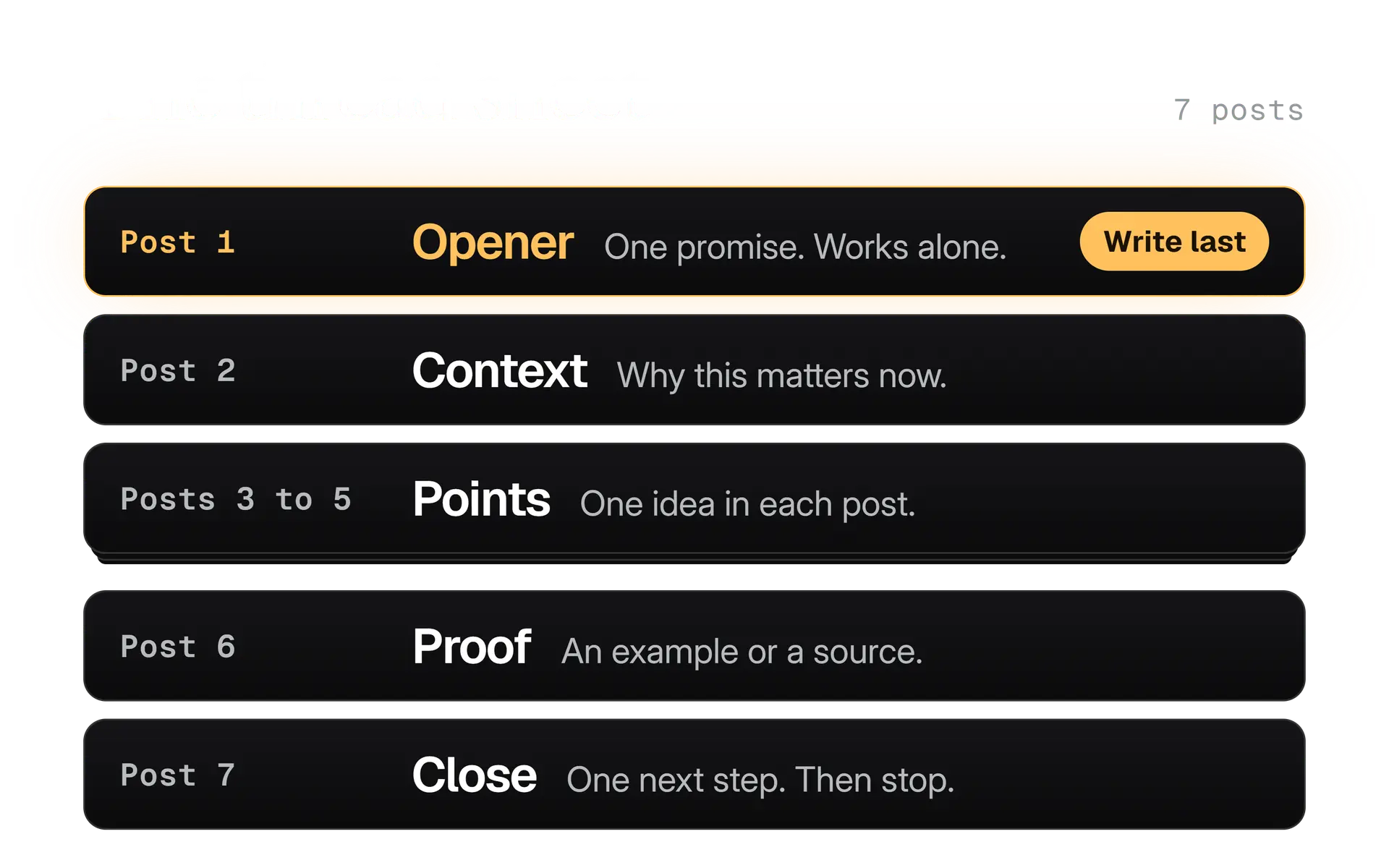
Here is what each part does:
- Opener. Makes one promise that the thread keeps. It has to work alone.
- Context. One post, at most two. It answers the silent question: why should I care now?
- Points. The body. One idea per post, in the order the reader needs them.
- Close. The one thing to remember or do. Then stop.
Notice what the sheet leaves out: a recap post, a thank you post and a second opener. If a post has no job on the sheet, it has no place in the thread.
How to write the first post of a thread
The first post must work alone. It is what readers see before anything else, and when a thread has 4 or more posts, X shortens the rest behind the Show this thread prompt.
Write it last. Once the rest of the thread exists, you know exactly what it delivers, and the opener can promise that and nothing more. A first post written first promises what you hoped to write.
Three kinds of opener work, each with a different promise:
- A result. What the reader will have by the end.
- A claim. Something specific enough that a reader could disagree with it.
- A question. Only when the thread answers it in full.
Promise something
Most onboarding emails ask a new user to do too much. Here is how we decide the one thing they should do first.
Announce a topic
Some thoughts on onboarding emails. A thread.
The first example tells the reader what they get. The second tells them what the thread is about, which is not the same thing.
Most onboarding emails ask a new user to do too much.
Ours asks for one thing. Here is how we pick it, and what we cut to make room.
Our guide to writing X hooks goes deeper on first lines. If you want a second opinion on one, the hook grader scores it against a short checklist. It will not tell you what to say. It will tell you when the line is doing too little.
Give every post one job
One job per post makes a thread easy to follow and easy to share. Read each post on its own, as if someone had shared only that one. If it still gives the reader something, it passes.
A middle post usually does one of five jobs:
Do this
A step
What the reader should do next, in one move.
Because
A reason
Why that step works, in plain words.
Like this
An example
The idea in a real case, small enough to follow.
But
A turn
Where the usual advice breaks, and what to do instead.
Source
A proof
A cited number, a screenshot or a link to the rule you are relying on.
Two quick fixes cover most weak drafts:
- One post, two jobs. Split it. The reader should never have to hold two ideas at once.
- Two posts, one job. Merge them. The thread gets shorter and better.
Inside a post, write the way you would explain it to one person across a table. Plain words, short sentences, and a line break where you would pause. A post is not a place to prove you are clever. It is a place to make one point easy to take in.
A third fix is about subjects. A post that begins "This is why" only makes sense after the post before it. Give it its own subject, such as "Short onboarding emails work because", and it travels.
Every post is a small exit door. Give the reader a reason to stay at each one.
How long should an X thread be
As long as your idea has parts, and no longer. We found no X page that names an ideal length, so treat any exact number you read as someone's opinion, including ours.
Here is how we plan it. Count the points. Add one post for the opener and one for the close. Add a context post only if the reader needs it.
| Points in your idea | Thread length | What to do |
|---|---|---|
| 1 or 2 | One post, or a post and a reply | Not a thread |
| 3 to 5 | 5 to 7 posts | Opener, the points, a close; add one post if context is needed |
| 6 to 8 | 8 to 10 posts | Check that every point earns its post |
| 9 or more | Two threads | Split the idea and link the second from the close of the first |
That table is our rule of thumb, not an X rule. It protects you from the two usual mistakes: stretching a short idea to look substantial, and cramming a big one into a single run.
Premium's longer posts change the size of a post, not the logic of a thread. A post of up to 25,000 characters still needs one job, and a reader still decides post by post whether to continue.
How many posts can one thread hold, and what about daily limits?
We found no maximum on the X pages we could read. Plan well under any number you might hear.
Separately, the German technology site heise reported on 19 May 2026 that free X accounts may publish 50 original posts and 200 replies a day, and that X's support pages had been updated by 5 May 2026. None of the pages we read says whether the later posts of a thread count as posts or as replies. If you run several long threads in one day on a free account, check how your account behaves before a launch day.
Count, number and format each post
Every post in a thread follows the same rules as any other post on X: 280 characters, with each link counted as 23 and each emoji as 2. Our guide to how X counts characters has the full table, including other scripts and symbols.
What matters for threads is how the small things add up across posts:
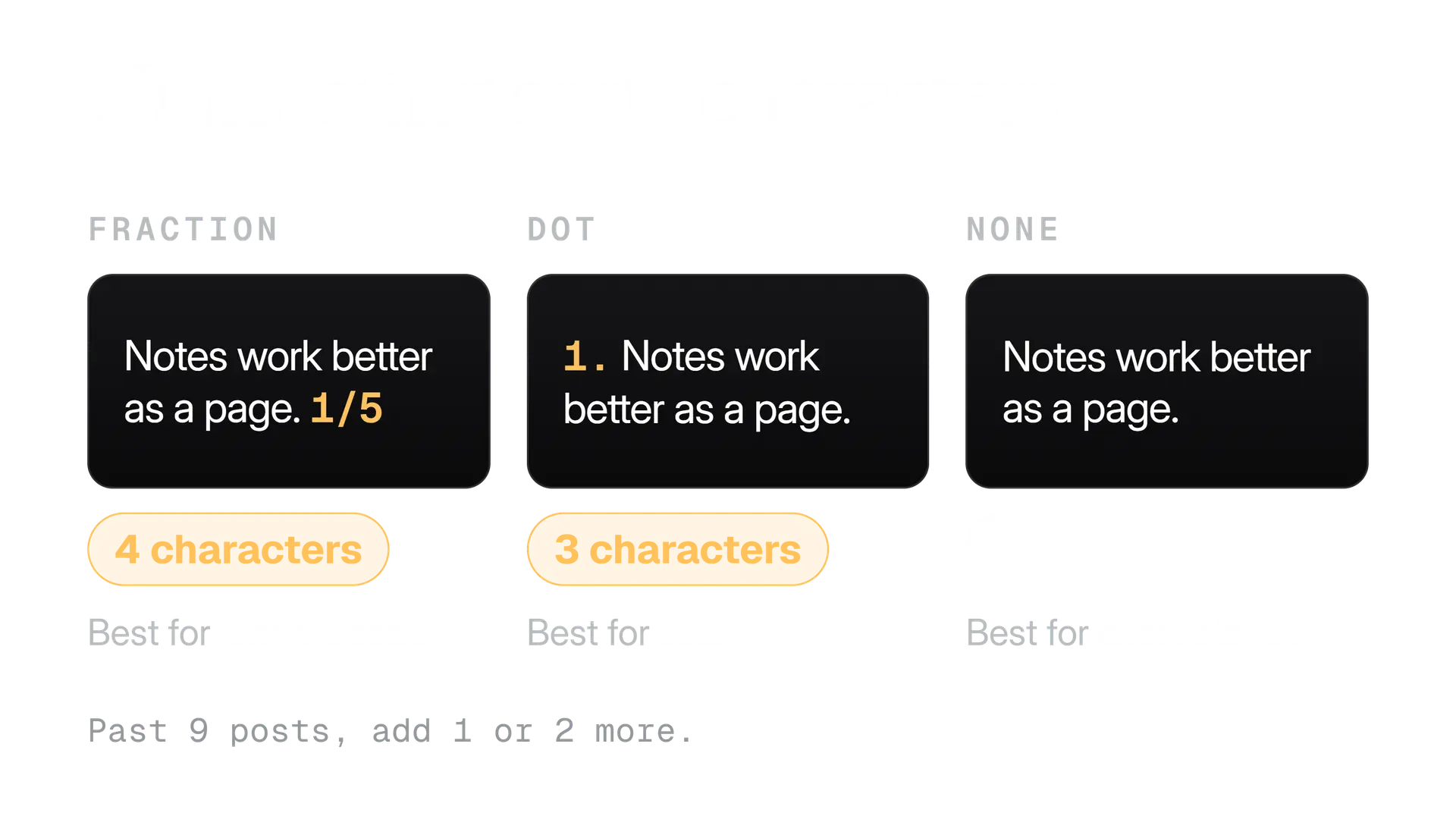
- Numbering. Optional, because X connects the posts either way. Numbers show the length up front and cost characters, as the image below shows.
- Links. A link costs 23 wherever it sits. We put it in the post where the reader needs it, often the close.
- Line breaks. A blank line between two paragraphs costs 2 characters, because each line break weighs 1.
- Images. A post takes up to 4 media items, and media counts as 0 characters. Add a description to each image, up to 1,000 characters. Our guide to X image sizes covers the dimensions.
- Emoji. Each one costs 2. Use them where they say something a word cannot.
The thread splitter does this for you when you start from a long draft. It reserves room for the number before it packs each post, never cuts a link and counts the way X does. For a single post, the character counter shows the weighted count as you type.
A worked example: from a long draft to a thread
Most threads start as something else: a blog post, a memo, a talk. The risk is chopping the text into pieces and calling it a thread. The pieces then read like pages torn from a book.
Here is a made up draft, about a small team that moved its release notes:
We moved our release notes from a monthly email to a changelog page. Email notes were read once and lost. The changelog is searchable and linkable, and it shows what changed in each version. The hardest part was writing entries as we shipped instead of at month end. A short template made that routine. We still send a short email that points to the page. If your notes live in email, move the last 3 releases first.
Turn it into a thread in five steps:
Write the one sentence
Find the sentence the draft exists to say: release notes work better as a page people can search than as an email read once.
Mark the joints
Put a line wherever the idea turns: the problem, the move, what changed, what stayed the same, what was hard, what to do first.
Give each piece a subject
Rewrite any post that leans on the one before it, so it still makes sense if it travels alone.
Cut the connective tissue
Phrases such as 'as mentioned above' do a job the order of the posts already does. Delete them.
Write the opener last
Now that you know what the thread delivers, write the first post to promise exactly that.
The result is a thread of 6 short posts. Here are three of them, so you can see the jobs.
Release notes work better as a page people can search than as an email they read once.
We moved ours. Here is what changed, and what was hard.
The hardest part was writing entries as we shipped, not at month end.
A short template made it routine.
If your notes live in email, move the last 3 releases first.
See whether anyone searches for them. Then decide about the rest.
Notice that the thread is shorter and plainer than the draft. That is the point. The draft is where you work out what you think. The thread is where you hand the reader only the part they need.
Proof the thread before you press Post all
Proof a thread before you publish, because afterwards you cannot rewrite it. X's Help Center says edit post for Premium subscribers covers original posts and quote posts, not threads, and that once you reply to your own post, the original can no longer be edited. You can add posts later. You cannot fix the ones that are live.
Before you choose Post all
- Every post makes sense when it is read alone.
- Every post is inside the limit as X counts it, with the number added.
- The opener promises only what the thread delivers.
- Every link opens the page you mean, and no post carries a link it does not need.
- Every image has a description.
- The reply setting is what you want for this thread.
- The numbers match the final count of posts.
- A second person has read it.
Two free tools help with the parts a second reader cannot check by eye. The AI phrase checker flags wording that reads as machine made. The post preview shows how a post looks on phone and desktop, including where long posts get cut off.
When to publish a thread, and what to do after
Publish when your readers have a few minutes, not when they are glancing at their phone between meetings. The right hour depends on where your followers live, and our guide to the best time to post on X shows how to find it for your own audience.
After that, the thread has a short life cycle of its own.
Before
Set the conversation
Check the reply setting in the composer. You can also change who can reply after posting, from the post's More menu.
Minute 0
Post all, then open the thread
Scroll through every post and confirm they are all there, in order, with the right images.
First hour
Stay close
Answer the replies that add something. A good question under post 3 is worth a proper answer.
Day 1
Add, do not rewrite
If a question deserves an answer for everyone, choose Add another post and add it to the thread. Pin the opener to your profile if it is the best introduction to your work.
Week 1
Write down what you learned
Note which posts drew replies and which were skipped. Use it to plan the next thread.
If you publish with a tool, check what it does when a thread stops halfway. In Kairo Post, the posts already published stay published and the thread resumes from the next post, so the beginning is never posted twice. Whatever you use, open the finished thread and count the posts.
Then read the replies as research. A question under one post tells you where the thread was unclear. A reply that adds a case tells you what to include next time. Both are cheaper than guessing, and both feed the next thread you plan on the sheet.
Thread mistakes we see over and over
Some problems come up so often that we check for them on every thread. If you only have time for one pass, look for these.
- The opener names a topic. Rewrite it so the reader knows what they will get.
- A post only works next to its neighbours. Give it its own subject.
- The middle repeats itself. Merge the posts that do the same job.
- The numbers no longer match. Recount after every cut or addition.
- A link in every post. One link, placed where it helps, beats five.
- No ending, or a thank you. End on the one thing to remember or do.
- Images with no description. Add alt text to each image, for readers who cannot see it.
None of these needs a special tool. They need a plan before you write and a second reader before you publish.
What to do next
Take one idea you have been meaning to share and plan it on the sheet from this guide: an opener, a line of context, the points, a proof and a close. Write the points first, then the close, then the opener.
Paste the draft into the thread splitter to check that every post fits. Ask someone to read it. Then open the composer, use the plus icon for each post and choose Post all.
In the product
How Kairo Post does this
Everything above works by hand. Kairo Post does the same work for you, with your approval before anything goes out.
Questions people ask
Do I need X Premium to write a thread?
Can I add posts to a thread after I publish it?
How many posts can one thread have?
Should I number my thread?
Where should the link go in a thread?
Can I schedule a whole thread?
Sources
Every rule, limit and figure in this post was checked against these on the date shown.
- How to create a thread on X and how to view, X Help Center
help.x.com · checked
- Counting Characters, X developer documentation
docs.x.com · checked
- About Edit Post, X Help Center
help.x.com · checked
- About X Premium, X Help Center
help.x.com · checked
- About Articles, X Help Center
help.x.com · checked
- How to post photos or GIFs on X, X Help Center
help.x.com · checked
- How to add image descriptions, X Help Center
help.x.com · checked
- How to customize your profile, X Help Center
help.x.com · checked
- About conversations on X, X Help Center
help.x.com · checked
- X: Unverified users may only post 50 times per day, heise online
heise.de · checked
Written by