How to optimize your X profile so visitors follow
The short answer
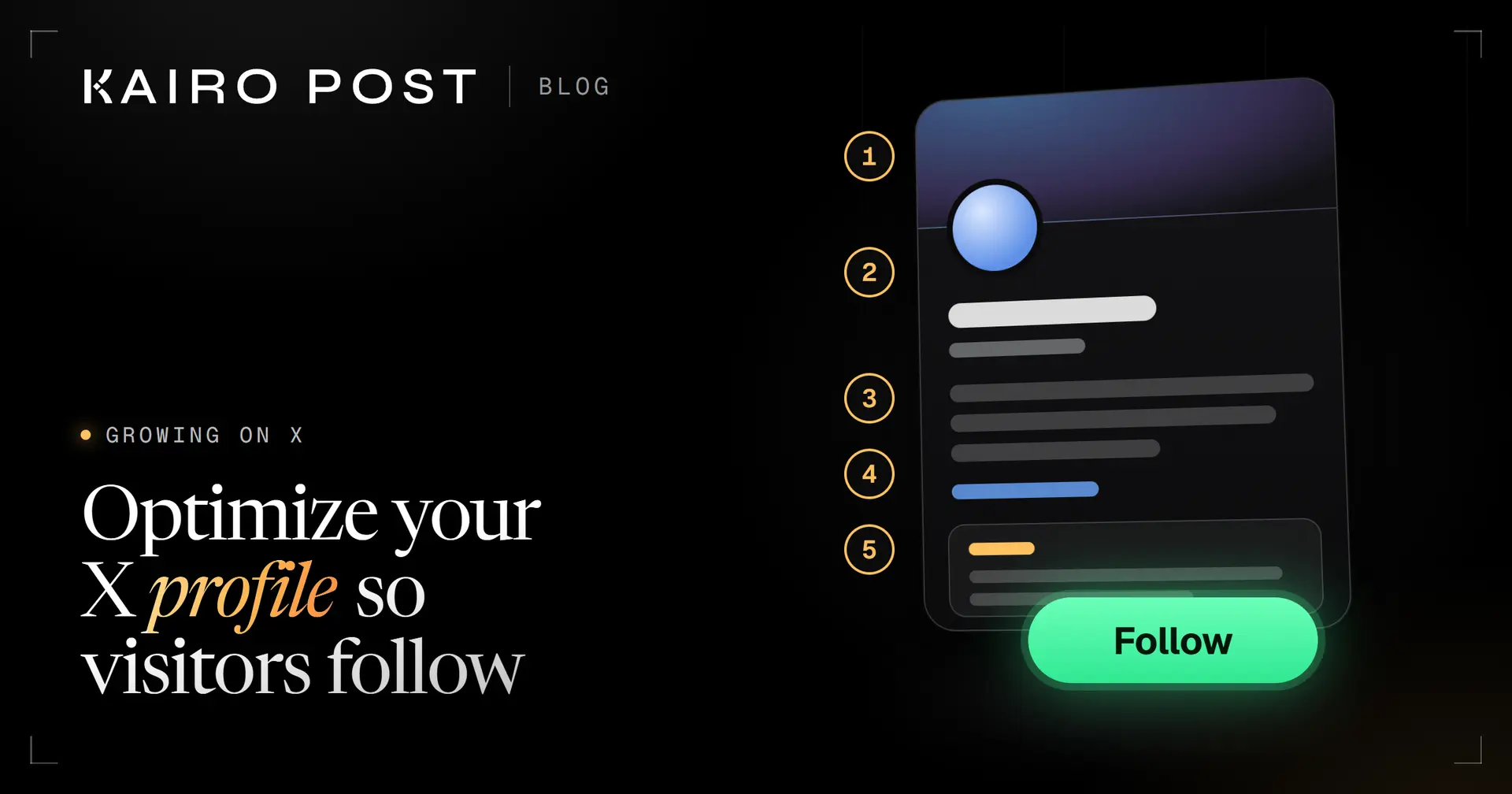
Make every field of your X profile answer one visitor question: who you are (photo, name, handle), what you post (header, bio, link) and what a good post looks like (the pinned post). Stay inside X's limits: 50 characters for the name, up to 15 for the username and 160 for the bio.
Key takeaways
- A visitor reads your profile in order: photo and name, then bio, then the pinned post. Give each zone one clear answer.
- X's limits: a name of up to 50 characters, a username of 5 to 15 and a bio of up to 160. We found no published limit for location or website.
- Write the bio as who you are, what you post and one next step. Cut every word that would fit anyone.
- Pin one post that shows what following you gets, and replace it when it goes out of date.
- Change one thing at a time, then compare new follows per profile visit over two equal periods.
Someone replies to you, or reposts you, and a stranger taps your name. What they land on is your profile, and it has one job: to make the answer to "should I follow this account?" obvious. Your profile is the first lever in our guide to growing on X. If your handle no longer fits, see how to change your X username.
X profile optimization is the work of making that answer easy to find. It is not clever. Each field gets one job, and most profiles waste at least three of them. This post goes field by field, using X's own limits (checked on 1 October 2026), and ends with a ten minute checklist.
What does a visitor see when they open your X profile?
A visitor sees your photo, name and handle first, then your bio with its link and place, then your pinned post. Read in that order, those three zones answer three questions: who is this, what will I get, and can you show me one. A gap in any answer is a reason not to follow.
The header sits above all of it and backs up the first answer. From Edit profile, X lets you change the header photo, profile photo, name, bio, location, website and birth date, and it lets you pin a post. Everything below follows that list. For framing a face or shrinking a logo, see how to choose a profile picture people recognise.
50
characters in a display name
X Help Center, change your username
15
characters at most in a username
X Help Center, change your username
160
characters in a bio
X Help Center, customize your profile
The eight fields and the one test each must pass
Every field on an X profile gets a single test, a question you can answer yes or no in a few seconds. If you cannot say yes, that is the field to fix first.
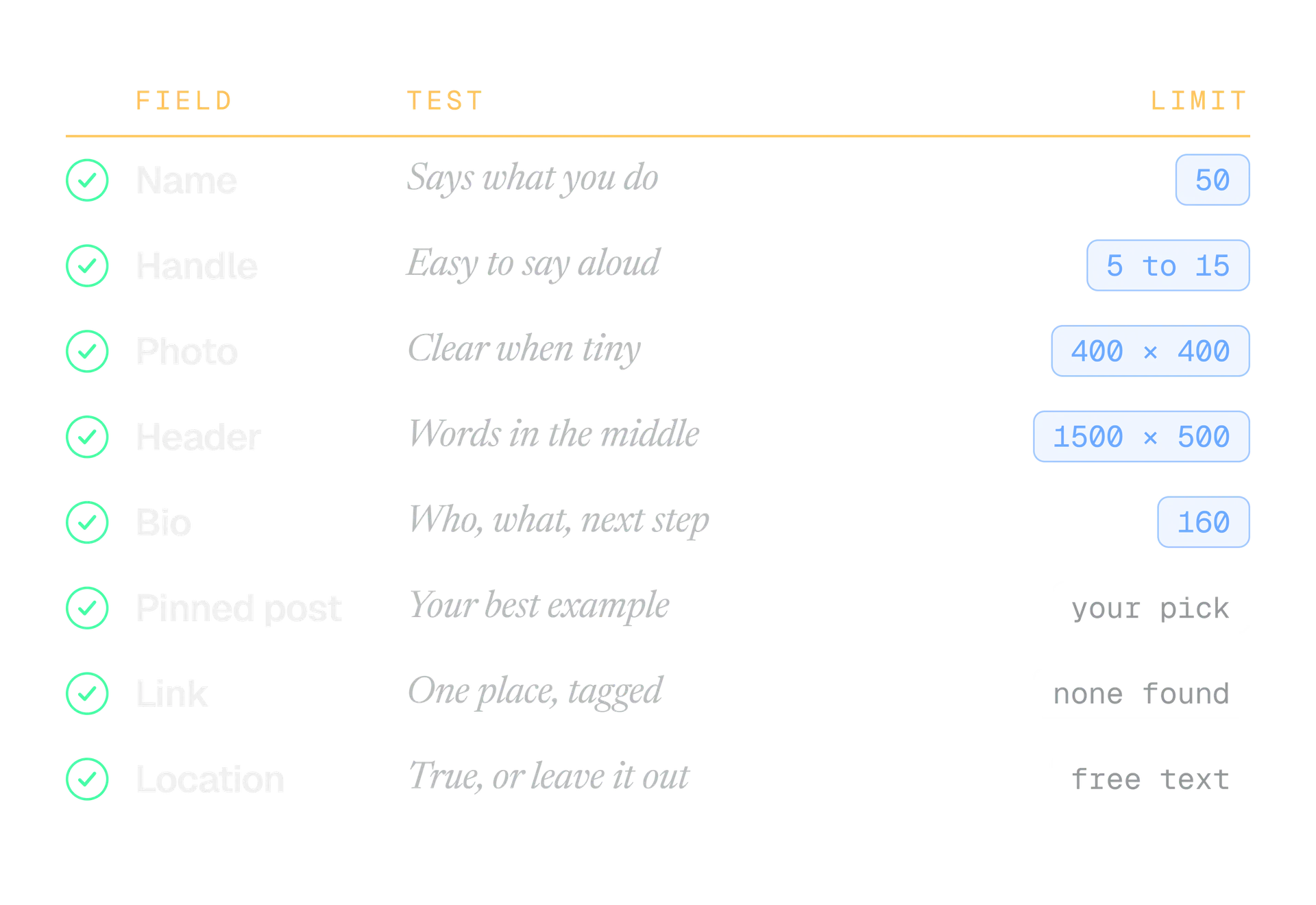
The table shows what each field is for and how it usually goes wrong.
| Field | Its job | The usual failure |
|---|---|---|
| Name | Tell a stranger what to call you and what you do | Only a first name, or a string of emoji |
| Handle | Be easy to say, spell and remember | Random digits and extra underscores |
| Photo | Be recognisable at a tiny size | A wide logo or a far away group shot |
| Header | Back up the first answer | Words in the zones that can be cropped |
| Bio | Say who, what and the next step | Filler that would fit anyone |
| Pinned post | Prove the bio is true | A post that is months out of date |
| Link | Give interested people one place to go | A homepage that matches nothing in the bio |
| Location | Help a visitor place you | A joke, or a place you no longer live in |
Name and handle: what to put in each
Your display name is a label you can change whenever you like. Your username, the part after the @, is the address people use to reach you. They do different jobs, so write them differently.
Put what people call you in the name, then a few words on what you do. The name is the first line of text a visitor reads, so a role beats decoration.
Name that works
Dana Okoro, Pagewise. A real name and a place to find out more, in 20 characters.
Name that hides you
Dana ⭐ DMs open ⭐ Growth. Two stars and no reason to follow.
For the handle, say it out loud. If you have to spell it, shorten it. Keep digits out unless they are part of a brand, and remember that X reserves some words, such as Admin, for official accounts.
Changing a display name is safe. Changing a username is also possible, but it moves the address people use.
X says a username change does not affect your followers, Direct Messages or replies, and that the old username becomes available to someone else straight away. X suggests telling your followers before you switch. Handles shown on your website, in email signatures and on other platforms are yours to update.
Profile photo and header: look recognisable, say what you do
The photo answers "who is this" and the header backs it up. X recommends 400 by 400 pixels for the photo and 1500 by 500 for the header, and says 60 pixels at the top and bottom of a header could be cropped. Our image sizes guide has the full measurements and file limits, so we will not repeat them here.
What matters is what the images say once they are small, because visitors often meet your photo at thumbnail size.
Photo
A person
A close crop of your face, in good light, that you also use on other platforms. People look for the same face.
Photo
A brand
The logo mark on a plain background, not the full wordmark. A wordmark turns into a smudge at this size.
Header
Any account
One short line or one picture of the work, kept in the middle band. If the header has nothing to say, a calm brand colour is fine.
X does not support animated GIFs for the profile photo or header, so pick a still image. If you are not sure which photo to use, put each candidate at thumbnail size next to a few other accounts and see which one you recognise first.
How to write an X bio that earns the follow
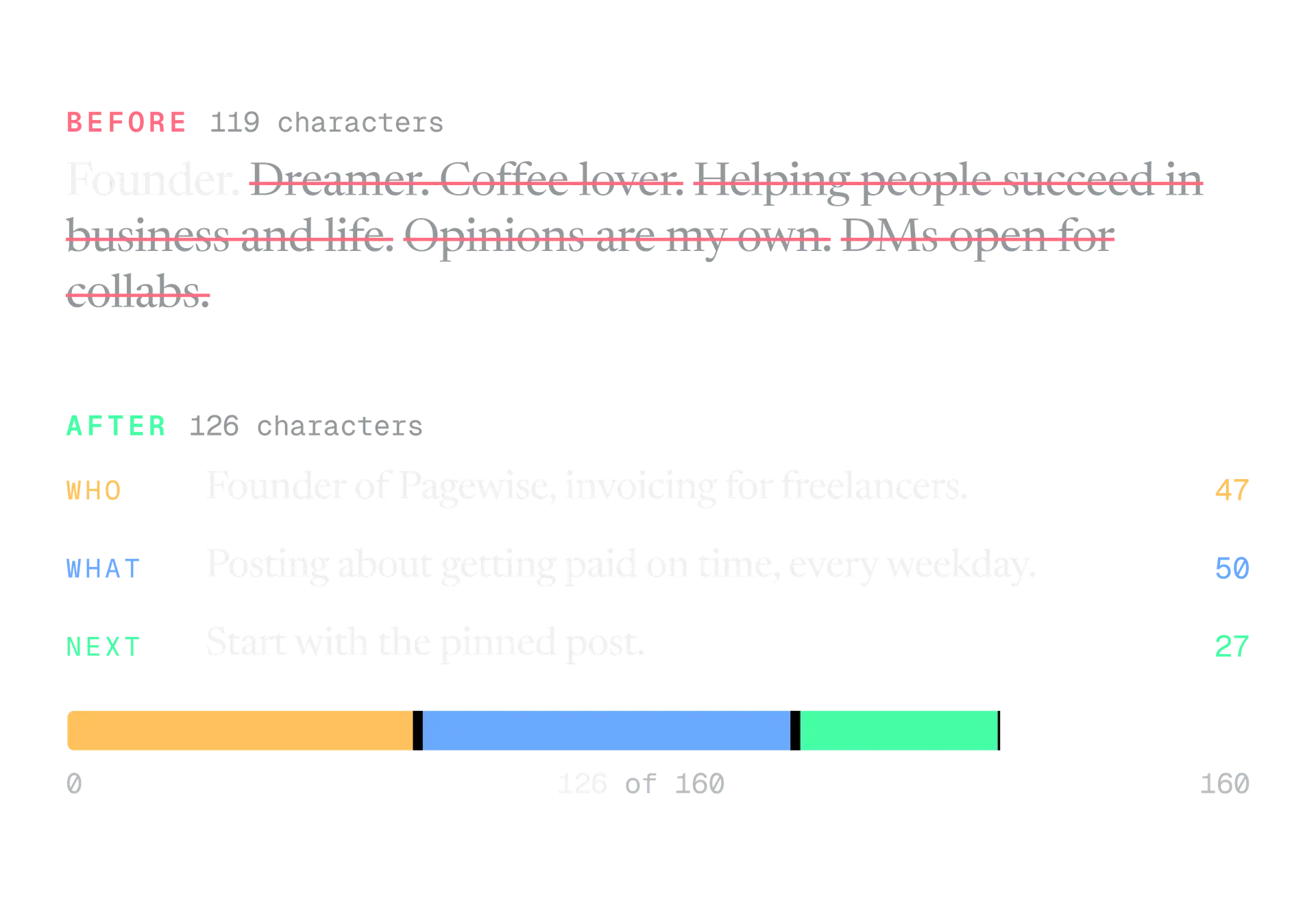
A bio has three jobs in 160 characters: say who you are, say what you post, and give one next step. Everything else is optional, and most of it is filler. A bio that fits anyone does not tell this visitor why you.
Write who you are in one clause
Your role and your focus, with something concrete in it. "Founder of Pagewise, invoicing for freelancers" does more than "Entrepreneur and dreamer".
Say what you post, and only if it is true
"Posting about getting paid on time, every weekday." A visitor now knows what their feed will look like after they follow.
Add one next step
Point at something that exists, such as the pinned post or the link below. One step. Two steps is a menu.
Cut, then count
Remove any phrase that could sit in anyone's bio. Then count characters against the limit of 160.
Leave a little room if the bio holds emoji. X documents weighted counting for posts, and we found nothing about profile fields, so how X counts characters in posts is a guide, not a guarantee. Our free bio checker counts each field against X's limits as you type, shows a live profile preview, and runs entirely in your browser.
What to pin on your X profile
The pinned post is the first post a visitor sees when they open your profile, according to X's Help Center. That makes it the third answer: show me one. Pick the post that proves your bio is true.
To pin, open your profile, find the post, use the icon at the top of it, choose Pin to your profile and confirm with Pin. Repeat with another post to replace it.
Most accounts
Your best proof
A post that shows the kind of thing you share, and was received well. It tells a visitor what the feed will be like.
Teachers and writers
A start here thread
The opening post of a thread that introduces you and points to your best work.
Products and services
The offer
One post that explains what you sell, who for, and where to go. Keep it plain and put the link in the post or the bio.
Launches and events
Time limited news
A launch or an event. Useful while it is current, damaging when it is not. Put a date in your calendar to replace it.
A pinned post is read cold, by someone who has not seen anything else you wrote. Its first line has to work alone, so borrow from our guide to X hooks.
I send invoices for a living. Here is the whole system: three templates, one reminder schedule, zero awkward emails. Free to copy. Reply "system" and I will send it.
That example names the topic, says who it helps and tells the visitor what to do next, in three short sentences.
Link and location: the two small fields people skip
The website field is where your bio's next step should lead. One link, one destination. If the pinned post is about a newsletter, the link goes to the newsletter, not to a homepage.
The location is free text. X's developer documentation calls it a free form value that may not indicate a valid place. We found no published limit for it or for the website field. Write something true that helps a visitor place you, such as a city or a time zone, or leave it empty.
If X will not save your changes, these are the causes its Help Center lists. Work down the list, one item at a time.
The four reasons a profile will not save, and the fix for each
- Check mark symbol in the name or bio. X treats it as a fake verification mark. Remove it.
- Bio over 160 characters. Shorten it, then save.
- Angle brackets or quotation marks in the bio. Remove them.
- A link detected as unsafe. Clear the website field and the bio links, save, then add the links back one at a time to find the one X flags.
Public or protected: the setting that decides who can read
If you want strangers to follow you, keep your posts public. With protected posts, a visitor cannot just follow. They must request it and wait for your approval, and only approved followers can read your posts.
| Public posts | Protected posts |
|---|---|
| Anyone can read your posts | Only followers you approve can read them |
| One tap to follow | A follow request you must approve |
| Your replies to strangers can be seen by them | A reply to someone who does not follow you is not seen by them |
| The default when you sign up | A setting you turn on |
Protecting posts is a fine choice for a private account. For an account that is supposed to grow, it adds a step in front of every visitor. Check this setting if a well made profile still gets no follows.
How to tell if your profile changes worked
You cannot see a visitor's thoughts, but you can compare how many visits turned into follows. Change one thing, wait, then compare.
Use whatever profile visit number your analytics gives you, and divide new follows by profile visits. That is your follow rate. Say you had 400 profile visits and 20 new follows. That is 5%, a made up sum to show the method.
Day 0
Write down the baseline
Note the date, your profile visits and your new follows for the last two weeks. Save screenshots of the profile as it is.
Day 1
Change one thing
The bio, the pinned post or the photo, never two at once. Write down what you changed.
Week 2
Compare like with like
Take the same number of days, count the same things and divide. Keep the change if the rate held or rose. Revert it if it fell.
Treat the result as a hint, not proof. Follows also depend on what you posted in those weeks, and small accounts swing a lot from one fortnight to the next.
The profile mistakes we see most
These are patterns we see, not statistics. Each one is easy to fix.
- Filler that fits anyone. "Dreamer", "Opinions are my own" and "Coffee lover" take up room and tell a visitor nothing about what they would get.
- Text in the crop zones. A header with words near the top or bottom edge, where X says up to 60 pixels may be cropped.
- A stale pinned post. A launch announcement that is long over tells a visitor the account has gone quiet.
- Writing for people who already know you. A bio full of in jokes and project names means nothing to a stranger.
- A link that does not match the bio. The next step says one thing and the link goes somewhere else.
- Changing everything at once. The profile may improve, but nobody knows which edit did it.
- Switching the handle without a word. Followers keep following, but the people who tagged the old handle will not find you.
The ten minute profile checklist
Open your own profile in a private window, on your phone, as a stranger would. Then tick these off.
Before you close the tab
- The name says who you are and what you do, and is 50 characters or fewer.
- The handle is easy to say aloud and is 5 to 15 characters of letters, numbers and underscores.
- The photo is still recognisable when it is small.
- No words sit in the top or bottom 60 pixels of the header.
- The bio says who, what and one next step, in 160 characters or fewer.
- The bio has no check mark symbol, angle brackets or quotation marks.
- The pinned post proves the bio, and it is current.
- The link goes to the place the bio points at, and is tagged.
- The location is true, or empty.
- The account is public, if you want strangers to follow.
When all ten are ticked, leave the profile alone and measure. If you want to test a bio before you save it, our free bio checker is the quickest place to do it.
In the product
How Kairo Post does this
Everything above works by hand. Kairo Post does the same work for you, with your approval before anything goes out.
Questions people ask
How long can an X bio be?
Can I change my X username without losing followers?
Why will X not save my profile changes?
Does the location field have to be a real place?
Should my account be public or protected?
Can I pin more than one post?
How often should I update my profile?
Sources
Every rule, limit and figure in this post was checked against these on the date shown.
- How to customize your X profile, X Help Center
help.x.com · checked
- How to change your X username, X Help Center
help.x.com · checked
- X profile update failed? Here's why, X Help Center
help.x.com · checked
- Help with uploading a profile photo, X Help Center
help.x.com · checked
- About public and protected Posts, X Help Center
help.x.com · checked
- X API data dictionary, X Developer Platform
docs.x.com · checked
- Metrics, X Developer Platform
docs.x.com · checked
Written by