How to launch a product on X: the complete playbook
The short answer
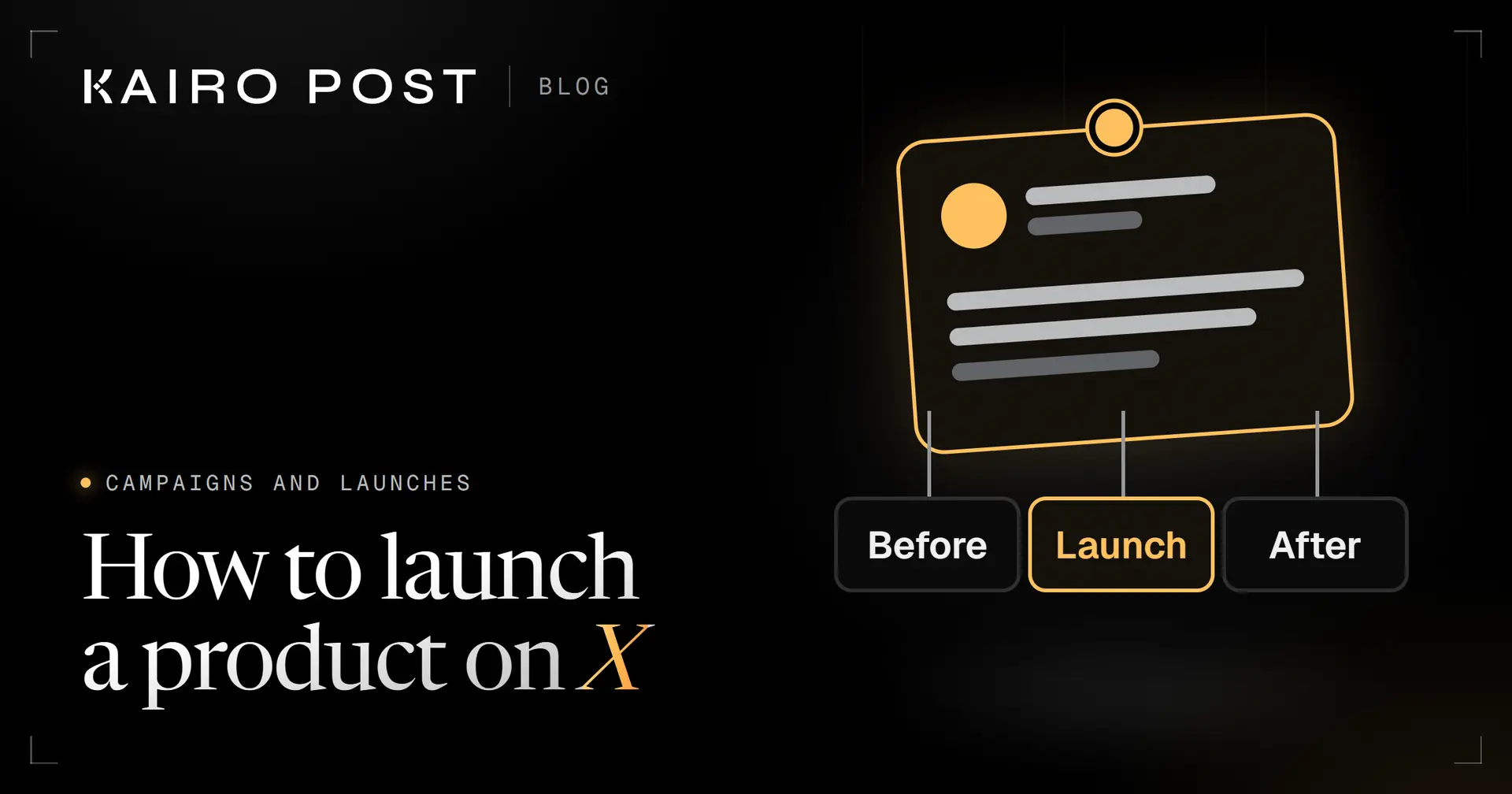
Launch on X in three phases: get the profile, page, link preview and tracking ready, make one pinned anchor post (usually a thread) the centre of launch day while you stay in the replies, then follow up for a week. If several accounts post, give each its own angle.
Key takeaways
- Build one anchor post and point everything at it: teasers lead up to it and follow ups lead back to it.
- Test the whole route a visitor takes, from post to profile to link preview to page to sign up, before launch day.
- Give every launch link its own utm_content value so each post can be measured.
- X bans substantially similar posts across accounts you operate, so each account in a launch needs its own angle.
- Launch day is a day of replying. Plan who answers, when, and what they may say.
You have a product shipping soon and an X account with a few people watching it. A product launch on X is not one post. It is a few weeks of preparation, one day when everything points at the same place, and a week of follow up. For the thread itself, follow our guide to writing a launch thread.
The short version: build the pieces before you announce anything, make one anchor post the centre of launch day, and stay in the replies while it runs. Below you get each phase, a way to launch from several accounts without posting duplicates, a tracking setup and a launch week you can copy. Every example here is made up.
What does a product launch on X involve?
It involves three phases around one post. Before launch you get ready and warm up the people who will care. On launch day you publish one anchor post and answer everyone who responds. After launch you follow up for a week and learn from the numbers. Before launch day, a campaign brief gets everyone aligned and a waitlist campaign collects interest.
Having one anchor matters because attention is easy to scatter. If five posts each carry a different link and a different promise, nobody knows where to go. One anchor gives your own team, your followers and anyone who shares the news a single place to point. Running an event instead? See event promotion before, during and after, and if something breaks, how to announce an outage.
This guide covers organic posting, not paid ads. Here is what each phase is for and when it ends. Before the next launch, decide how you will measure the campaign, and for date driven pushes see seasonal campaign ideas by month.
| Phase | Its job | It ends when |
|---|---|---|
| Before | Get the profile, page, tracking and first audience ready | Everything on the pre launch checklist passes |
| Launch day | Publish the anchor post, pin it, answer people | The last question of the day is answered |
| After | Follow up, thank people, read the numbers | You know what to repeat and what to drop |
What should be ready before you announce anything?
Everything a visitor touches between your post and your sign up form. People who click go on a route of five screens: your post, your profile, the link preview, your page and the sign up. They leave at the first screen that lets them down.
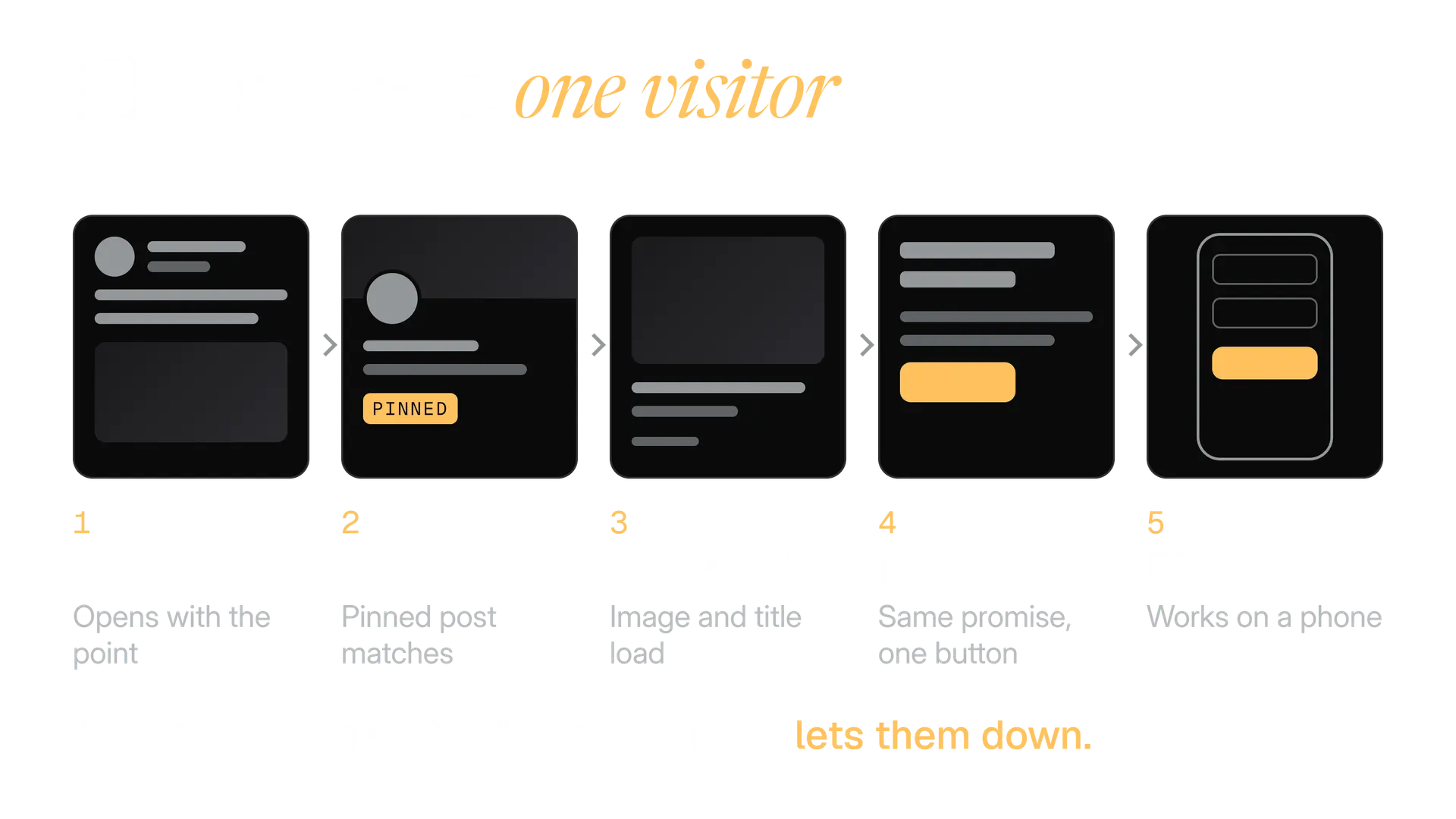
Work through this list a week ahead, so there is time to fix what you find. Five more launch guides: announcing a price change, announcing funding, embargoes and timed releases, covering a conference live and a launch post mortem template.
Ready before the first teaser
- Your profile says what the product is. Our guide to X profile optimisation covers each field.
- The page you link to loads fast on a phone and repeats the promise of your post.
- You pasted the link into a draft and the preview shows the right title and image.
- Every launch link carries its own tags. The UTM builder makes them.
- Images have alt text and fit their sizes.
- Any demo clip is short and works with the sound off. See video on X.
- Every account that will post has two factor login and a safe setup.
- The anchor post is drafted, and so are answers to the five questions you expect.
The link preview is the step teams skip most. X's cards documentation says a page without X specific tags can still be read through its Open Graph tags, which are the title, description and image tags most websites already carry. So the usual fix is on your website, not in X. Paste the address into a draft to see what readers will see.
How do you build an audience before launch day?
You mostly do not build one in the last week. You warm up the people you already have: followers, readers of your newsletter and the people who reply to you. A launch works best for people who already know why you are building this.
Closest
Your followers
They chose to see your posts. Give them the story of the problem for a fortnight and they arrive at launch day knowing why it matters.
Warm
Your email list
Readers who gave you their address. Turn an issue into posts with our guide to newsletter to X posts, and tell the list the date.
Earned
People you reply to
Useful replies under other people's posts put your name in front of strangers who have your problem. See how to use replies to grow on X.
Hottest
People who ask
Anyone who replies to a teaser with a question. Answer them properly, because they are the first users you will meet.
Then ask for one small thing at a time. X's Help Center says people can turn on notifications for an account from its profile and choose All posts, so your launch lands in front of them. Ask your closest followers to do that, and ask everyone else to reply with their own use case.
For a longer plan to grow the account itself, read how to grow on X. For teaser material you will not run out of, use content ideas for X.
How do you tease a launch without spamming?
Make every teaser give a reason to come back that the last one did not. A teaser is a post that makes sense on its own and adds one new thing about the product. If a post would read the same a week ago, it is a reminder, and reminders are what people mute.
Four kinds of teaser cover most of a fortnight, each with a different new thing.
Week one
The problem
Describe the annoying thing your product fixes, in the words customers use. No product name needed yet.
Week one
The making
A screenshot of something half built, a decision you changed your mind about. Real work earns attention.
Week two
The proof
A short clip of the product doing the job. Show it working rather than describing it.
Week two
The date
Tell people when it arrives and what to do on the day. A poll can ask which feature they want to see first.
Polls are a light way to involve people. X's Help Center says a poll can have up to 4 options of up to 25 characters each, and run from 5 minutes to 7 days. A 25 character option has to be a word or two, so ask a question people can answer at a glance.
Which one should we show first on Thursday? Shipping notes that write themselves, or the one tap customer update. Vote, then tell us what we missed.
What counts as spam here is spelled out. X's Authenticity policy prohibits bulk, aggressive, high volume unsolicited replies, mentions and Direct Messages, and using trending or popular hashtags to manipulate a conversation. Teasers are where launches slide into exactly that.
A teaser people can use
- Tells one new thing about the product.
- Goes to people who follow you or asked.
- Ends on a clear next step, such as a vote or a date.
A teaser that reads as spam
- Tags dozens of accounts that never asked.
- Repeats the same coming soon post every day.
- Attaches a trending hashtag that has nothing to do with it.
For the first line of each teaser, see our guide to X hooks. For hashtag habits that are safe, read X hashtags.
What goes in the launch day thread?
Five jobs, one post each: name the product, show it, prove it, say who it is for, and give the next step with the link. Our guide on how to write an X thread covers the writing of each post, so this section only lays out what a launch needs.
| Post | Its job | For Parcelnote, our made up example |
|---|---|---|
| 1 | Say what it is and the one result it gives | Shipping notes that write themselves |
| 2 | Show it working | A 20 second clip of one note being created |
| 3 | Give proof you can source | A quote from a tester who agreed to be named |
| 4 | Say who it is for, and who it is not for | Small shops sending under a hundred parcels a week |
| 5 | Give the next step and the link | Try it today, link, and what happens next |
Post 4 is the one teams skip. Saying who it is not for makes the rest more believable, and it saves your support inbox from the wrong visitors.
Parcelnote is live today. It writes the note that goes in every parcel, so you stop retyping thank yous at midnight. A short demo and what it costs you: below.
Where should the link go? Many launch guides say a reply, because they claim links reduce reach. We found no X page that says so, and X publishes no ranking rule either way. So test it: put the link in the closing post of one launch and the opening post of the next, tag each, and compare.
Three facts help you plan the post itself.
23
characters, for any link
X Developer Platform, counting characters
5
edits for Premium subscribers
X Help Center, About Edit Post
1 hour
window to make those edits
X Help Center, About Edit Post
X counts every link as 23 characters, however long, so tags cost you nothing. On edits, X's page also says a post can no longer be edited once its author has replied to it. A thread is made of replies to yourself, so we assume the first post is locked once the thread is up. Read it twice before you press Post all.
X's Help Center also says you can add more posts to a thread after publishing, from the thread page with Add another post. That is where a "now open to everyone" update goes, without starting a second thread.
How do you pin the post and plan the first hours?
Pin the first post of the thread as soon as it is live. X's Help Center says a pinned post is the first post people see when they open your profile. Everyone who clicks through from a reply, a repost or a quote lands on your anchor, not on whatever you posted last.
Open your profile and find the post
The first post of the thread is the one to pin.
Use the icon at the top of the post
Choose Pin to your profile, then confirm with Pin.
Plan the unpin
Pin something else when launch week is over, so the profile does not advertise a finished event.
For the hour itself, our guide to the best time to post on X shows how to find when your audience is awake. For a launch, pick an hour when you and your team can both be online for the next three. A perfect time with nobody at the keyboard is worse than a decent time with the whole team there.
| When | What happens |
|---|---|
| One hour before | Last route walk on a phone, replies drafted, team on a call |
| Minute 0 | Publish the thread, pin the first post, share the link internally |
| First three hours | Answer every reply, give each its own wording |
| Midday | Post one proof point as a reply or a new post, such as the tester quote |
| Early evening | Thank people, answer the question you were asked most |
| Before you stop | Write down what was asked, for the FAQ post tomorrow |
How should you handle replies on launch day?
Answer each one with something specific, and answer fast. Launch day replies are your first sales conversations. A reply that repeats the person's question and gives a real answer is worth more than ten that say thanks.
Answer it
A question
Answer in the thread, in two sentences, then link the page that explains more. Questions asked twice become tomorrow's post.
Own it
A bug report
Say thanks, say what you will do and when. Move the details to a message if they need account information.
Be calm
A sceptic
Answer the argument, not the tone. Others are reading. Never delete a fair question, and do not argue with a rude one.
Ask more
A fan
Thank them, then ask what they will use it for. Their answer might be your next proof post.
Do not hand replies to a bot. X restricts automated replies, and our guide to X automation rules lists what is allowed. A launch is the worst time to find out your reply tool breaks them. For the bigger picture of replying, see how to use replies to grow on X.
A reply that helps
Good question. Parcelnote prints the note from your order data, so there is nothing to retype. Here is the setup page, which takes a few minutes.
A reply that wastes the moment
Thanks so much for the support!! Link in bio.
How do several accounts launch the same product without duplicate posts?
Give each account its own job and its own words, and share only the facts. X allows you to create and operate up to 10 accounts for different, non duplicative purposes, according to its Authenticity policy. It does not allow accounts you operate to post substantially similar or identical content to one another.
10
accounts X allows one person to operate, for different purposes
X Help Center, Authenticity
The Automation rules say it plainly: "You may not post duplicative or substantially similar posts on one account or over multiple accounts you operate." Our guide to X duplicate posts explains what X allows and what it does not.
Here is the process we use for a launch across a brand account, a founder account and a support account.
Lock the facts
Write the name, date, price pointer and link once. These are the only words allowed to match across accounts.
Give each account a job
The brand announces. The founder tells why it was built. Support shows how to start. A job decides what each account says.
Write each post from its own point of view
Different first line, different example, different call to action. Read our guide to brand voice for X for keeping accounts distinct.
Stagger the times
Do not post at the same minute. Stagger by an hour or more, so each post has its own conversation.
Compare the drafts
Paste any two into the duplicate post checker. It shows shared phrases and a score out of 100. It is a prompt to look again, not a prediction of what X will do.
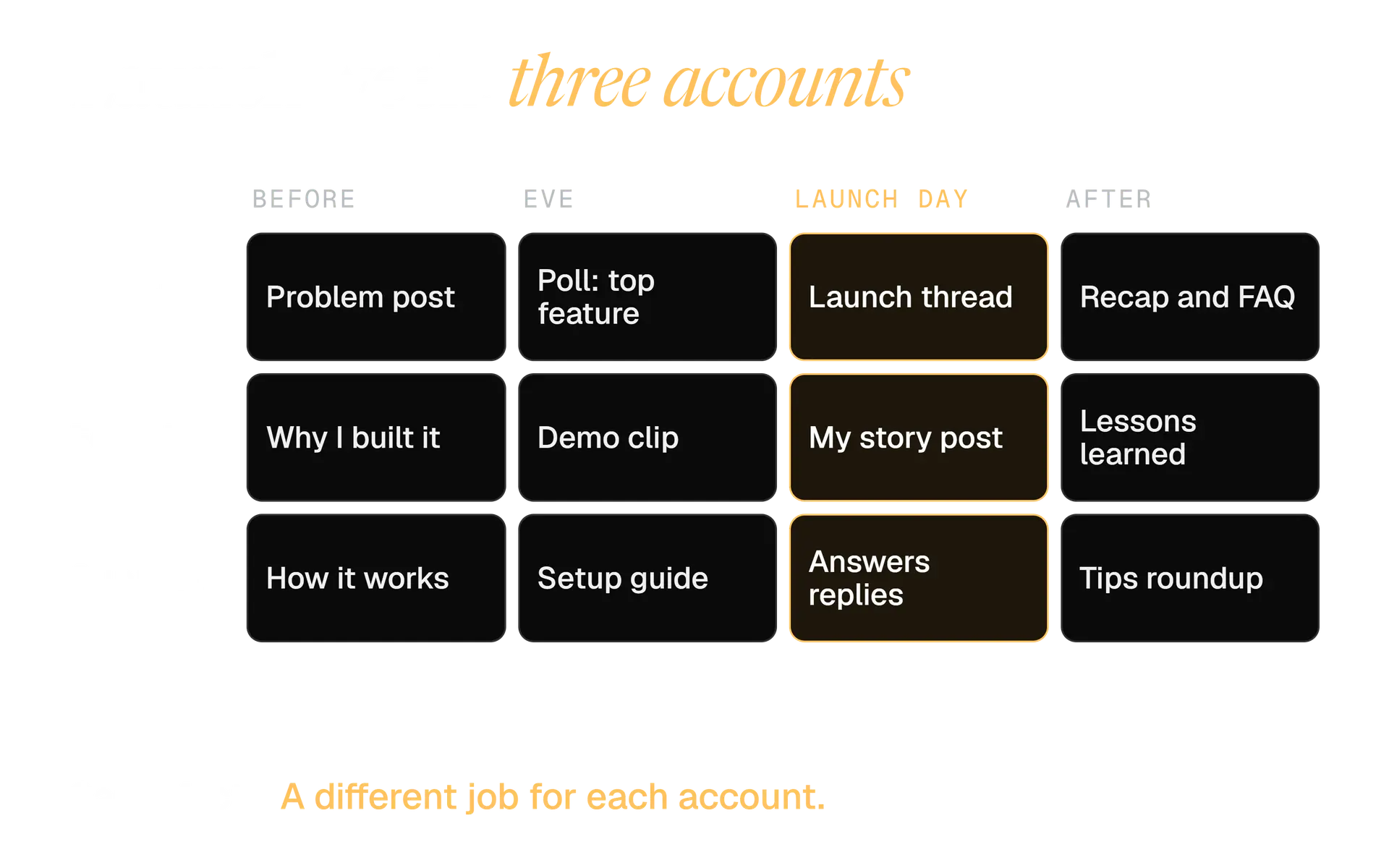
If you plan launches across accounts often, the campaigns page describes how Kairo Post works from one brief, gives each account its own angle and keeps near duplicates apart. For ordinary agency practice, see managing X for clients.
What about creators, customers and partners who post about your launch?
Give them facts and a brief, not a script, and make sure any commercial link is disclosed. A script pasted by twenty people is the duplicate problem again, only with other people's accounts attached.
Two sources set the bar, and both cover more than payment.
| Source | What it asks for |
|---|---|
| X Paid Partnerships policy | The Paid Partnership disclosure, in the Content Disclosure settings when composing, for gifted products, payment, affiliate or discount code commission and ambassador roles |
| US Federal Trade Commission | Disclosure of any financial, employment, personal or family relationship with a brand, including free products, placed with the endorsement itself, not in a profile or behind a "click more" |
Rules differ by country. Treat this as a prompt to ask a lawyer, not as advice.
What to send a partner:
- The facts: name, date, link and anything they must not claim.
- Two or three angles they may use, in their own words.
- The disclosure wording, and where X puts it.
- A date they should not post before.
Giveaways come with their own X rules, so read them before you tack one onto a launch.
How do you track a product launch on X?
Count in four places and tag every link. A single post is seen, then clicked, then loaded, then converted, and a different tool counts each step. Our guide to tracking clicks from X walks through the detail. This section is the launch version.
Fix the names before you post. Google asks you to always use utm_source, utm_medium and utm_campaign, and says values are case sensitive, so one spelling matters. utm_content is the tag that tells your posts apart.
| Tag | Launch value | Why |
|---|---|---|
| utm_source | x | The same on every post |
| utm_medium | social | Organic posts only |
| utm_campaign | parcelnote_launch_2026_10 | One name for the whole launch |
| utm_content | 00_teaser_poll, 10_thread_post5 | One value per post, sorted by order |
Build each link in the UTM builder, which lowercases for you. Test every tagged link before you post.
Also add one question to your sign up form: how did you hear about us? It catches people who saw a post, then searched for your name and never used the tagged link.
What should you do after launch day?
Keep the anchor pinned for a week, then follow up with a different job each day. Launch day gets the attention. The week after is where you answer the questions, show real use and decide what worked.
Day after
Thank and recap
Thank people by name where you can. Post the three questions you were asked most, answered.
Days 2 to 4
Show real use
Share what a customer built, with their permission. It is better proof than any claim you wrote.
Week one
Fix and say so
List the problems people raised and post what you changed. A visible fix turns a sceptic into a fan.
Week two
Read the numbers
Fill in the sheet, compare posts and write down what to repeat. Then change the pinned post.
You may bring old posts back honestly. X's Authenticity policy does not allow repeatedly posting identical or nearly identical posts, so quote the anchor with a new reason it matters now, instead of posting the same words again.
A launch week timeline you can copy
This is one week built around a Thursday launch. Change the days to fit yours. For a month around it, the content calendar generator lays out slots from your own pillars and posting rhythm and downloads them as a spreadsheet or calendar file.
Monday
Tell the problem
One post about the problem, no product name. The founder account says why it matters to them.
Tuesday
Show the product working
A short demo clip from the brand account. Support posts how setup works.
Wednesday
Ask and set the date
A poll on the feature people want to see first. Tell everyone the time of launch.
Thursday
Launch
The thread, the pin, the replies. The founder posts their story an hour or more later, in their own words.
Friday
Answer and thank
A post answering the top three questions. Thank the first users.
Weekend
Rest, then recap
Quiet replies only. On Sunday, a short recap of what people built.
Next Monday
Read and decide
Complete the sheet, change the pin, note what to do differently next time.
What mistakes ruin a launch on X?
Most failures are preventable, and boring. They sit in the gaps between the pieces, not in the writing.
- The link points to a draft page. Open every link on a phone, logged out, the day before.
- Nobody is assigned to replies. Name one person, and give them permission to answer.
- One post, one chance. If the thread is the only thing you made, a quiet morning feels like a failure. Plan the follow ups.
- Every account says the same thing. It reads as spam to people, and it is what X's rules describe as substantially similar posts.
- The numbers cannot be told apart. One untagged link makes a whole post unmeasurable.
- The pin stays up for months. A launch post still pinned in spring says the account has gone quiet.
Your 24 hour pre launch checklist
Run this the day before. If a line fails, fix it before you post anything.
The day before you launch
- I walked the five screens from a phone, logged out, and nothing broke.
- Every launch link has its own utm_content value, and I opened each one.
- The anchor thread is drafted and I read it aloud once.
- Two people are named: one posts, one answers replies.
- The reply answers for the five likely questions are written.
- Each account in the launch has its own angle, and I compared the drafts.
- Partners know the date, the facts and the disclosure wording.
- The tracking sheet exists with one row per post.
Your next step is small. Open the content calendar generator, set the launch Thursday, and fill the week's slots with one new thing per post.
In the product
How Kairo Post does this
Everything above works by hand. Kairo Post does the same work for you, with your approval before anything goes out.
Questions people ask
How early should you start teasing a launch on X?
Should the launch link go in the post or in a reply?
Can you edit a launch post if you spot a typo?
Do creators who post about your launch have to disclose it?
Can your team post the announcement from their own accounts?
How many posts should a launch thread have?
Sources
Every rule, limit and figure in this post was checked against these on the date shown.
- How to create a thread on X and how to view, X Help Center
help.x.com · checked
- About Edit Post, X Help Center
help.x.com · checked
- How to customize your X profile, X Help Center
help.x.com · checked
- X Polls, X Help Center
help.x.com · checked
- Authenticity, X Help Center
help.x.com · checked
- Automation rules, X Help Center
help.x.com · checked
- Paid Partnerships Policy, X Help Center
help.x.com · checked
- Counting characters, X Developer Platform
docs.x.com · checked
- Metrics, X Developer Platform
docs.x.com · checked
- Collect campaign data with custom URLs, Google Analytics Help
support.google.com · checked
Written by