X rules for brands and creators, explained simply
The short answer
The X Rules group X's rules under three headings: safety, privacy and authenticity. For brands and creators the trouble spots are spam and platform manipulation, impersonation, copyright and trademark, paid partnership disclosure and sensitive or manipulated media, and X can act on a post, the account or both.
Key takeaways
- The X Rules sit under three headings, safety, privacy and authenticity, and detailed policies, the Terms of Service and the Ads policies sit around them.
- Spam and platform manipulation is the area brands break by accident, usually through bulk posts, copied text, keyword replies or bought engagement.
- A parody or fan account must say so in its name and bio, and a posted deal with a brand needs the Paid Partnership disclosure.
- X can limit a post's reach, require removal, restrict an account or suspend it, and you can appeal a permanent suspension.
- Keep one rules sheet for your team, review it each month and open the linked X page before any campaign.
You run an X account for a brand, or you are building your name as a creator. Sooner or later a plain question lands on your desk. Can we reply to everyone who mentions a keyword? Can a fan page use our logo? Does this sponsored post need a label? The X rules answer all of it, but the answers sit on dozens of separate pages.
This post is a map of the X rules and policies that matter to brands and creators. For each area you get the rule in everyday words, what it means for your account and where the full text lives. Where we have already written a deeper guide, we link to it instead of repeating it.
What are the X rules, and where do they live?
The X Rules are one Help Center page that groups the rules under three headings: safety, privacy and authenticity. Around it sit detailed policies, the Terms of Service, rules for tools built on the API, and separate Ads policies. Which layer applies depends on what you are doing. Review the tools that can act for you from time to time: here is how to check connected apps.
| Layer | What it covers | It matters most when |
|---|---|---|
| The X Rules | Safety, privacy and authenticity, in one page | Always. They apply to every account |
| Detailed policies in the Help Center | One page per topic, such as private information, copyright, paid partnerships and synthetic media | You do something that topic covers |
| Terms of Service | Your agreement with X | Always |
| Automation rules and the Developer Policy | Bots, scheduling tools and anything built on the API | A tool acts for you |
| Ads policies | Extra rules for paid ads | You pay to promote a post |
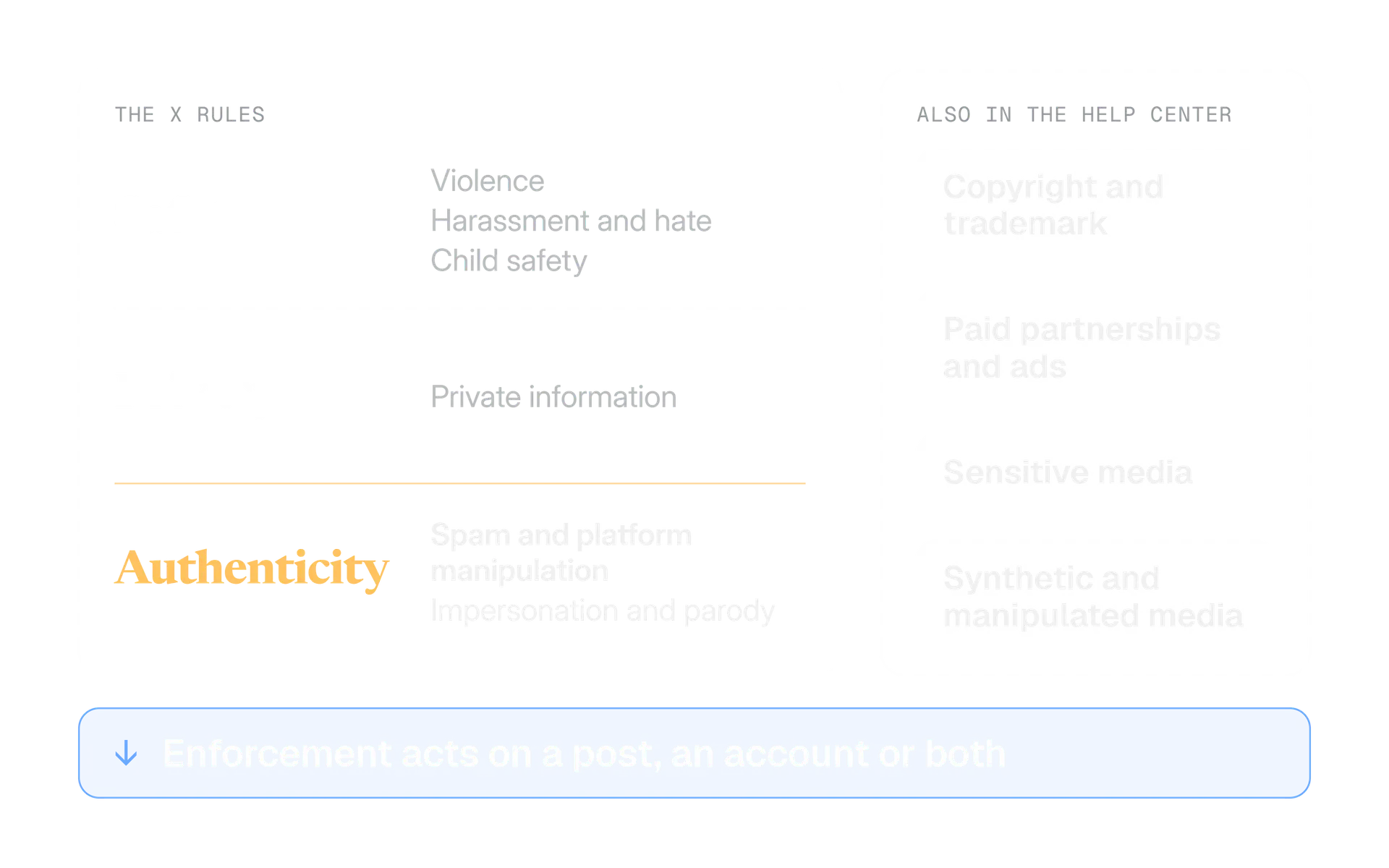
3
groups in the X Rules: safety, privacy and authenticity
The X Rules, X Help Center
2
levels X can act on: a post or an account, or both
Enforcement options, X Help Center
4
kinds of deal that make a post a paid partnership
Paid Partnerships Policy, X Help Center
9 Oct 2026
when X's announced Terms of Service update takes effect
Updates to Our Terms of Service, X Privacy blog
One more layer sits on top: the people and tools that work on your account. X's Automation rules say you are ultimately responsible for actions taken with your account, or by applications associated with it. A teammate, an agency or a scheduler acting for you is you, as far as X is concerned. Two topics have their own guides: copyright on X and handling impersonation of your brand.
How does X enforce its rules?
X can act on one post, on the whole account, or on both. How far it goes depends on the rule broken, how severe the violation is and the account's history. The options run from light to heavy.
- Limited reach (post level). X can keep a post out of search results, trends and recommended notifications, take it off the For You and Following timelines, limit it to the author's profile, rank it lower in replies, or restrict likes, replies, reposts, quotes, bookmarks, sharing, pinning and editing.
- Required removal. When a violation is severe enough to warrant removing a post, X requires the account to remove it before it can post again.
- An ownership check. X may ask the owner to verify ownership with a phone number or email address.
- Read only mode. For a time, the account cannot post, repost or like. It can still read timelines and send Direct Messages.
- Permanent suspension. The most severe step. The account is removed from view and the person may not create new accounts.
X describes its approach as "Freedom of Speech, Not Reach": rather than always deleting a post, it can make the post less discoverable. For you, that means a rule problem can look like a reach problem. The post is still up, and fewer people see it. Before you connect any tool, read why a tool should never ask for your X password.
X keeps help pages called Notices on X and what they mean, Help on your suspended X account and Help with locked or limited account. Bookmark all three before you need them. We come back to appeals near the end.
Safety rules: threats, harassment, hate and child safety
The safety rules cover violence, harassment, hateful conduct, child safety and self harm. Brands rarely plan to break them. The risk is a community manager replying under pressure, so the useful test is how your reply looks to a stranger who sees only that thread.
Safety
Violent content
Explicit threats, inciting, glorifying or wishing for violence are not allowed. Graphic media can be shared if it is properly labelled, not prominently displayed and not excessively gory or showing sexual violence.
Safety
Violent and hateful entities
You cannot affiliate with these groups or promote their activities.
Safety
Abuse and harassment
"You may not share abusive content, engage in the targeted harassment of someone, or incite other people to do so."
Safety
Hateful conduct
You may not attack people because of race, ethnicity, national origin, caste, sexual orientation, gender, gender identity, religious affiliation, age, disability or serious disease.
Safety
Child safety
X has zero tolerance for any form of child sexual exploitation.
Safety
Suicide and self harm
Promoting or encouraging suicide or self harm is not allowed.
Notice the last words of the harassment rule: "or incite other people to do so". A brand account with a large following that points its audience at one critic can come close to that line without a single rude word of its own.
Answer the complaint, then move it private
"Sorry this arrived late. Send us your order details in a Direct Message and we will sort it today."
Rally the audience against a critic
Quote posting a critic with a joke so your followers pile in. The thread turns into a pile on with your name on it.
If your work involves graphic material, such as news, health or safety training, the rule is to label it and keep it from being prominently displayed. The section on sensitive media below shows where that setting lives. Two settings guides go further: privacy settings every brand should check and sensitive media labels.
Privacy rules: what you can show about other people
You may not publish other people's private information without their express authorization, threaten to expose it, or share private media of individuals without their consent. X also bans non consensual nudity. Brands rarely doxx anyone on purpose. They slip in customer service.
Four slips we would check first:
- A screenshot of a complaint with an order number, email address or phone number still visible.
- A Direct Message pasted into a public reply to prove a point.
- A photo or video of a person in a private moment, posted because it made good content.
- A public request for personal details. X's Automation rules say to ask people to move to a Direct Message or another private channel instead.
Before you screenshot or share anything about a person
- Can a reader see a name, contact detail, order number or address that the person did not choose to make public?
- Did the person agree, in writing, to be shown?
- Is it from a private message? If so, ask first or describe it without showing it.
- Would a link to their own public post do the same job?
- If you blur or crop, does the image still identify them from the context?
The private information policy lists what counts as private information. Read that list once with your team rather than guessing.
Spam and platform manipulation: the rules brands break by accident
X does not allow using its services in a manner "intended to artificially amplify or suppress information or engage in behavior that manipulates or disrupts people's experience on X". This is the Authenticity rule. It is the area where a tool or a shortcut can break a rule without anyone meaning to.
What the Authenticity rules name:
- Fake accounts. You may not create, operate or mass register accounts that are not legitimate, genuine and transparent about their source, identity and popularity.
- Content spam. Sharing content in a bulk, duplicative, irrelevant or unsolicited manner is out. Our guide to X duplicate content covers what X does to copied posts.
- Bulk contact. That means aggressive, high volume unsolicited replies, mentions or Direct Messages.
- Hashtag hijacking. Using trending or popular hashtags with an intent to subvert or manipulate a conversation.
- Link dumping. Repeatedly posting links with no commentary.
- Bought or swapped attention. Trading, buying or selling accounts, coordinating to exchange engagement, and paying others to inflate Likes, Reposts, Views or Follows.
- Ban evasion. You may not circumvent X's enforcement actions, for example by creating new accounts or repurposing an existing one.
| What you want to do | What the rules say | Read next |
|---|---|---|
| Post the same text from five brand accounts | Duplicative content across accounts you operate is not allowed | Duplicate posts |
| Auto reply to everyone who uses a keyword | Replies based on keyword searches alone are not permitted | Automation rules |
| Send a welcome Direct Message to every new follower | Unsolicited bulk or automated Direct Messages are not allowed | Automation rules |
| Buy 5,000 followers for a launch | Paying others to inflate metrics is not allowed | This section |
| Reply to a trending hashtag with a promo | Not allowed when it is meant to subvert or manipulate the conversation | This section |
| Open a new account after a suspension | Ban evasion is not allowed | The last two sections |
On engagement pods and swap groups, X's wording covers coordinating to exchange engagement. That is how we read it. Asking your own team to share a launch post is not the same as a group that trades likes, but X's sentence does not draw that line for you, so keep the habit small and genuine.
If an account gets a temporary label, X's Spam Label Review Update page says a label that stays means the account was found to contain spam or other platform manipulation. Developers have an extra layer: the Developer Policy bars using the API to create spam or manipulate the platform. Our guide to X automation rules covers both.
Impersonation, parody and fan accounts
You may not impersonate people, groups or organisations to mislead, confuse or deceive others, or use a fake identity in a way that disrupts other people. Parody, commentary and fan accounts are allowed, but they must say what they are.
The policy also covers manufactured identities. It names stock, stolen or AI generated profile photos, copied or stolen bios and misleading profile details used to deceive. If your brand account has an AI generated "team member", that is worth a second look.
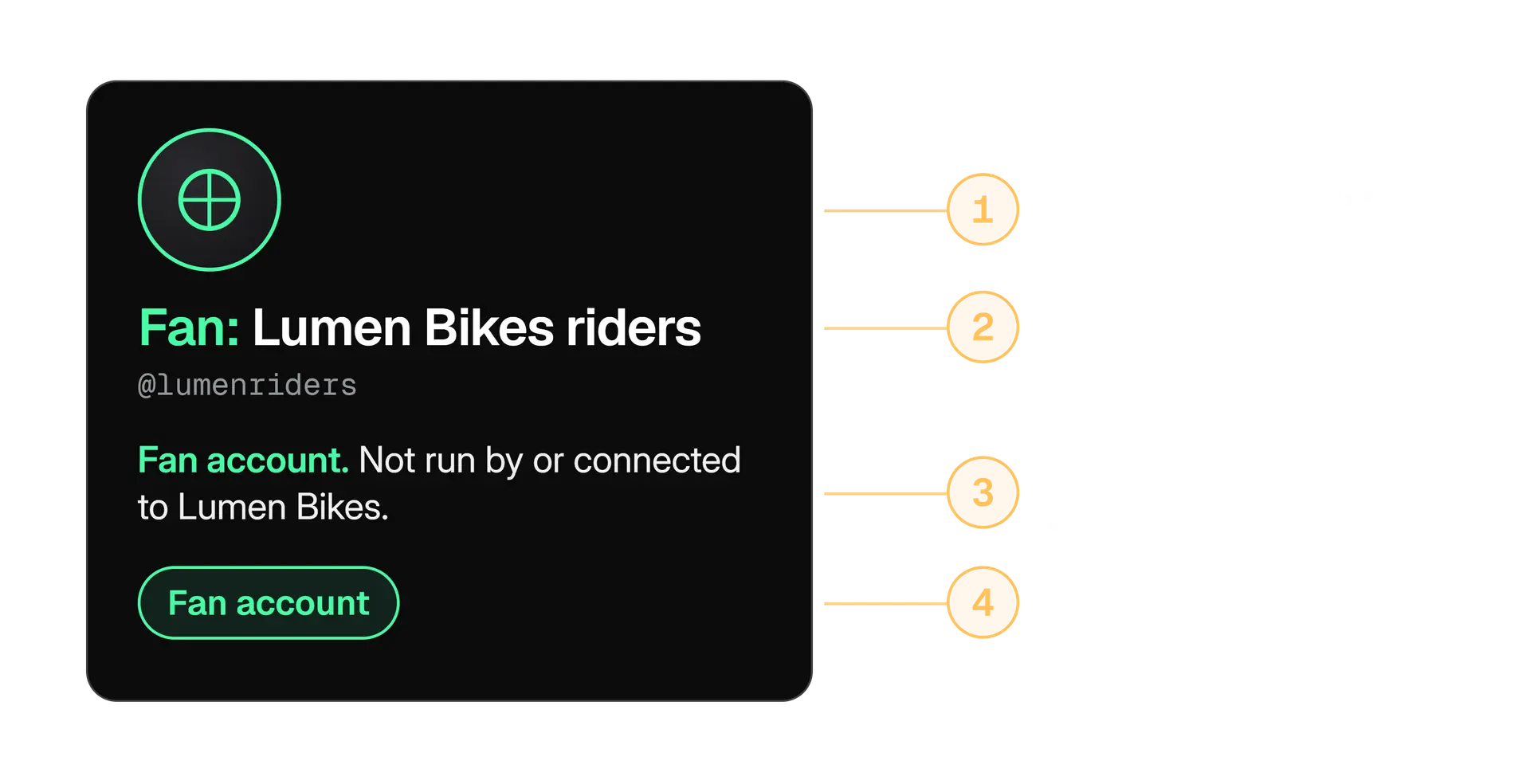
X lists what a parody, commentary or fan account must do, and the image shows the four things. Open the policy page for the current wording.
Accounts that fail to distinguish themselves are non compliant. That works both ways. If you run a fan account for a brand, add the words. If a fan account of yours is confusing people, fix the name and bio before someone reports it.
Collect what shows the copy
Links to the account and to posts that use your name, logo or photos.
Report it as impersonation
X has a page for reporting impersonation accounts. Open the profile, choose Report and pick impersonation.
Warn your audience
A short pinned post that says which account is the real one. Our guide to X verification badges explains how checkmarks help people tell, and what they do not prove.
Copyright and trademark: your work, other people's work and your name
X responds to copyright reports about things like a copyrighted image used as a profile or header photo, a copyrighted video or image uploaded through media hosting, or a post that links to allegedly infringing material. If X removes material or disables access to it, the affected person is told and gets a full copy of the complaint.
That detail matters in both directions. If you file a report, the other person sees your complaint, so do not put in anything you want private. If you are reported, X gives you instructions for a counter notice. A counter notice asks X to reinstate the material, and X says it has legal consequences, so take advice before you send one.
Check you own the work
A photographer's photo you paid for the licence to post is not yours to report. A photo you took is.
Gather the proof
The link to the copy, the link or file of the original, and the date you published it.
Use the copyright form
File it through X's copyright policy page, not by replying to the account in public.
If you are reported, read before you reply
Remove the material if you know it is not yours to use. Counter notice only if you believe it was removed by mistake.
Trademark is a different question: using someone's name or logo in a way that may mislead people about who you are. X's trademark policy says exactly that, and adds that referencing another's trademark is not automatically a violation. Its examples of non violations include use outside the registration (a different country or a different class of goods) and nominative or other fair use.
Name a brand to talk about it
"We compared three bike locks, including the Acme Heavy." You are using the name to refer to the product.
Look like the brand
Using another brand's logo as your avatar or a handle built to be mistaken for theirs. That can mislead people about your affiliation.
X also has a counterfeit policy. It bars selling or promoting goods that use a mark identical to, or substantially indistinguishable from, a registered one without authorisation. News, information and commentary about goods are not a violation.
Paid partnerships and ads: disclose the deal
If a brand pays a creator, gifts a product, gives a commission or signs a deal, the post is a paid partnership, and X wants it disclosed with its Paid Partnership label. The legal duty to disclose is yours under advertising law, whatever the label says.
Tap the flag icon
It sits at the bottom of the composer.
Switch on Paid Partnership
It is under Content Disclosure. The label then shows under the post.
Forgot? Add it afterwards
Social Media Today reports you can add it from the post's three dot menu, under Add content disclosure.
X names four situations. Any one of them is enough.
According to the policy, an organic post that is part of a paid partnership must have the Paid Partnership disclosure on. You find it in the Content Disclosure settings when you create the post. X's Creators account announced the label in early March 2026 and said you can disclose a paid post without writing "ad" or "sponsored" in the copy.
The policy also says you are responsible for making sure a paid partnership follows all applicable laws, including advertising laws and, where it applies, the FTC's endorsement guides. The FTC's own page for influencers is plain about this:
"As an influencer, it's your responsibility to make these disclosures, to be familiar with the Endorsement Guides, and to comply with laws against deceptive ads."
That is United States guidance, and other countries have their own rules. The FTC also says to disclose free or discounted products, to put the disclosure where it is hard to miss, and to avoid vague terms such as "sp", "spon" or "collab".
| Paid partnership on an organic post | Paid ads |
|---|---|
| A creator or employee posts about a product under a deal | The brand pays X to show a post to an audience |
| Governed by the Paid Partnerships Policy | Governed by the Ads policies, which add rules for ad content |
| The Paid Partnership disclosure goes on the post | The advertiser is responsible for all promoted content and for following advertising law |
Some categories cannot use paid partnerships and some countries add limits. The lists sit on the policy page, so read it before you brief a creator. Our guide to managing X for clients has the contract side of this, and the agreement to write down before the first post.
Before a sponsored post goes out
- The brief says who posts, when, and that the disclosure must be on.
- You have read the policy's current list of excluded categories and country limits.
- Gifted products, discount codes and affiliate links count as deals, so they are disclosed too.
- The disclosure is on the post itself, not only in a profile or a later reply.
- You keep a copy of the agreement and the approved text.
Sensitive media and synthetic or manipulated media
These are two different questions. Sensitive media asks whether people need a warning before they see an image or video. Synthetic and manipulated media asks whether a picture or clip is likely to deceive people.
| Sensitive media | Synthetic or manipulated media |
|---|---|
| The question is whether people need a warning | The question is whether the media is likely to deceive and cause harm |
| Consensual adult content and graphic violence can be shared if labelled and not prominently displayed | Misleading media may be labelled or removed |
| You fix it with the sensitive media setting | You fix it by not presenting a fake as real |
On sensitive media, X allows consensually produced adult content if you mark the post or the account as sensitive. It does not want adult content in highly visible spots such as a profile photo or banner.
- The setting. In the app it is "Mark media you post as containing material that may be sensitive", under Settings and privacy, Privacy and safety, Your posts.
- What visitors see. A message asking them to confirm before they view the media.
- If you forget. When much of your content should have been marked, X may switch the setting on for you.
On synthetic media, X's Authenticity policy says you may not share inauthentic media, including manipulated or out of context media, "that may result in widespread confusion on public issues, impact public safety, or cause serious harm". X may label such posts. For the rule to apply, two things must be true:
- The media is deceptive. It is significantly and deceptively altered, manipulated or fabricated, or shared in a deceptive way or with false context.
- The risk is real. It is likely to cause widespread confusion on public issues, affect public safety or cause serious harm.
What this means for AI images in brand posts
The policy does not ban AI generated images. It targets media that deceives, and it names media of a real person that was fabricated or simulated, including with AI, when it is shared as real. An illustration or a product render that is clearly a design is a different thing from a made up photo of a real event posted as proof.
Our rule of thumb: if a reader could reasonably take the image as a record of something that happened, and it did not, do not post it. If a post with misleading media draws a note, our guide to Community Notes explains how those notes are written and rated.
What creators need to add: the monetisation rules
If you earn money from X, you have an extra rulebook: the Creator Monetization Standards, on top of the X Rules. X says breaking them can limit your reach to people who do not follow you, and pause or end your ability to earn.
For a creator, three habits keep the account safe:
- Own your account's security. A hijacked creator account breaks every rule above in your name. Our guide to securing your X account covers the settings.
- Disclose every deal. Gifted items and discount codes count, as the paid partnerships section showed.
- Credit and clear what you reuse. Clips, music and photos you did not make are where copyright reports start.
Small accounts get reported for the same reasons large ones do. The rules do not scale with followers. What changes is how many people are watching when something goes wrong.
How do you report a violation and appeal when X acts?
To report something, open the post's more menu or the profile's more menu and choose Report. You say who the report is for, add detail, and X may ask you to select more posts from the account for context. You can report spam, abusive or harmful content, impersonation and copyright or trademark violations.
Read the notice
Note which policy X names and which post or action it points to. X says it tells people which policy was violated and which content was in violation when it permanently suspends an account.
Pause everything that posts for you
Schedulers, bots and shared logins. Under the Automation rules you answer for apps connected to your account.
Write down the facts
What happened, when, which tools were connected and who had access. Keep it short and factual.
Use X's appeal route for your situation
X says violators can appeal a permanent suspension if they believe X made an error, through the platform or by filing a report. Locked, limited and temporary label cases have their own help pages, linked earlier.
We cannot promise how long a review takes or what it will decide. X publishes no response times that we could find, and anyone who quotes one is guessing. What you control is the quality of your account: a clear record of who did what, and no tools you cannot explain.
Mistakes that break the rules by accident
Most of what we see go wrong is not malice. It is a shortcut that nobody checked against the rules. These are the ones worth a ten minute review.
Spam
One text, many accounts
A launch posted word for word from every brand account. Give each account its own angle.
Automation
Keyword reply tools
A bot that replies to anyone who uses a word. Keyword searches alone are not a valid reason to reply.
Authenticity
Bought followers
A round number before a launch. X bars paying others to inflate metrics.
Impersonation
A fan page without words
Your logo, no label. Add the disclosure to the name and bio.
Copyright
A found photo
A good image from a search, posted without checking who owns it.
Paid partnership
A deal without a label
A gifted product or a discount code with no disclosure on the post.
A rules check to run before you publish
Put the nine areas on one sheet your team can read in two minutes, and keep it next to the approval step. The sheet matters more than the tool.
Kairo Post connects X accounts through X's own sign in and invites teammates by email, so nobody shares an X password, and clients can approve posts through a private link. See how Kairo Post handles teams.
The one page rules sheet
- Spam: no copied text across accounts, no keyword replies, no bought or swapped engagement.
- Identity: every account says what it is, and fan or parody accounts say so in the name and bio.
- Privacy: no personal details or private messages on show.
- Copyright and trademark: you own or have cleared every image, clip and logo.
- Disclosure: every deal has the Paid Partnership disclosure.
- Media: sensitive media marked, and no made up image presented as real.
- Tools: you know what each connected app can do on your account.
- Owner: one named person reads X's changes each month.
Rules move. X has announced updated Terms of Service that take effect on 9 October 2026, including clearer wording that you are responsible for your use of the services, including features that act on your behalf. Read them when they go live, and run your rules sheet against anything that changed. Before you reuse text across accounts, our duplicate post checker shows how close two drafts are.
How we checked this post
The Help Center pages cited here did not open for our research tools, so most X rules in this post come from search result excerpts of those exact pages, which we compared across more than one search. We have kept to sentences those excerpts stated clearly and quote only where the wording matched. The Paid Partnerships list of excluded categories and the appeal steps were left out because we could not read them in full.
Open the linked X page for the rule you are relying on. If the wording differs from ours, the page wins.
In the product
How Kairo Post does this
Everything above works by hand. Kairo Post does the same work for you, with your approval before anything goes out.
Questions people ask
Where are the official X rules?
Do brand accounts follow different rules from personal accounts?
Is buying followers against the X rules?
Can I mention another brand's name in my posts?
Are AI generated images allowed on X?
Why does my account have a temporary label?
Sources
Every rule, limit and figure in this post was checked against these on the date shown.
- X launches paid partnership labels for sponsored content, Social Media Today
socialmediatoday.com · checked
- The X Rules: Safety, privacy, authenticity, and more, X Help Center
help.x.com · checked
- Our range of enforcement options for violations, X Help Center
help.x.com · checked
- Authenticity, X Help Center
help.x.com · checked
- Private information policy, X Help Center
help.x.com · checked
- Copyright policy, X Help Center
help.x.com · checked
- X's trademark policy, X Help Center
help.x.com · checked
- Paid Partnerships Policy, X Help Center
help.x.com · checked
- Adult Content Policy, X Help Center
help.x.com · checked
- X Ads policies, X Business
business.x.com · checked
Written by