How to schedule posts on X: the complete guide
The short answer
Write the post in the web composer, click the calendar icon, pick a date and time, then press Schedule. X Pro, Media Studio and X Ads schedule too, X began adding scheduling to its iOS app in September 2026, and approvals or threads need a third party tool.
Key takeaways
- The calendar icon in the web composer schedules a single post. Change or delete it from Unsent posts before the send time.
- X's API has no publish time field, so every scheduling tool keeps your post and sends it at the time you chose.
- Read the time zone shown in the date picker before you confirm. Clocks change on 25 October and 1 November 2026.
- A scheduler needs a valid connection, room under X's limits and a tool that is running at the send time.
- Write in a weekly batch, read the next two days of the queue every morning and keep the time zone written beside every slot.
You wrote a good post at 11 p.m., and it would land better at 9 a.m., when your followers are awake and you are not at your desk. So you search for how to schedule posts on X and find guides that disagree. One says only on a laptop, another says the app does it now, a third is selling a tool.
This guide sorts that out as of 1 October 2026. You will learn:
- Where X lets you schedule, surface by surface, and what we could and could not confirm.
- How to edit or delete a scheduled post, and what changes once it is live.
- Which clock a scheduled post runs on, and why a slot can drift by an hour.
- What a third party scheduler really does through the X API.
- A weekly routine and the mistakes that break it.
A note on sources. X's own help pages block automated reading, so some facts below come from excerpts of those pages, from news reports and from tool vendors' guides. We say which each time, and where X has not written a rule down we say that too. Choosing a tool? Our buyer's checklist for X schedulers lists what to test, and scheduling a thread has its own traps.
How do you schedule a post on X?
Open x.com in a browser, start a post, click the calendar icon in the composer, pick a date and time, and press Schedule where the Post button used to be. That is X's built in route. Tool vendors' guides describe the same steps, and the news coverage we read says X has offered scheduling on the web for years.
Sign in to the right account
Scheduling happens in the account you are signed in to. If you use more than one account, check the avatar before you write a word.
Write the post and add media
Write it as you would for an immediate post. Attach images, a GIF or a video now, because you cannot check them once you walk away.
Click the calendar icon
Guides describe it as a calendar icon with a clock in the composer's toolbar, in the same row as the image, GIF and poll icons.
Pick the date and time, then confirm
Read the time zone the picker shows before you confirm. Part of this guide is about why.
Press Schedule
The Post button now reads Schedule. The post goes into your list of unsent posts instead of the timeline.
How far ahead can you go? Tool vendors report that the web composer accepts dates up to 18 months out. The X pages we could read do not state a maximum, so treat 18 months as a report, not a rule. X's Ads API caps scheduled posts at one year, which is a different surface. We suggest you plan a week or two at a time.
Where can you schedule posts on X?
Six places, and they are not equal. The web composer works for most people. The others serve specific accounts, and the iOS app only started in September 2026. For the steps inside X's own app, see how to schedule a post in the X app.
X Ads schedules posts too. In ads.x.com, under Creatives and then Posts, an advertiser can schedule an organic post or a promoted only post up to a year ahead. Five planning questions have their own guides: a queue or fixed time slots, quiet hours at night, weekend posting, scheduling for a global brand and scheduled vs live posting.
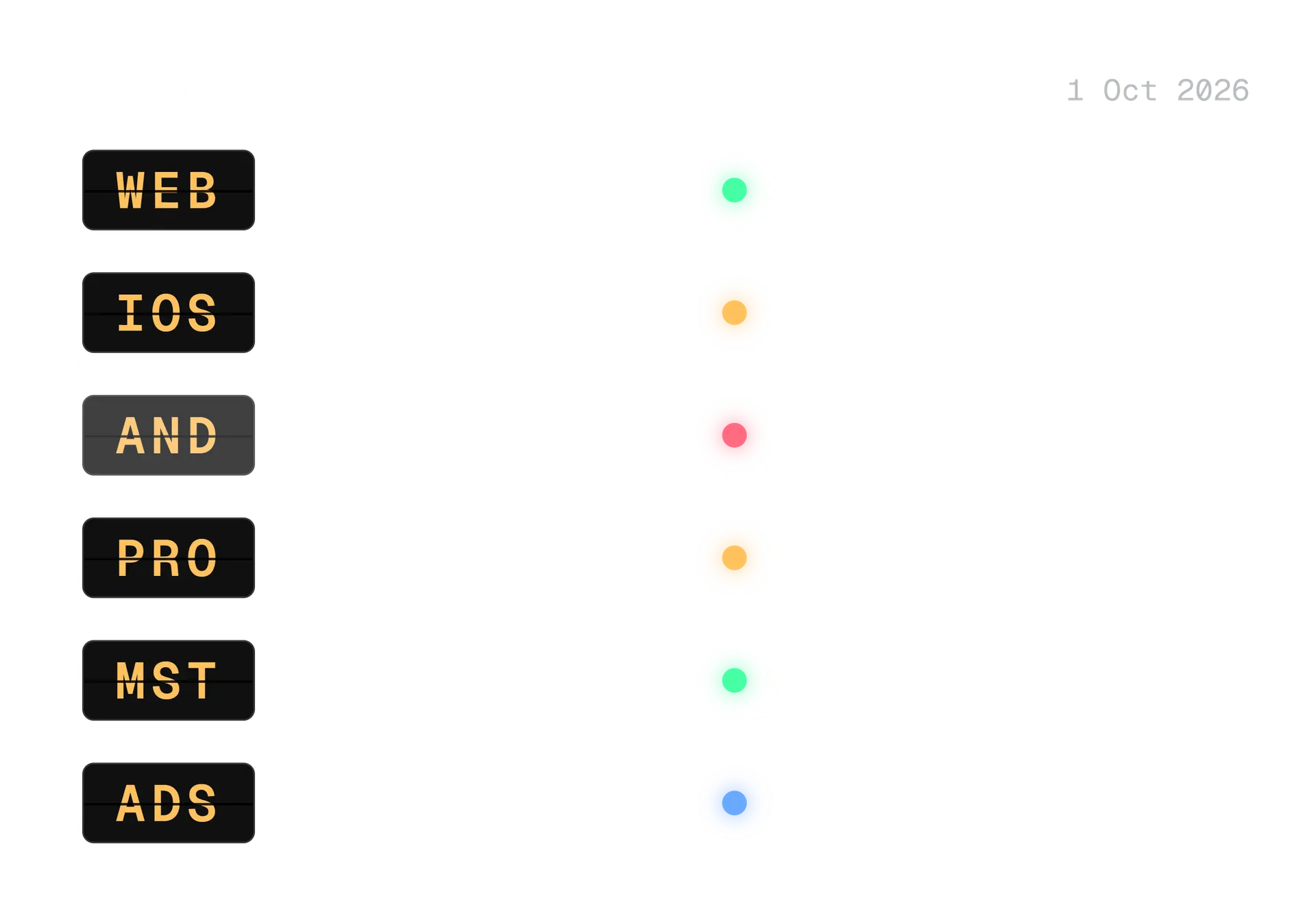
Any account, reported
Web composer
The calendar icon on x.com. Tool vendors' guides say it needs no Premium subscription. We could not read an X help page for it, so confirm in your own composer.
Rolling out
iOS app
On 5 September 2026 an X designer announced that scheduled posts had begun rolling out in the app, according to a 7 September report. The reporter found it on iOS.
Not found
Android app
The same report did not find scheduled posts in the latest Android app. We found no later report that it has arrived. Open your composer and look for the calendar icon.
Paid plan
X Pro
X's help page says X Pro schedules posts for each of your accounts and lists them in a Scheduled column. It does not schedule Direct Messages. An excerpt of X's X Pro FAQ says Premium+ is required.
Media accounts
Media Studio
X's Media Studio page describes a Schedule button in the Library. The date picker shows your current time zone, and at the chosen time Media Studio posts your content.
Ad accounts
X Ads
The X Ads API lets advertisers create scheduled posts up to 365 days ahead. It is a separate system from the free composer, and needs ad account permissions.
What about a team? X's Delegate page says contributors and admins can act on behalf of the delegated account, including scheduling posts. That lets an agency schedule without a shared password. Our guide to managing X for clients covers the approval side.
How do you edit or delete a scheduled post on X?
Open the composer on the web, choose Unsent posts, and switch to the Scheduled tab. Click a post to change its text, media or time, or delete it. Do it before the send time, because after that it is no longer scheduled. Brandwatch's guide describes the same route.
Open the composer
On x.com, click Post to open the composer, as if you were writing a new post.
Go to Unsent posts
Guides place the Unsent posts link at the top right of the composer. It holds two tabs: Drafts and Scheduled.
Open the scheduled post
Click the post. You can change the text, swap the media or move the time, then schedule it again. Or delete it.
Check the time before you leave
If you moved the time, read the zone name once more. Most mistakes happen on the second visit, not the first.
In X Pro, you add a Scheduled column to your dashboard and edit from there, according to X's help page. In Media Studio, X warns about one trap. If you modify a Media Studio scheduled post on x.com, X says it creates a new, lower quality copy of the media and loses the metadata you set in Media Studio. So finish edits where you made the post.
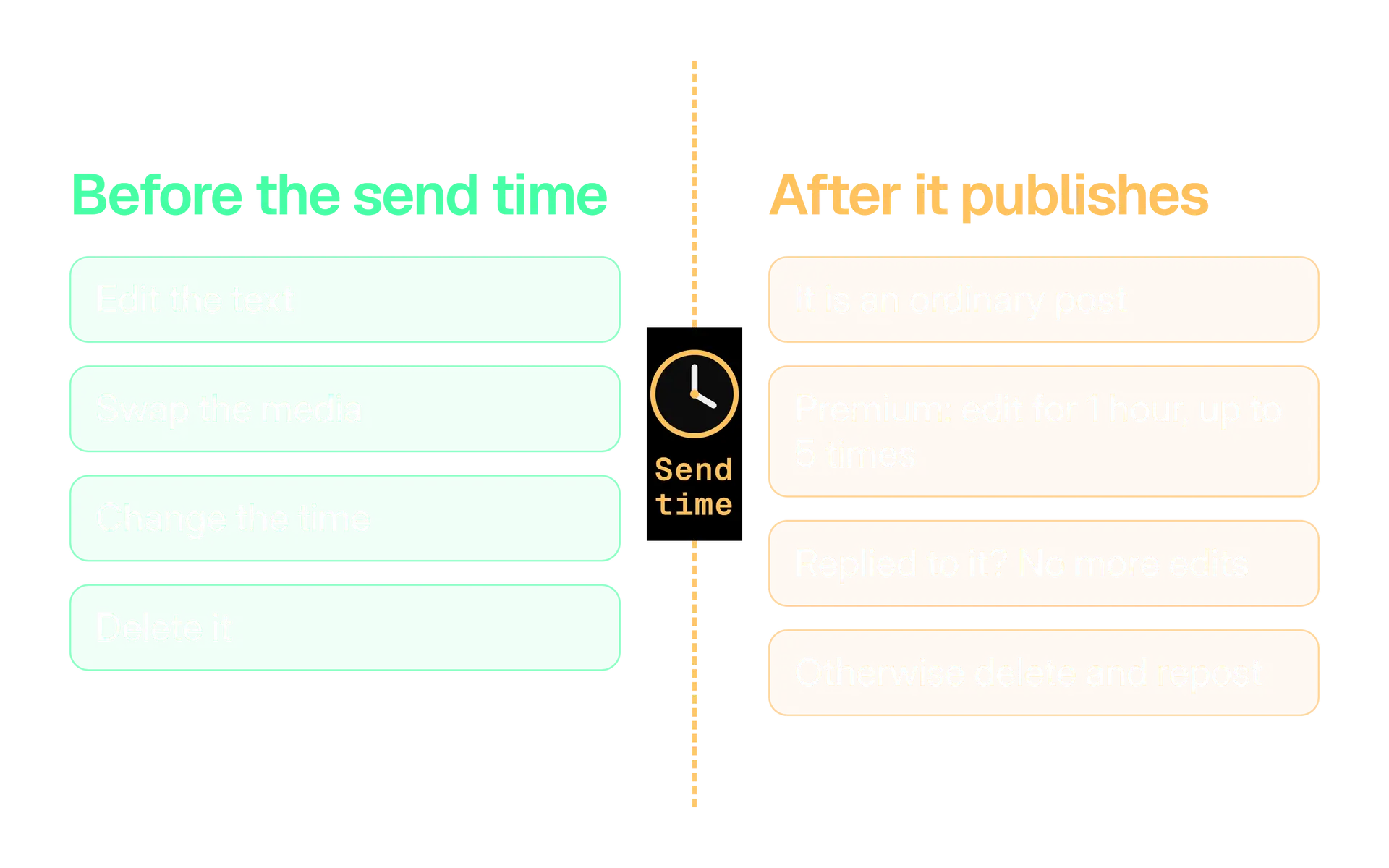
After the send time, the post is an ordinary post, so ordinary rules apply. According to X's Edit Post page, X Premium subscribers get a 1 hour window and up to five edits, on original posts and quotes only. Once you reply to your own post it can no longer be edited. Without Premium, delete the post and publish a corrected one.
Which time zone does a scheduled post use?
The one you chose, if you looked. The X pages we could read do not say which zone the web composer uses. Media Studio's page says its date picker shows your current time zone. Either way, the safe habit is the same: read the zone name in the picker before you confirm, and write it next to every slot in your plan.
Tools add a second layer. Buffer's help centre says it publishes a post by the channel's time zone, and that the calendar and queue may show times in your browser's time zone for reference. Two clocks on one screen is how people end up an hour out. Ask any tool you use which clock it publishes on and which it displays.
Then there is the quieter problem: clock changes. A slot can be saved as a wall clock time ("9:00 in New York") or as a fixed instant ("13:00 UTC"). They agree for half the year and disagree for the other half. Two failure cases have their own guides: daylight saving time and what happens when a scheduled post fails.
The dates that matter this autumn are below. Hawaii and most of Arizona do not change their clocks.
| Place | Clocks go back in 2026 | Source |
|---|---|---|
| United Kingdom | Sunday 25 October | GOV.UK |
| United States (most of it) | Sunday 1 November | U.S. Naval Observatory |
If your audience spans the Atlantic, the gap between London and New York is 4 hours instead of 5 for the week between those dates.
Our guide to the best time to post on X shows how to work out which hours suit your audience. Here we only need the habit: after every clock change, open your queue and read the times. When the news turns serious, know when to pause scheduled posts.
Can you schedule threads, polls and media on X?
You can schedule one post with media. Threads are the gap. Tool vendors say the web composer's scheduler handles single posts and not threads, and we found no X page that says otherwise. Polls we could not confirm from any X page, so test one on a spare account.
| What you want to schedule | X's built in scheduler (as reported) | A scheduling tool |
|---|---|---|
| A text post | Yes | Yes |
| Images, a GIF or a video | Reported yes, check your composer | Yes, uploaded first, then attached |
| A thread | Reported no | Usually, but ask how it recovers if a post fails |
| A poll | Not confirmed | Varies by tool |
| Several accounts | One account at a time | Yes |
Why does media need care? Through the API, X's reference says a post can include up to 4 photos, 1 animated GIF or 1 video, and that media is uploaded first and attached by its ID. If a tool fails to upload your image at 9:00, it may send the post without it or not send it at all. Ask which.
A scheduled post cannot be checked by you at the moment it goes out, so the checks move to the day before. Three guides cover them:
- Length. How X counts characters explains why a link, an emoji or a script can cost more than it looks.
- Images. X image sizes lists the shapes and file limits so a crop does not surprise you.
- Threads. How to write an X thread covers the structure; schedule it only with a tool you have tested.
Add the image description (alt text) while the image is open in front of you. It is the step people skip when they batch a week of posts, and it is far easier now than at 9:00.
What do third party schedulers do through the X API?
They keep your post themselves, wait, and send an ordinary create post request for your account at the right moment. X's API reference for creating posts has no field for a publish time, so the clock lives in the tool, not at X.
Three numbers explain what that means for a tool and for you.
$0.015
to create a post through the X API, per request
X API pricing page, 1 October 2026
$0.200
per request when the post contains a URL
X API pricing page, 1 October 2026
30
most posts an X Ads account may schedule inside the same 15 minutes
X Ads API documentation
X bills API access by use, and a post with a URL costs more per request than one without. Who absorbs that cost depends on the tool, so ask before you assume it is free at scale. The 30 in the third box applies to the Ads API's scheduled posts, a separate surface, but it shows that X treats a burst of scheduled posts as something to limit.
So a scheduler depends on four things working at the same moment:
- The tool is running. If it is down at 9:00, X will not send the post for it.
- The connection is valid. The tool posts with the permission you granted through X's sign in. If that permission is revoked or expires, the request fails.
- There is room under the limits. X's API answers 429 when a rate limit is exceeded, and X's account limits apply on top.
- The rules allow it. X's developer guidelines list scheduled content from an automated account as allowed. Our X automation rules guide covers what is not allowed, including duplicate content across accounts.
Threads need one more question. A tool builds a thread by posting the first post, then sending each next post as a reply to the one before, which is what X's reference shows the reply field for. X changed what API replies are allowed in February 2026, so ask any vendor how it publishes threads today. Our automation rules guide explains the change.
Should you use X's scheduler or a tool?
Use X's scheduler for a few single posts on one account. Use a tool when you need threads, several accounts, a calendar, approvals or protection from your own mistakes. It is a fit question, not a quality one.
| X's built in scheduler | A scheduling tool |
|---|---|
| Free to use, per vendor guides | Usually a subscription or credits |
| One post at a time | A calendar of many posts |
| Single posts, as reported | Threads, if the tool supports them |
| No approval step | Often an approval step |
| You check it all yourself | Alerts, logs and retries, if the tool has them |
Whatever you pick, put it through the same short test.
Ask before you connect a scheduler
- It connects through X's official sign in and never asks for your password.
- Each account has its own time zone, and you can see which one a time is in.
- You know what happens to a post if the tool is down at the send time.
- You know how it publishes a thread, and what happens if one post fails.
- It slows down at a rate limit and does not push through.
- You can pause the whole queue in one step.
- Someone other than the writer can approve a post before it is scheduled.
Kairo Post's scheduling page describes schedules that follow each account's time zone, quiet hours and daily limits per account, and a missed slot rule for downtime, which skips a missed post or sends it once within a window you choose. Read it against the checklist like any other tool.
Why do scheduled posts fail?
Almost always the cause is the connection, a limit or the tool, not the post itself. These are the failures X's own documentation lets us name.
| Cause | What you may see | What to do |
|---|---|---|
| The connection expired or was revoked | The API answers 401, invalid or missing credentials | Reconnect the account in the tool |
| The account lacks permission for the action | The API answers 403, valid sign in but no permission | Check the account's role and the tool's access |
| A rate limit was reached | The API answers 429 | Wait for the reset and spread your slots out |
| A daily account limit was reached | The post is refused or limited | Check X's limits page and thin the day's slots |
| The tool was down | The post is late or skipped | Know the tool's missed slot rule |
If you disconnect a tool in X's Apps and sessions settings, you remove its access. That is the right move when you leave a tool, and the usual cause of a sudden queue of failures when someone else does it by accident.
On limits, news reports from May 2026 said free accounts may publish 50 original posts and 200 replies a day, and that apps connected to an account count towards the same limits. The numbers have changed during 2026, so check X's limits page before a busy day rather than trusting a blog.
What about duplicate posts?
X's developer guidelines list identical content across accounts as not allowed, and the automation rules also cover duplicate posts on one account. A schedule makes this easy to do by accident. You paste the same text into two time slots to reach two audiences, and a tool happily queues both. Write a fresh version for each slot instead.
The rule is simple: open the tool's log before you reschedule anything, so you know whether the post failed or never left.
A weekly scheduling routine that holds up
Write once a week and check every morning. A batch is efficient, and the check is what makes it safe. Without it, a full queue becomes a list of posts that were right when you wrote them.
Friday, one sitting
Plan and write next week
Pick the week's slots, write the posts and attach media and descriptions. Put the time zone beside each slot.
Friday, same sitting
Schedule and read it back
Schedule everything, then open the list and read each time aloud. Check the first and last post twice.
Every morning, 5 minutes
Read the next two days
Look at today's and tomorrow's posts. Ask whether anything has changed since you wrote them. Edit or delete what no longer fits.
Midweek
Reply and adjust
Answer replies when they arrive, not on the schedule. Move a slot if the news has.
After a clock change
Recheck every slot
Open the queue and read the times against the new offset.
Read tomorrow's queue today. A full queue is comforting and risky in the same way. Scheduled posts rarely go wrong because they are badly written. They go out on the wrong day because something happened after you scheduled them. Read the next two days of the queue every morning.
How many posts a week? That is your call and your limits. The content calendar generator is a free tool that lays out a month of slots so you can see a rhythm before you commit. For the hours themselves, use the method in our best time to post guide instead of copying a list.
Write posts that survive being scheduled
A scheduled post is read at a time you chose in the past. Words that depend on the moment, such as today, tonight or this morning, are the first to break.
Write for any hour
The new autumn menu starts on Thursday. Here is what is on it, and which dish sold out first last year.
Write for right now
We're open late tonight, come and see us! Doors are open until 10.
The second post is fine at 4 p.m. on the day. If the plan changes, or the post is edited into the wrong slot, it is wrong for everyone who reads it.
The autumn menu starts on Thursday: pear and ginger loaf, a smoked cheddar scone and a new flat white blend. Full list is on our site.
Some posts should never be scheduled far ahead. News, replies to events and anything about people in a bad week belong in the moment. Schedule evergreen and planned posts, and keep a rule that anything time sensitive is posted by a person.
Mistakes we see when people schedule posts
Most scheduling mistakes come from trusting the queue more than it deserves.
- Time words in a scheduled post. "Today", "tonight" and "right now" age badly.
- A slot saved on the wrong clock. It works until the clocks change, then it is an hour out.
- Scheduling and forgetting. No morning check means nobody notices the post that went stale.
- The same post in two slots. It looks like reach. It looks like duplicate content to X.
- Skipping the dry run. The first time you learn where the button is should not be launch day.
- A queue that cannot be paused. When something goes wrong in the world, you need one step to stop it.
- A tool that asks for your password. Walk away.
Your scheduling setup, step by step
You can do this in an afternoon. Do it in this order and the rest of the guide becomes habit.
Set up scheduling on X
- Decide where you schedule: the web composer for a few posts, a tool for threads, teams or approvals.
- Do a dry run on a spare account, and note which time zone the picker names.
- Write the time zone beside every slot in your plan.
- Put the next clock change dates in your calendar: 25 October and 1 November 2026.
- Pick a weekly slot for writing and a daily five minute check for the queue.
- Before connecting a tool, run it through the checklist above.
- Write one rule for pausing the queue, and tell whoever might need it.
Start with next week. Schedule the posts you can write in one sitting, read the list back, and look at the queue tomorrow morning. If the routine holds for a month, add more posts. If it does not, schedule fewer.
In the product
How Kairo Post does this
Everything above works by hand. Kairo Post does the same work for you, with your approval before anything goes out.
Questions people ask
Can you schedule posts on X for free?
How far ahead can you schedule a post on X?
Can you schedule a thread on X?
Is it safe to use a third party scheduler on X?
Can you edit a post after a scheduled post goes live?
Why did my scheduled post not go out?
Do scheduled posts count towards X's daily post limits?
Which time zone does X use for a scheduled post?
Sources
Every rule, limit and figure in this post was checked against these on the date shown.
- Scheduled Posts, X Business Help
business.x.com · checked
- About advanced X Pro features, X Help Center
help.x.com · checked
- Media Studio Library, X Help Center
help.x.com · checked
- How to use the Delegate feature, X Help Center
help.x.com · checked
- About Edit Post, X Help Center
help.x.com · checked
- Create or Edit Post, X API reference
docs.x.com · checked
- Media upload endpoints on the X API v2, X developer documentation
docs.x.com · checked
- Pricing, X API documentation
docs.x.com · checked
- Response codes and errors, X developer documentation
docs.x.com · checked
- Developer Guidelines, X developer documentation
docs.x.com · checked
- Creatives (scheduled posts), X Ads API documentation
docs.x.com · checked
- X brings scheduled posts to iOS, with Android support absent, Roboin
roboin.io · checked
- Can You Schedule Posts on X? Mobile and Desktop, Brandwatch
brandwatch.com · checked
- About third party apps and log in sessions, X Help Center
help.x.com · checked
- X: Unverified users may only post 50 times per day, heise online
heise.de · checked
- X now limits unverified accounts to 50 posts a day, MediaNama
medianama.com · checked
- Setting up your timezones and posting schedules, Buffer Help Center
support.buffer.com · checked
- When do the clocks change, GOV.UK
gov.uk · checked
- Daylight Saving Time, U.S. Naval Observatory
aa.usno.navy.mil · checked
Written by