Managing X for clients: the social media agency guide

The short answer
A social media agency running X for clients needs six working parts: safe access without shared passwords, a written voice, a calendar, an approval path where silence is never a yes, a reply routine and a monthly report. Build them once and every new client fits.
Key takeaways
- Get access through X's Delegate feature or an app that signs in through X, never a shared password, so the client stays the owner.
- X allows agencies to manage many client accounts. It does not allow near identical posts across accounts you operate, so every account needs its own angle.
- An approval counts only when it sits next to the exact text and time, and silence is not a yes. X cannot edit posts from third party tools once they are out.
- Save your reporting numbers every month. X's API serves some post metrics for only 30 days.
- If a post is part of a paid partnership, X requires its disclosure switch, and the FTC says agencies stay accountable.
You run X accounts for clients. Maybe three of them, maybe thirty. Approvals arrive by email, chat and the odd voice note. Someone asks where this month's report is. And the one post you were unsure about goes out on a Friday afternoon. For the monthly report itself, use our client report template. When you write for several clients, keep their brand voices separate.
Running a social media agency on X is less about writing posts than about running a system that keeps every client's account safe, on voice and on time. This guide is that system, in the order a client lives it: Winning and starting the work have their own guides: writing a social media proposal, pricing X management and the agency onboarding checklist.
- Onboarding and access: what to collect, and how to get in without a password.
- Approvals and voice: how a post gets a real yes, and sounds like the client.
- Calendar and replies: a steady rhythm, and every mention handled.
- Reports and handover: proof each month, and a clean exit.
We built it from our own agency years, and we checked every X rule in it against X's own pages on 1 October 2026. Each section gives you something to set up this week. Where a topic deserves a guide of its own, we say so.
What a social media agency actually manages on X
An agency on X manages six things for each client: access, voice, calendar, approvals, conversations and proof. The posts are only the part the client sees. To keep revisions short, see how to handle client feedback rounds.
When a client says "manage our X", they picture someone writing posts. The job is wider, and the parts that go wrong are rarely the writing.
- Access. How your team gets into the account without ever holding the client's password.
- Voice. How the account sounds, written down so any teammate can match it.
- Calendar. What goes out and when, and why each post earns its slot.
- Approvals. Who says yes, and how you can show it later.
- Conversations. Replies and mentions, including the awkward ones.
- Proof. Reports that show the client what the work did.
One line from X explains why clients feel nervous. X's Delegate page says account owners are responsible for the content that their authorised admins and contributors post. The client carries the risk of whatever you publish. Your job is to make that risk small, and to be able to show why it is small.
How to onboard an X client without chasing them for weeks
Run onboarding as one working session and one written sheet, not a trail of emails. By the end you should be able to post for the client without asking another question.
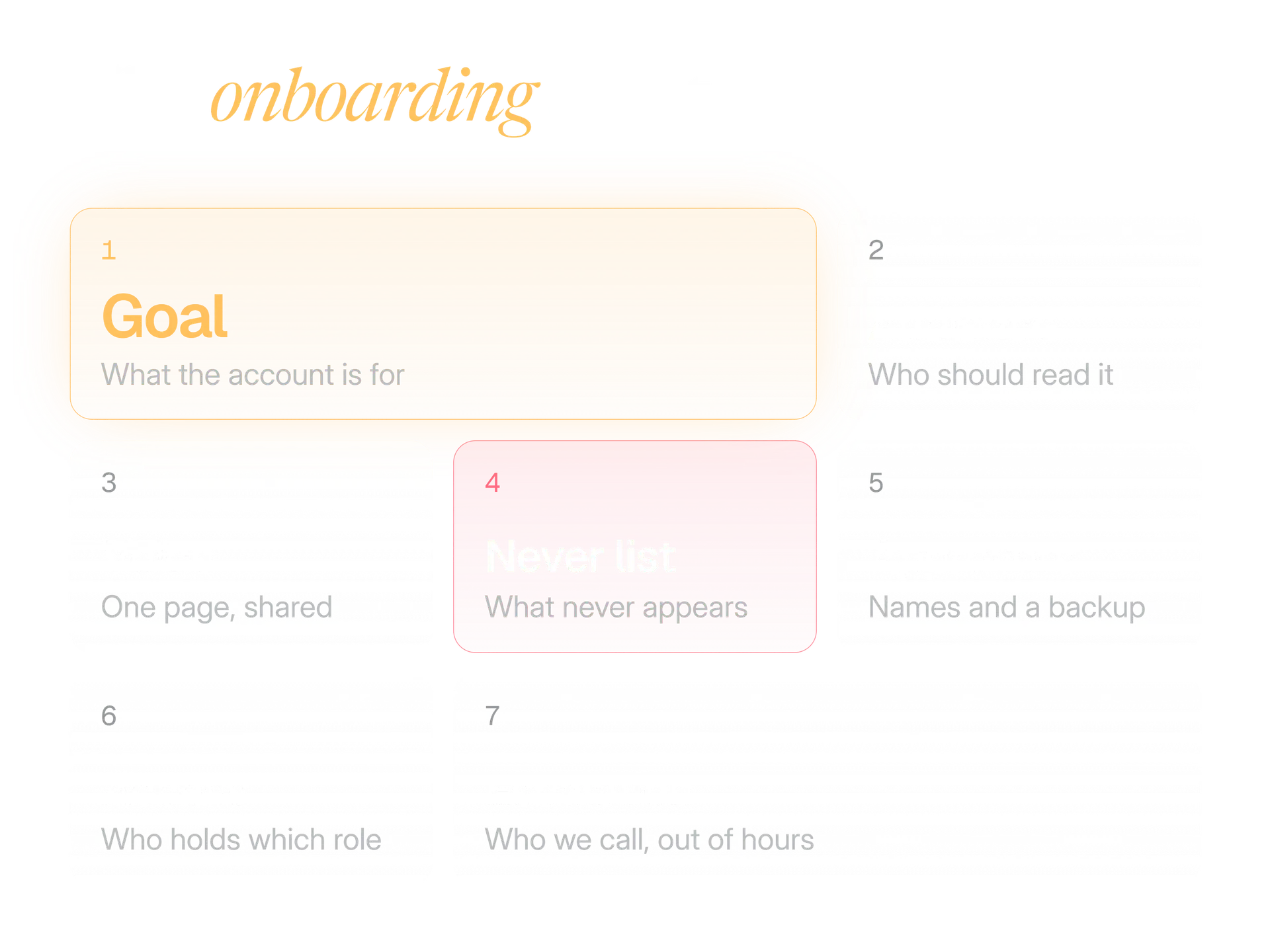
The sheet has seven blocks. Fill it in with the client on a call, and send it back for sign off the same day.
- Goal. One sentence on what this account is for in the client's business. "More followers" is a wish. "Get trade buyers to ask for a demo" is a goal.
- Audience. Who should read it, in words the client would use.
- Voice. A pointer to the one page voice sheet (more on that below).
- Never list. Topics, claims, competitors and words that never appear.
- Approvers. Names, a backup for each, and how fast each can answer.
- Access. Who owns the account and who holds which role.
- Escalation. Who you call, out of hours, if something goes wrong.
Two extras are worth the time. Ask for five posts the client loves and five they hate, from any account on X. The pile they hate teaches you more. And ask what the client's legal or compliance team must see before anything goes out, because finding that out in week three is expensive.
Then audit the profile before you post anything: name, bio, links, pinned post and images. The bio and alt text checker shows the limits with a live preview, and the image size guide shows the safe areas for header and profile images.
How to get access to a client's X account safely
Never ask for the password. Use X's Delegate feature, or a tool that connects through X's own sign in, so the client stays the owner and you can be added and removed without anyone sharing a login.
X Pro works the same way. Its Teams feature lets an account share access with up to 200 team members, and nobody shares the password.
Delegate lets several people work on one account without sharing the password. The owner invites people on x.com as an admin or a contributor, and each person has to accept. The roles are simple:
- The owner keeps the password, the phone number and the login verification settings. Nobody else can change them.
- An admin can post, schedule and delete posts, invite or remove other people, and view post analytics.
- A contributor can post, schedule and delete posts, but cannot manage the team.
Our habit is to ask for one admin first, usually the account lead, and then add the writers as contributors ourselves. Keep admins few, because every admin can bring in more people.
Tools that connect through X work differently:
- Sign in on x.com: the owner approves what the app may do.
- Permissions vary: depending on them, X says an app can read posts, post for you and use Direct Messages.
- No password sharing: X does not share your password with apps.
- Revoke any time: the owner reviews connected apps under Apps and sessions in settings, and X suggests doing that regularly.
With a shared login, a leaver keeps the key until somebody changes the password, and everyone else must be told the new one. X also lists weak or reused passwords among the ways accounts get compromised, which is one more reason not to pass one around.
| One shared password | Delegate or a connected app |
|---|---|
| Everyone who knows it has the same power | Roles decide what each person can do |
| A leaver means a new password for the whole team | Remove one person, nobody else is affected |
| The client hands over the only key to the account | The client stays the owner and keeps the password |
| Nothing shows who has access today | The owner can list members and revoke apps at any time |
What X allows when one agency runs many accounts
X allows it. Its authenticity policy lists controlling multiple accounts on behalf of a third party, such as social media managers, as allowed, as long as no X Rules are broken. What it forbids is the thing an agency is most tempted to do: post the same thing everywhere.
Here is what X's authenticity policy and automation rules say, and what each one means for client work.
| What X says | What it means for an agency |
|---|---|
| Operating accounts that post substantially similar or identical content is not allowed. The same content localised into another language is permitted. | An announcement never goes out word for word on several client accounts. Write a version for each. |
| Using several accounts to engage with the same posts, or to boost a topic or hashtag, is not allowed. | Do not have your team like and reply to one post from five client accounts. |
| Automated likes and automated hiding of replies are not allowed. Neither is following or unfollowing in bulk. | No tool should like, hide or follow on a client's behalf. |
| Automated replies are allowed only to people who opted in, with an easy opt out and one automated reply per interaction. | Answer mentions with people. If a client wants an automated flow, design the opt in first. |
| An AI powered reply bot needs prior written approval from X. | Use AI to draft. A person sends. |
| Scripting the X website may lead to permanent suspension. | Use only tools that connect through X's own sign in. |
The case that catches agencies is a shared launch. Three clients attend the same event, or react to the same industry news, and somebody writes one post and pastes it three times. It saves ten minutes and puts three accounts at risk.
Give each account its own angle. One can lead with the numbers, one with the story behind it, one with a question for its audience. Paste two drafts into the duplicate post checker and it shows how much language they share before X's rules or your clients' followers notice.
One more habit is worth copying from X's automation page. It says that acting through another person's account needs a clear description of the automated actions and the person's express consent. It is written for app developers, but it suits agencies: write down in your scope exactly what is automated.
How to run client approvals that hold up
Decide three things in writing before the first post: who approves, what counts as a yes, and what happens when nobody answers. Then keep every yes next to the exact text it covers.
Be strict, because X will not help you fix a mistake later. Approval is the last point where fixing a mistake costs nothing.
Name the approvers
One main approver and one backup per client, by name. "The marketing team" is not an approver.
Define a yes
A yes is a written reply, in the agreed place, to the exact text, media and time. "Looks good" under a screenshot from last week is not a yes.
Set the silence rule
If nobody answers by the deadline, the post does not go out. Put that in the onboarding sheet. If the client wants some pre approved formats to run on silence, let them choose which, in writing.
Batch the asks
Send a week of posts in one review with one deadline, instead of five separate pings.
Keep the trail
Store the approved version and the yes together. When anyone asks later, you find both in a minute.
Not every post needs the same care, and asking for the same sign off on everything wears the client out. Sort by risk.
| Tier | Examples | Who approves |
|---|---|---|
| Routine | A pre approved format, an evergreen tip | The client approves the format once. Your account lead checks each post. |
| Normal | New ideas, offers, launches | The named approver says yes to the exact text. |
| Sensitive | Claims, reactions to news, paid partnerships, anything a lawyer might read | The approver and the client's reviewer, both in writing. |
How to capture a client's voice so any teammate can write it
Write a one page voice sheet for each account: how it sounds, who is speaking, what it never says and six example posts. Then test it. Give the sheet and a topic to a teammate who has never touched the account, and see whether the client can tell that draft from your best writer's.
The sheet has five parts.
- Three words for how it sounds, and three it is not. "Dry, precise, warm" beats "professional". Pair each word with its opposite so the edges are clear.
- Who is speaking. The brand as "we", a founder as "I", or a named person. On X this decides almost every sentence.
- Habits. Sentence length, emoji or none, hashtags or none, how it writes numbers, whether it ever jokes, and how it signs off.
- The never list. The words, topics, competitors and promises from onboarding, kept in the same place.
- Six examples. Three posts that sound exactly right and three that are close but wrong, each with a one line reason. The wrong ones teach the edges.
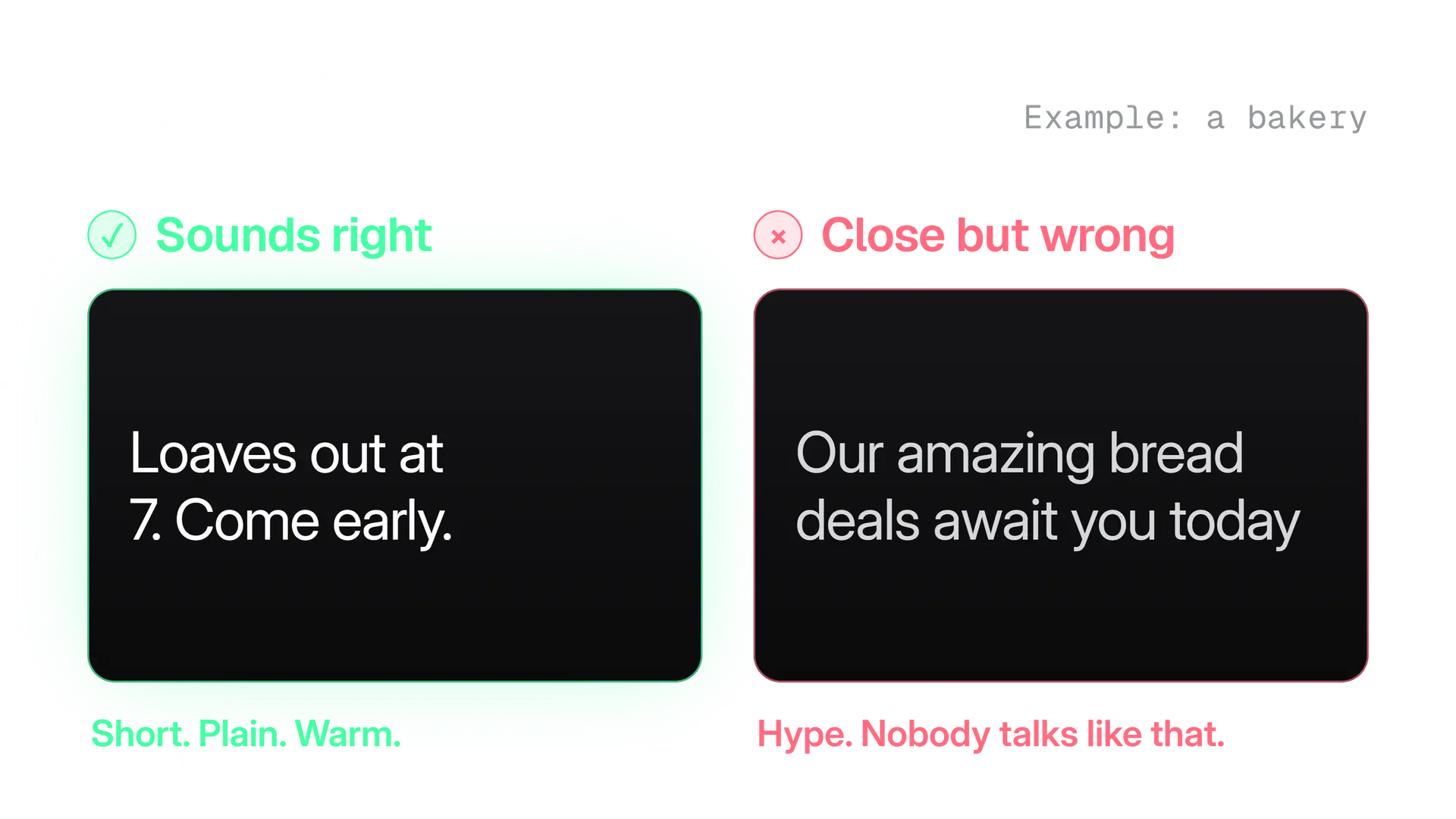
Replies sound different from posts: shorter, warmer and quicker. Add one line to the sheet about that, with an example.
If you use AI to draft, the voice sheet is the brief you give it, and a person still reads every word. The AI phrase checker is a quick way to catch the stock phrases that make a draft sound like everyone else's. Tell your clients how AI is used in their account, early and in plain words.
How to plan a content calendar for several X clients
Plan every client on the same weekly rhythm, give each account three or four content pillars, and keep one calendar that shows all clients together. The shared view is what catches collisions.
- Pillars. Agree three or four topics per account, each with a job: teach, prove, show the team, answer questions. They stop a calendar from turning into a list of announcements.
- Rhythm. Pick a posting rhythm the account can keep up. We think a steady rhythm beats bursts: an account that posts ten times in a day and then vanishes teaches its readers nothing about when to look.
- Time zones. Schedule for when the client's audience is awake, not when your team is. The best time to post planner shows the overlap between cities in your own time zone.
- Collisions. On one shared calendar you can see two clients in the same industry about to post the same news on the same morning, or every approval in your team due at 9am on Monday.
- Reserve. Keep a slot or two a week for reactive posts, and a few evergreen posts ready to swap in when news makes your schedule look tone deaf.
A weekly rhythm like this one lets a small team run many clients without every day being a Monday. Move the days to suit your clients.
| Day | What happens for every client |
|---|---|
| Monday | Review last week, confirm this week's pillars |
| Tuesday | Write the batch |
| Wednesday | Internal check, then send for client approval with a Thursday midday deadline |
| Thursday | Apply the silence rule, fix feedback, chase backups |
| Friday | Schedule the approved week, and pull anything that news has overtaken |
The content calendar generator will lay out a month of posts around the pillars you pick, which is a fast way to start the first client's calendar. One more thing to set up before you need it: a way to pause every client's queue at once. Breaking news is the day your scheduled posts look worst.
How to handle replies and mentions for a client
Sort every mention into one of three piles: reply now, escalate first or leave alone. Agree the rules with the client in advance, including who answers complaints and how quickly.
Replies are where an account's voice is judged in public, and where a rushed answer does the most damage.
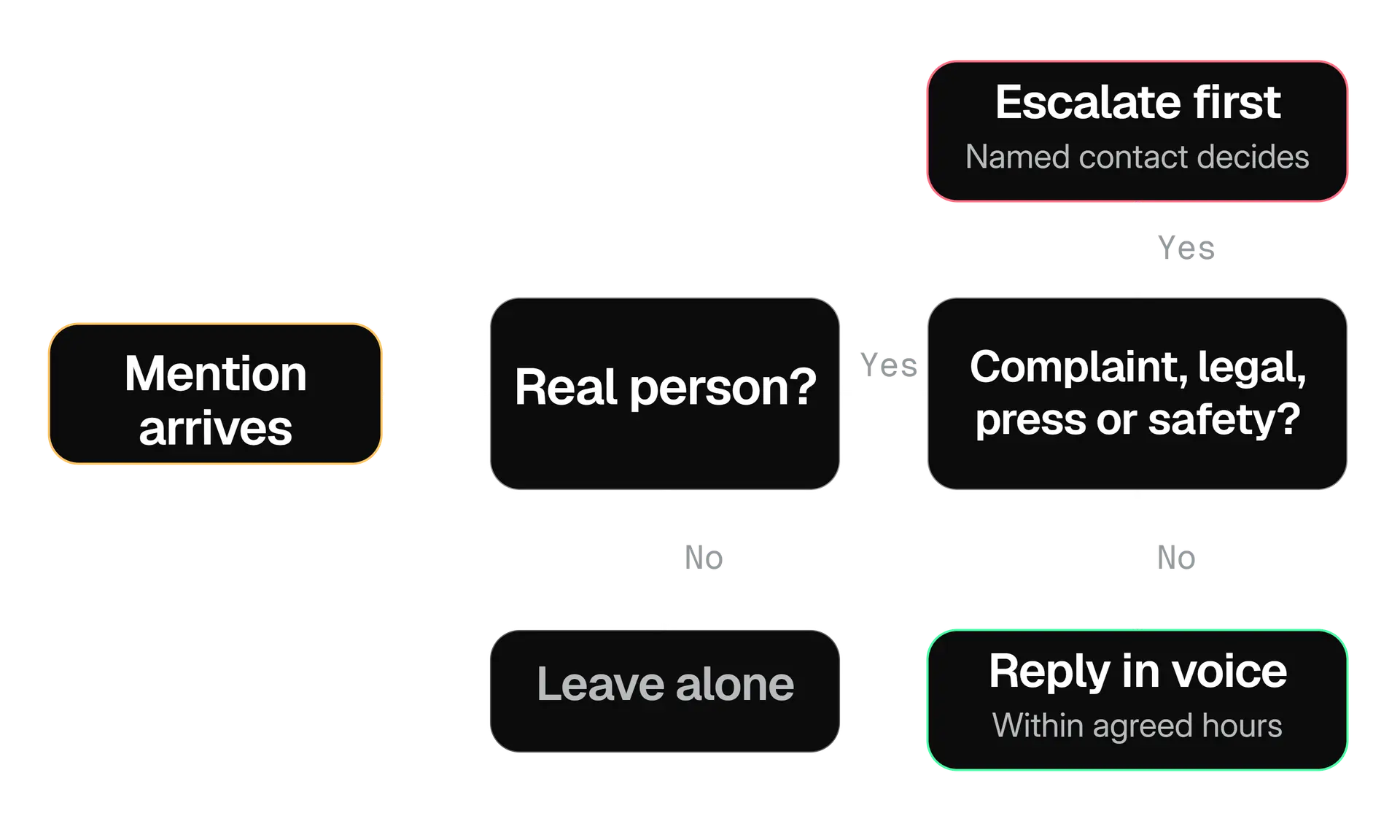
Three rules keep this safe:
- A person writes and sends every reply. X's automation rules allow automated replies only to people who have opted in, with a clear way to opt out and one automated reply per interaction. An AI powered reply bot needs X's prior written approval. Drafting with AI is fine; sending without a person is a risk no time saving justifies.
- Private details go to Direct Message. X's rules ask accounts not to invite people to post personal information in public replies. Offer a DM, or another private channel, when a customer needs to share an order number or an email address.
- Response times live in the scope. "Within business hours" and "by the next working morning" are things a contract can say. "As fast as possible" is a promise you will break. Agree who covers evenings and weekends, or agree that nobody does.
When several people watch one account, the conversations need an owner. A shared inbox where you can assign a conversation and leave internal notes beats a group chat where three people each assume somebody else replied.
What to put in a monthly X report for a client
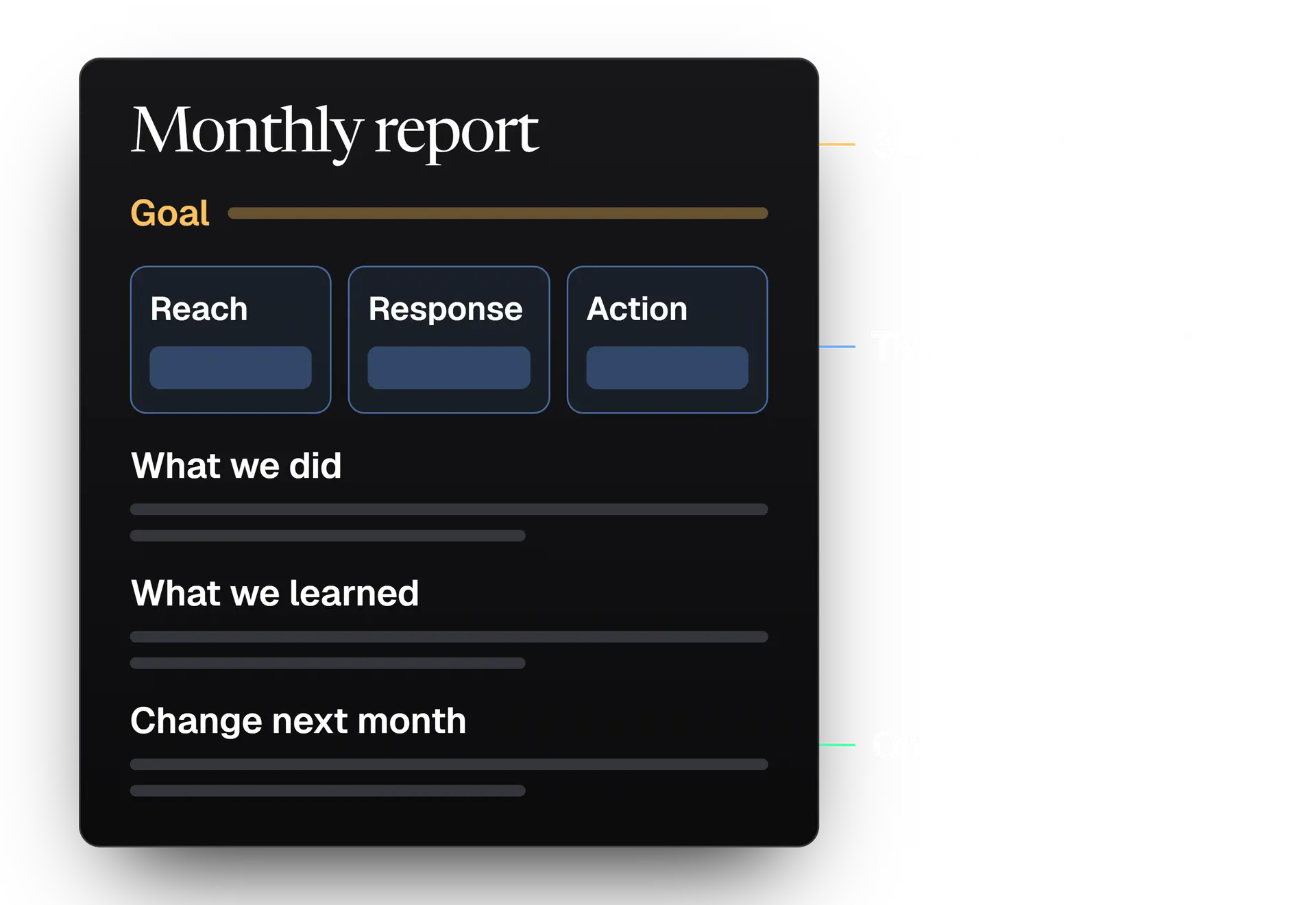
Send one page: the client's goal, three numbers that relate to it, what you did, what you learned and what you will change next month. Save the numbers every month, because X's API only serves some of them for 30 days.
Start from the goal in the onboarding sheet. Every number on the page must answer one question: are we closer to it? A report that lists every metric X offers tells the client you are not sure either. Three numbers cover most accounts:
- Reach. Impressions for the month.
- Response. Engagement rate, pooled across the month: all engagements divided by all impressions. One hit post dominates an average of per post rates, so the pooled figure is steadier. The engagement rate calculator works out both.
- Action. What the client wanted people to do: visit a page, ask for a demo, find the profile. Tag the links with the UTM builder so visits can be traced back to X.
Then add three short notes:
- What we did: the pillars and anything special.
- What we learned: one post that did better than expected, one that did worse, and your best guess why.
- What changes: one thing to test next month, and only one.
Now the part that surprises people. Through X's API, metrics come in two kinds:
| Metric | Who can read it | How long |
|---|---|---|
| Reposts, quotes, likes, replies, impressions, bookmarks | Any authentication | No 30 day limit stated |
| URL clicks, profile clicks, engagements | Needs the account owner's permission | Only for posts created within the last 30 days |
If your tools read metrics through the API, link clicks and profile clicks for an old post cannot be fetched later.
So save the month's numbers on a fixed day, every month, in the client's folder. Do it even when a tool stores history for you, so you can still answer when the tool changes.
Report misses plainly. Clients forgive a quiet month that comes with a clear explanation and a plan far more than a loud month that fades. Never promise a number in advance: you do not control the audience.
Paid partnerships, claims and disclosure
If a post is part of a paid partnership, X requires its Paid Partnership disclosure to be switched on, and the FTC says agencies stay accountable for disclosure. So disclosure becomes one more line on your approval checklist.
What counts as a paid partnership on X. X defines it as a brand compensating a creator or user to promote a product or service. That covers more than money:
- Payment for the post.
- Gifted products.
- A commission through affiliate links or discount codes.
- A commercial agreement, such as a brand ambassador role.
If a client's posts feature a creator, or your agency posts for one, check each of those before approval.
Open Content Disclosure in the composer
The Paid Partnership toggle sits in the Content Disclosure settings.
Switch on Paid Partnership
Mark the post as on behalf of a third party.
Let X add the label
Once both are set, X labels the post automatically.
The rules go beyond X. X says the poster must also comply with advertising law. Here is what that means in practice:
| Rule | What it asks of you |
|---|---|
| FTC Endorsement Guides | Disclose any connection a significant minority of consumers would not expect, in each post, not once |
| Placement | A disclosure buried in a description, a comment or a link is not enough |
| Agencies | Agencies and intermediaries cannot escape responsibility by delegating the promotion |
| United Kingdom | All posts with commercial intent need a disclosure, including own brand posts by someone with a commercial interest, per X's policy and the CAP and CMA influencer guide |
Claims need a trail of their own. In our approval notes, every number, superlative or comparison in a client post carries a link to where it comes from. If the client cannot supply one, the claim is rewritten.
This is a summary of the rules, not legal advice. Ask the client's lawyer about anything regulated.
What to do when a client's post goes wrong
Pause the queue, tell the client at once, choose together between deleting, correcting or leaving the post, and write down what happened. The order matters: stop more damage first, then talk.
Pause
Stop the account's scheduled posts. If the cause is breaking news, pause every client's queue until someone has read the room.
Tell the client
Send the exact text, the time it went out and what you suggest. Do not wait until you have all the answers.
Choose
Delete, reply with a correction, or leave it. Recommend one and let the client decide. X holds the account owner responsible, so it is their call.
Fix it once
Posts from third party tools cannot be edited, so a correction usually means a new post. Do not cycle. X's authenticity policy lists posting and deleting the same content repeatedly as spam.
Write it down
What happened, why the check missed it and what changes in the process. A mistake with a note attached becomes a better checklist.
What to agree in writing before the first post
Write down scope, approvals, who is responsible for what, account ownership, tools and how the work ends. Pricing, proposals and contract wording each deserve a guide of their own. This is the checklist of what must be settled.
- Scope. Which accounts, what posting rhythm, whether replies are included, and what is out of scope: paid ads, customer support and crisis communications are the usual ones.
- Approvals. The approvers, the deadline and the silence rule from earlier.
- Responsibility. X holds the owner responsible for what delegates post. Say in the contract that approved text is the client's responsibility and any difference from approved text is yours. Ask a lawyer to word it.
- Ownership. The client owns the account and its audience. You hold delegated roles for as long as the contract runs.
- Tools and automation. Who pays for tools, and what is automated. Name it, as X's automation rules would expect.
- Reporting and meetings. What the client receives each month and when you talk.
- Ending. Notice period and handover, which is the next section.
Pricing, proposals and contract wording each need more room than this list. Until you have those drafted, keep this list on one page and have the client initial it at the kickoff.
How to hand an X account back
Remove every delegate role and revoke every connected app, then give the client a handover pack on the date the contract says. Do it the same way for a team member who leaves.
- Remove your people. In the client's account, open Delegate on x.com and use Members you've delegated to. Owners and admins can change a role or remove someone from the account.
- Revoke connected tools. In the account's settings, review Apps and sessions and revoke the tools your agency connected. Disconnect the account inside each tool as well.
- Hand over the pack. The voice sheet, the calendar, the archive of monthly reports, a list of scheduled posts and what to do with them, and a list of the tools that were connected.
- Remove leavers the same day. When someone on your team leaves, repeat steps 1 and 2 for every client they touched. A written list of who holds which role makes this a ten minute job instead of a hunt.
When a spreadsheet stops being enough
A spreadsheet is fine for the first few clients. You need more when three things happen: you chase approvals in several places, you cannot say who can reach which client, or reports take a day. Fix them in that order.
| What you notice | What fixes it |
|---|---|
| Approvals live in email, chat and calls | One place where the client reviews the exact post and says yes, ideally from a link that needs no account |
| You cannot say who can reach which client | Roles for each person, scoped to the accounts they work on, with a record of who did what |
| A new hire needs a week to learn the accounts | A voice sheet, a calendar and a report archive for every client in one place |
| Reports take a day | Numbers saved automatically each month |
This is the gap Kairo Post's teams features are built for:
- Four roles: owner, admin, editor and viewer. Editors and viewers reach only the accounts you give them.
- Client approval by link: clients review and approve posts through a private link, without creating an account.
- An audit log: publishing, approvals and access changes are all recorded.
- A workspace per client on the Agency plan, each with its own credits.
- No passwords: accounts connect through X's own sign in.
The teams page shows how it works, and the pricing page lists what each plan includes.
You can also run all of this without any tool. A tool is worth adding when the cost of the chasing is bigger than the cost of the tool, and only you can judge that.
Mistakes we see over and over
Most agency problems on X are the same few mistakes in different clothes. If you only have time for one review, check this list against your current clients.
- Taking the password "just for now". It is never for now. Use Delegate or a connected app from day one.
- Treating silence as a yes. The deadline passes, the post goes, and the client is surprised. Silence means the post waits.
- One post, five accounts. Quick today, a rules problem tomorrow.
- Approvals in three places. Nobody can find the yes when it matters.
- Reporting every metric. The client reads none of it. Three numbers and a plan.
- No named person out of hours. The worst mention arrives on a Saturday.
- Skipping the never list. It is the shortest part of onboarding and the one you reach for first on a bad day.
Your first 30 days with a new client
Spend week one on the sheet and access, week two on voice and the first batch, week three on live posts and replies, and week four on the first report and one change. Here is the order we would follow.
Week 1. Foundations.
- Run the onboarding call and complete the seven block sheet.
- Get the client to turn on two factor authentication, then invite your account lead as admin.
- Add writers as contributors. Audit the profile: bio, links, pinned post, images.
- Agree the approvers, the deadline and the silence rule in writing.
Week 2. Voice and the first batch.
- Write the voice sheet with six examples and test it on a teammate.
- Plan three or four pillars and the weekly rhythm.
- Send the first batch for approval with the exact text, media and times.
Week 3. Live.
- Publish the approved posts. Watch replies and mentions each day.
- Use the triage tree for every mention, and test the escalation contact once.
- Check any paid partnership or claim against the disclosure rules.
Week 4. Proof.
- Save the month's numbers in the client's folder.
- Send the one page report: goal, three numbers, what you did, what you learned.
- Pick one thing to change next month, and say why.
The next step is smaller than a whole programme: take your busiest client and check whether you could answer, right now, who can reach their account, who approves their posts and what happens when nobody answers. If any of the three is unclear, start there.
In the product
How Kairo Post does this
Everything above works by hand. Kairo Post does the same work for you, with your approval before anything goes out.
Questions people ask
Can one person manage several client accounts on X?
Do I need my client's X password to manage their account?
Can I fix a typo in a post that my scheduling tool published?
Who is responsible for a post an agency publishes for a client?
How far back can I get post metrics for a client report?
Can an agency use AI to answer mentions for a client?
Sources
Every rule, limit and figure in this post was checked against these on the date shown.
- How to use the Teams feature on X Pro, X Help Center
help.x.com · checked
- How to use the Delegate feature, X Help Center
help.x.com · checked
- Automation rules, X Help Center
help.x.com · checked
- Authenticity, X Help Center
help.x.com · checked
- About Edit Post, X Help Center
help.x.com · checked
- About third party apps and log in sessions, X Help Center
help.x.com · checked
- Paid Partnerships Policy, X Help Center
help.x.com · checked
- Metrics, X developer documentation
docs.x.com · checked
- How to use two factor authentication, X Help Center
help.x.com · checked
Written by