How to write great X posts: the complete guide
The short answer
Give each post one idea, open with a first line that earns the second, add one specific detail, use plain words and stop when the idea is finished. Choose the format that fits, add an image only if it helps, end with one ask, then edit and check the count.
Key takeaways
- A post carries one idea. If you cannot finish the sentence 'After this, the reader will know...' with one thing, split the draft.
- Put the detail in the first five words, then swap every vague word for a number, a name, a place or a cost.
- A standard post holds 280 characters as X counts them. A link costs 23, an emoji costs 2, and Premium subscribers can write longer posts of up to 25,000.
- Match the format to what you have: a view, a method, an event, a set, a number or a real question. End with one ask, not four.
- Edit in passes before you post. X's edit window is 1 hour with 5 edits, and it does not cover threads.
You have an idea worth sharing and an empty composer. Ten minutes later you have a draft that is accurate, a little long and easy to scroll past. Learning how to write X posts is mostly learning which small decisions to make, and in which order. When a post carries an image, see how to pair one line with one image.
This guide covers the whole craft of a single post, from the idea to the last check. Each part gets a short answer here and a link to the longer guide where we have one. For the last line, see how to write a call to action people follow; for news, how to write announcements that do not read like ads.
How to write X posts in nine passes
Write a post in nine passes, in this order: idea, first line, detail, words, length, format, image, ask and check. Each pass fixes one kind of problem, and the order stops you polishing the wording of a post that has the wrong idea. Explaining something complex? Read how to make technical topics readable on X, and if you also post on LinkedIn, what to change between the two.
You do not have to write in this order. Draft fast, however it comes out, then edit one pass at a time. Each pass asks one question of the draft. Four finishing passes have their own guides: filler words to cut, emoji, posts that stay useful for years and humour that does not hurt your brand.
| Pass | The question to ask | What it fixes |
|---|---|---|
| 1. Idea | Is this one idea? | Posts that wander |
| 2. First line | Does line one earn line two? | Warm ups and labels |
| 3. Detail | What exactly happened, to whom, how much? | Vague claims |
| 4. Words | Would I say this out loud? | Stiff, padded wording |
| 5. Length | Does it fit, and does it need to? | Cuts and counts |
| 6. Format | What shape is this idea? | The wrong container |
| 7. Image | Does a picture add something words cannot? | Decorative images |
| 8. Ask | What should the reader do next? | Four asks, or none |
| 9. Check | Would I stand behind every line? | Typos, wrong numbers, broken links |
Every example post in this guide is invented, including the names and the numbers. They show a shape, not a result.
Start with one idea per post
A post carries one idea: one claim, one lesson, one story or one question. If you cannot finish "After this post, the reader will know..." with a single thing, the draft holds two ideas or none, and the first job is to fix that. Two more finishing passes: formatting posts for easy reading and writing in plain English.
Nielsen Norman Group recommends one idea per paragraph for writing that people scan, based on research into web pages. It is not X research. We apply it because a post is short enough to be one paragraph, and a reader decides in a glance whether to read it.
Four ideas, one post
Quick thoughts on hiring: check references, write a clear job ad, never rush an offer, and our office dog is called Biscuit.
Each idea is fine. Together, the reader cannot tell which one to remember.
One idea, said once
Check references before the offer goes out, not after. It is the one hiring step that is hard to undo.
The reader leaves with a single rule they can use today.
The ideas you take out are not lost. Put each on a list and post it tomorrow. If they depend on each other, they may be a thread, and our guide to how to write an X thread shows how to give every post one job.
Write a first line that earns the second
The first line has three jobs. Our guide to X hooks covers seven structures and a ten minute routine. Here is the short version:
- Show who it is for. The right reader knows in a glance.
- Give one detail worth believing. A number, a name, a place or a cost.
- Leave a gap the post closes. Something the reader half knows and wants finished.
People scan a feed before they read it. Jakob Nielsen reported in 2009 that users typically see about 2 words of each item when they scan a list on a web page. That is web research, so take the direction, not the number: whatever comes first has to carry the point.
Our working window is the first five words. If they hold no number, name, contrast or promise, the line is asking the reader to be patient.
A warm up
Some thoughts on why customer onboarding matters so much.
It announces a topic. The reader learns nothing they can use.
A detail first
Step 3 of our signup form lost us new users. We deleted it.
A place, a loss and an action, in 13 words.
A label
Excited to share our new pricing page.
A feeling and a label. The page is the news, not the feeling.
The change, for the reader
You can now compare all three plans on one screen. No more tab hopping.
It says what changed for the person reading.
Two checks keep a first line honest. Keep the link out of it, because a link costs 23 of your characters and adds nothing a scanning reader can use. And only promise what the post delivers. A gap the post never closes is bait.
The hook grader scores a first line against a short checklist for length, specificity, tension and clarity. It checks the writing. It does not tell you what to say, and it does not predict reach.
Make it specific: swap every vague word for a detail
Vague posts feel safe and read as empty. Replace each general word with the number, name, place, time or cost it stands for. Nielsen Norman Group's advice on headlines is the same: be specific and give a concrete benefit, and write lines that make sense on their own.
| Vague | Specific |
|---|---|
| We improved our process a lot. | Our setup went from nine steps to four. |
| Many customers struggle with this. | Three of the last five support emails asked the same question. |
| Recently we made a change. | On Tuesday we moved the Pay button above the fold. |
| It saved us time and money. | The weekly report now takes 20 minutes, not a morning. |
| Great feedback so far. | Two people replied that the new label finally made sense. |
If you do not have the number, do not make one up. Say what you saw. "Two customers asked about it this week" is true and specific. "Customers love it" is neither.
Five questions find the detail in almost any draft:
Questions that find the detail
- Who exactly? A role, a name or a kind of business, not people.
- How many, or how much? A count, a size or a range you can stand behind.
- When and where? A day, a place, a step in a process.
- What did it cost or change? Time, money, a decision.
- What did you see or hear? The thing itself, not a summary of it.
What if the detail is private?
Share the shape and keep the name. "A regional bakery with two shops" is specific enough to picture and tells nobody who it is. If a number would reveal too much, use a ratio or a range you can defend, and say which it is.
Use plain words, short sentences and active verbs
Write the word you would say to a colleague. Plain wording is easier to scan and harder to hide behind. The Office of the Federal Register's guide to clear writing puts it simply: readable sentences are simple, active, affirmative and declarative, and each one states one thing.
Nielsen Norman Group tested this on web pages in 1997. It rewrote a travel website five ways. The concise version scored 58% higher on usability, the scannable one 47% and the objective one 27%, and the three combined scored 124% higher than the promotional original. Those were web pages, not X.
58%
usability gain for the concise version
Nielsen Norman Group, 1997 web study
47%
for the scannable version
Nielsen Norman Group, 1997 web study
124%
for all three changes combined
Nielsen Norman Group, 1997 web study
Four habits do most of the work:
- One thing per sentence. If a sentence has an "and" in the middle that starts a new thought, make it two.
- Name who did it. "We cut the step" beats "The step was cut." The Federal Register's guide says active voice forces you to name the actor.
- Pick the short word. The same guide pairs "commence" with "begin" and "terminate" with "end".
- Read it aloud. If you stumble, your reader will.
| Heavy | Plain |
|---|---|
| We have implemented a new onboarding solution. | New users now set up in four steps. |
| It is recommended that the form be reviewed prior to submission. | Check the form before you send it. |
| Our team is passionate about delivering value. | We answer every support email within a day. |
Some wording marks a draft as padding before the reader gets to the idea. Our guide to the words that make writing sound like AI sorts them into six types with a plain swap for each, and the AI phrase checker finds them in a draft, in your browser.
If you manage several accounts, Kairo Post lets you keep a list of words each account never uses, and AI drafts follow it, as the Brand brain page describes.
How long should an X post be, and what counts toward 280
Make a post as long as the idea needs. The limit is 280 characters, but X counts by weight, not by keystroke, so a post that looks like 270 can be over.
280
characters in a standard post
X developer documentation, Counting Characters
23
characters for any link, however long
X developer documentation, Counting Characters
2
characters for each emoji, however complex
X developer documentation, Counting Characters
25,000
characters in a longer post, for Premium subscribers
X Help Center, About X Premium
Latin letters, digits and common punctuation weigh 1. Emoji, Chinese, Japanese and Korean characters, and any other Unicode by default, weigh 2. Our explainer on how X counts characters has the full table, a worked example and the scripts that surprise people.
Longer posts exist, but they are an X Premium feature: subscribers can write up to 25,000 characters, and everyone can read them. We found no X page that says where the feed cuts a long post. So we write as if only the first lines will be seen, and make those lines stand on their own.
| Length | It fits | Watch for |
|---|---|---|
| One line | A single point, a result, a question | Being too thin to believe |
| A short paragraph | A point and its reason or example | A second idea sneaking in |
| A long post | An argument with parts that depend on each other | A first line that cannot stand alone |
| A thread | Parts that each work alone | A first post that only promises |
When a draft is over the limit, cut in this order:
Cut the warm up
Delete everything before the first line that carries a fact.
Cut the second example
If two examples prove the same point, keep the better one.
Cut the softeners
Words like "really", "quite" and "a bit" add characters, not meaning.
Move the link
If a link is still pushing you over, the post may want a reply for the link instead.
Six X post formats and when to use each
Six formats cover most posts: opinion, how to, story, list, data and question. Choose by what you actually have. A view gives you an opinion post, a method gives you a how to, an event gives you a story, a set gives you a list, a number gives you a data post and a real doubt gives you a question.
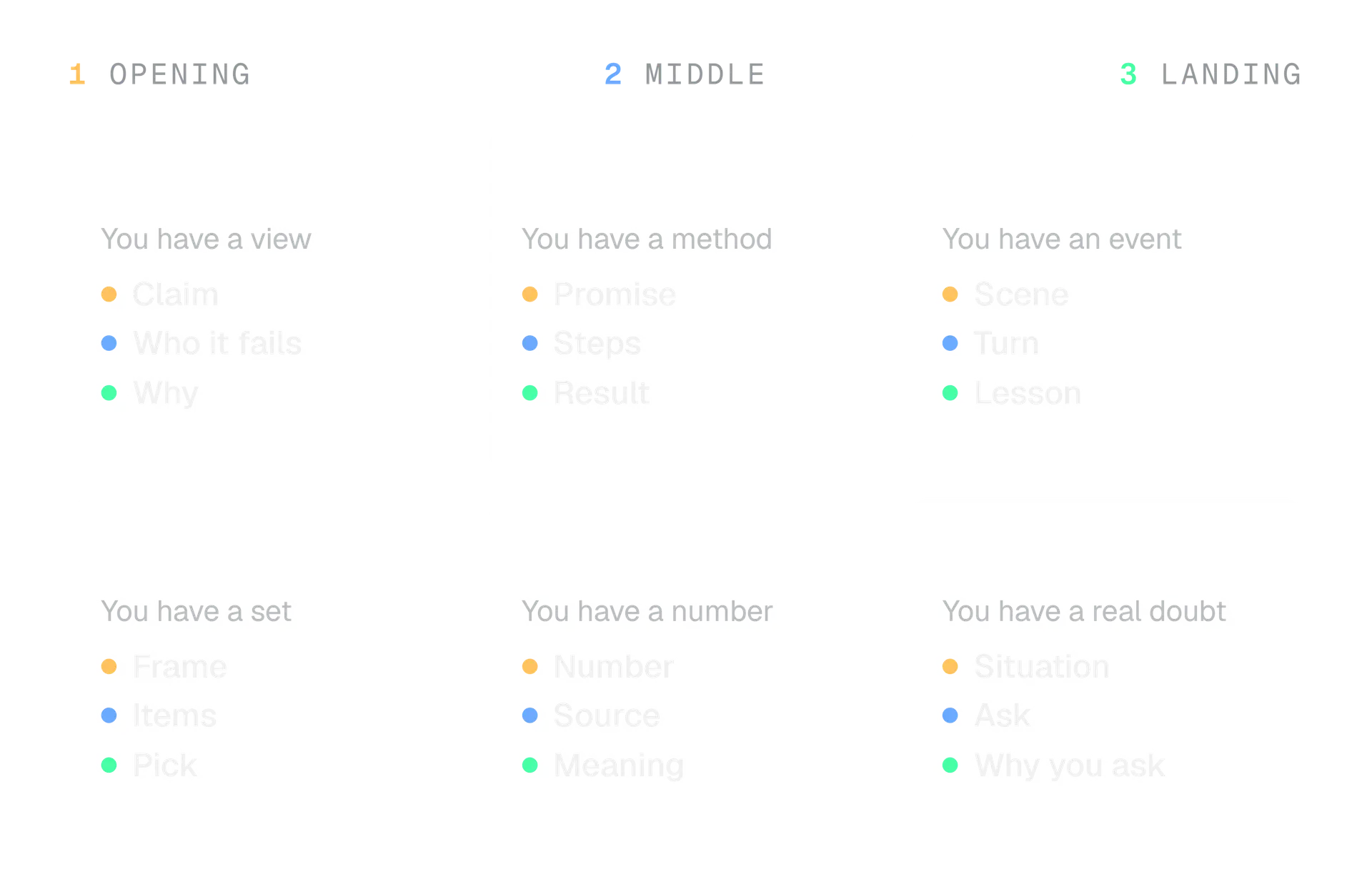
Each format below has a rule and an invented example. We do not rank the formats, because we found no X rule that says one performs better.
Opinion
State the claim, say who it fails and give the reason. An opinion without a case it applies to reads as a slogan.
Stop adding a settings tab to fix a confusing page.
We did it for three customers last year. The tab became the confusing part. Rewrite the page first.
How to
Promise a method and its size, then give the steps in the order the reader does them.
How to proof dough in a cold kitchen, in 3 steps:
- Use warm water, not hot
- Put the bowl in a switched off oven with the light on
- Check at 45 minutes, not an hour
Story
Start inside a moment, give it a turn, and end on what you learned. If the story has no turn, it is a diary entry.
The invoice went out at 5 pm on a Friday. The client's finance team closed at 4.
It sat for a week. We now send invoices on Tuesday mornings, with the due date in the first line.
List
Name the frame, then give items short enough to scan. Cut the list at the point where the items stop being good.
4 questions we ask before every release:
- What breaks if this is wrong?
- Who finds out first?
- How do we undo it?
- What did we forget to write down?
Data
Lead with the number, name where it came from and say what it means. State the base: a percentage of what?
6 of the 40 support tickets we closed in March were about invoices.
That is 15%, and it is the biggest single group. We are rewriting the invoice page first.
Question
Ask a question you will use the answers to. A question you already know the answer to is a prompt in disguise, and readers can tell.
We are choosing between a weekly email and a monthly one.
If you subscribe to a few newsletters, which do you actually open? Tell us the reason. We are deciding this week.
A poll is a question with set answers. X's Help Center says a poll takes up to four options of up to 25 characters each and runs from 5 minutes to 7 days. Short options force a clear choice.
Add an image when it shows something words cannot
An image earns its place when it shows what words cannot: a screenshot, a chart, a before and after, a piece of the product. Make the post work without it, add a description, and keep any text inside the image short.
X's Help Center says a post can include up to four photos, or a GIF or a video. X's developer documentation adds that media you attach counts as 0 characters. Our guide to X image sizes gives the shapes and file limits.
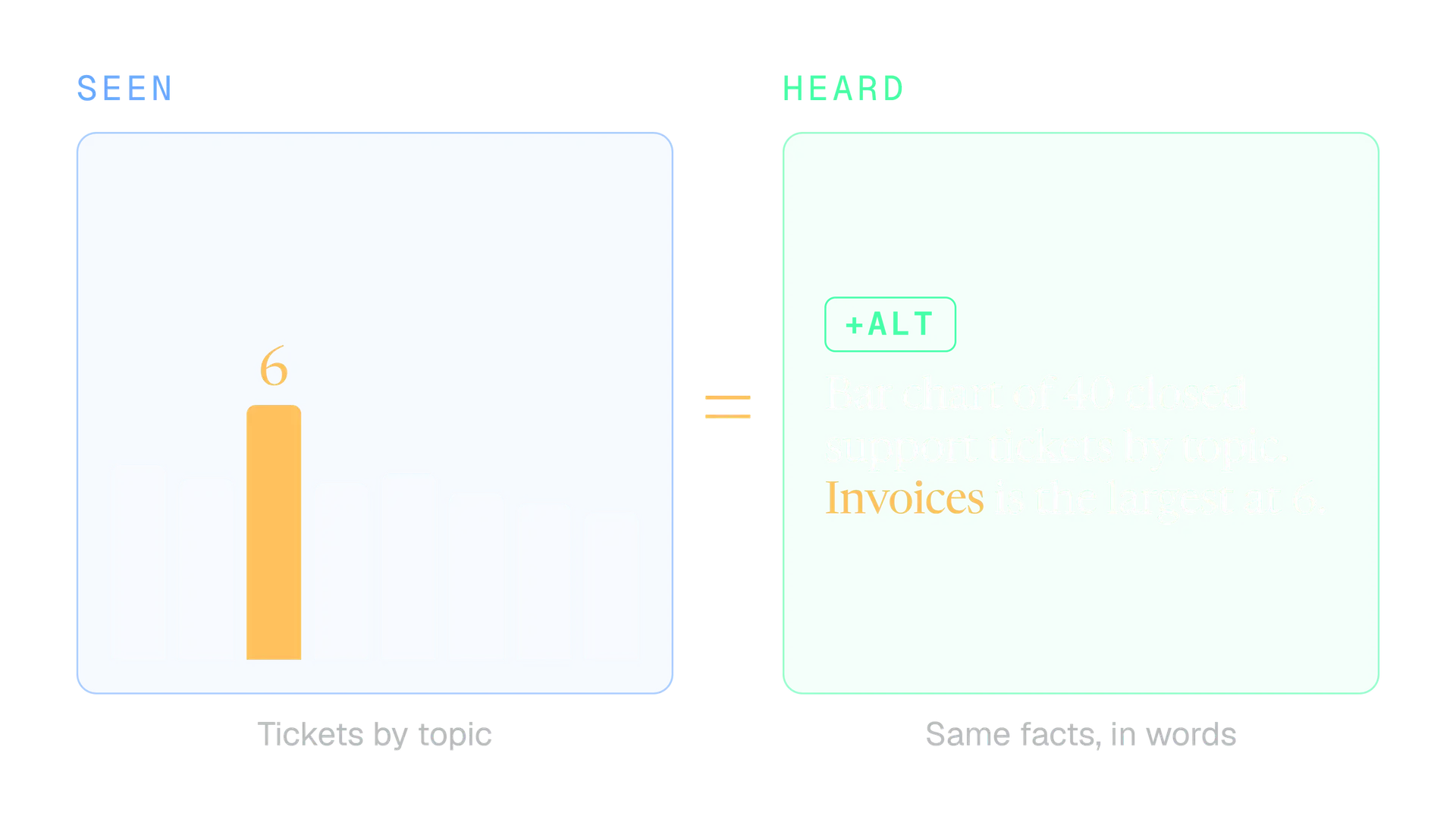
Add the description with the +ALT button after you upload. X's Help Center sets the limit at 1,000 characters and says to include any text that is in the image. Be short anyway: say what the image shows and why it is there.
The image is the claim
Read this.
[Image: a screenshot of a long paragraph]
The post says nothing without the picture, and anyone who cannot see it gets nothing.
The image is the proof
Invoices were the biggest group of tickets in March: 6 of 40.
[Image: a bar chart with Invoices highlighted]
The post makes the claim. The image lets the reader check it.
If your post is mostly a quote, a quote card can make it a picture, but it needs the same care: the full text in the description and a size that reads on a phone.
When to write a thread instead of a post
Use a thread when the idea has parts that each stand alone. A thread is a series of connected posts from one person, and X's Help Center describes making one with the plus icon in the composer, then Post all.
| One post | A thread |
|---|---|
| One idea you can say in a sentence | One idea with three to seven parts |
| The first line is the whole point | The first post is a promise the rest keep |
| Fits in one read | Each part makes sense if shared alone |
| Edit window may apply | Edit post does not cover threads |
Everything in this guide applies to every post in a thread. The first post needs a hook, each later post needs one job, and the last needs one ask. Our complete guide to writing an X thread covers structure, length, numbering and a worked example, so we will not repeat it here.
End with one clear ask
End with the one thing you want the reader to do, or with nothing. A post with four asks asks for none of them. The ask is the last pass of the draft, because you only know what to ask for once you know what the post says.
| The ask | It fits when | Example |
|---|---|---|
| Reply | You want answers you will use | Which of these would you cut first? |
| Read | The detail is longer than the post | The full table is here. |
| Click | One page finishes the job | Sign up for the Tuesday session. |
| Follow | The account will keep covering this | We post one build note a week. |
| Nothing | The post is complete on its own | (No ask. The idea is the post.) |
Ask for what you will use. If you ask for replies, read them. If you ask for a click, make the page worth it and tag the link so you know which post earned the visit, as our guide to tracking clicks from X explains. If you ask for a follow, your profile is the page the reader lands on.
X also draws a line around repeated asks. Its Original Content Rewards Program requires creators in it not to solicit engagement, which it defines as repeatedly instructing users to like, reply, bookmark, follow or repost. That rule covers the rewards program, not every account. We still take it as a useful test: would you ask this if there were no counter?
Four asks
Like, repost, reply and follow if you agree!
Nothing in it is about the idea. It asks for numbers.
One ask you will use
Which of these three would you cut first? I read every reply, and I will change the order this week.
It asks one question, and it says what will happen with the answers.
How to edit an X draft in passes
Edit in passes, with a different question each time. Cut first, then sharpen, then check. Leave the draft for ten minutes if you can, because you read your own words better when you stop remembering them.
Cut the warm up
Read only the first line. If the post begins on line two, delete line one.
Cut the repeats
Find any sentence that says what another already said. Keep the stronger one.
Sharpen the vague
Circle every general word and give it a number, a name or a place.
Read it aloud
Fix every place you stumble, hurry or run out of breath.
Count it
Check the weight, not the keystrokes. Links cost 23, emoji cost 2.
Here is the same invented post before and after those five passes.
Draft
Hey everyone! So I have been thinking a lot lately about how we onboard new customers, and honestly I think there are lots of things companies could do better. One thing that really helps is making the first email shorter. What do you think? Let me know in the comments!
50 words, no detail, a stock closer.
After five passes
Our first onboarding email had 7 links. It now has 1: connect your account.
New customers know what to do next. Which email of yours has too many links?
That is 29 words, with one detail and one question.
Sometimes you spot the mistake after you post. X's Help Center describes an edit window of 1 hour with up to 5 edits, for original posts and quotes, from the device you posted on, and it describes the feature as part of X Premium. Threads, replies, polls and pinned posts are not covered.
Before you write
Choose the idea
One sentence: after this, the reader will know what?
Ten minutes later
Edit in passes
Cut, sharpen, read aloud, count.
Just before you post
Run the check
The checklist in the next section, once, slowly.
The first hour
Edit window
If you have it, fix a typo, add a tag or reorder media within the hour.
A week later
Look back
Compare the post with your own recent posts, not with another account.
A two minute check before you post
Run this once, slowly, on the final text. It catches the mistakes that are easy to miss when you have read a post six times and expensive to fix when it is live.
Before you press Post
- The post has one idea, and I can say it in a sentence.
- The first five words carry a detail, and the first line has no link.
- Every number and claim has a source I could name.
- Names, handles, dates and prices are spelled and checked.
- The weighted count is under 280, with the link at 23 and each emoji at 2.
- There is at most one ask, and I will read the answers.
- Every image has a description, and any text in it is repeated there.
- I read it aloud and did not stumble.
- It is not a copy of another post from this account.
Three of those items deserve a second look:
- Claims. If a post states a fact someone can dispute, name where it came from in the post. X's Community Notes lets contributors add context to posts that may mislead, and our guide to how Community Notes work explains how a note ends up on a post.
- Repeats. Our guide to duplicate posts on X explains what X says about repeating the same words, and the duplicate post checker shows how similar two drafts are.
- Scheduled posts. Run the check when you write, then read the post again at the time it goes out. Words like "today" and "tonight" go stale. Our guide to scheduling posts on X covers the rest.
Writing mistakes we see over and over
Most weak posts break one of the passes above. These are the ones we see most often, each with the pass that fixes it.
Pass 2
The warm up
The post starts on line two. Delete line one.
Pass 1
Two ideas in one
Split it into two posts, or one thread.
Pass 3
Safe words
"Many", "great", "a lot". Replace each with the thing it stands for.
Pass 5
Counting last
You cut the good part to fit. Count as you draft, and draft the idea first.
Pass 7
The picture does the work
The post says "Read this." Say the claim in words and let the image prove it.
Pass 8
Asking for everything
Like, repost, reply, follow. Pick the one you will use.
Two more are about choosing, not wording. A data post with no data reads as a boast, so wait until you have the number and the base. And a format borrowed from someone else fails when you lack the material: a story needs a turn you lived through, and a list needs items you would defend one by one.
A post is one idea, told to one reader, in the fewest words that finish it.
That is the whole craft in a line. The nine passes are how you check it.
What to do next
Take your next draft through the nine passes once, slowly, and note which pass changed it most. That is where your habit sits, and it is the one to watch.
- Write your next post as a fast draft, then run the passes in order.
- Score the first line with the hook grader and the whole draft with the AI phrase checker.
- Count it with the X character counter.
- Run the two minute check.
- A week later, compare the post with your own recent ones using engagement rate, and pick the pass to work on next.
If you write for more than one account, Kairo Post gives each account its own voice and a list of words to avoid. For the question of when to post, read our guide to the best time to post on X.
In the product
How Kairo Post does this
Everything above works by hand. Kairo Post does the same work for you, with your approval before anything goes out.
Questions people ask
How long should an X post be?
Can I edit a post after I publish it?
Where should the link go in an X post?
What should I post when I have nothing to say?
Do I need X Premium to write good posts?
How do I know whether a post I wrote worked?
Sources
Every rule, limit and figure in this post was checked against these on the date shown.
- Counting Characters, X developer documentation
docs.x.com · checked
- About X Premium, X Help Center
help.x.com · checked
- About Edit Post, X Help Center
help.x.com · checked
- How to post photos or GIFs on X, X Help Center
help.x.com · checked
- How to add image descriptions, X Help Center
help.x.com · checked
- How to create a thread on X and how to view, X Help Center
help.x.com · checked
- X Polls, X Help Center
help.x.com · checked
- Original Content Rewards, X Help Center
help.x.com · checked
- How Users Read on the Web, Nielsen Norman Group
nngroup.com · checked
- Concise, SCANNABLE, and Objective: How to Write for the Web, Nielsen Norman Group
nngroup.com · checked
- First 2 Words: A Signal for the Scanning Eye, Nielsen Norman Group
nngroup.com · checked
- About Community Notes on X, X Help Center
help.x.com · checked
- Principles of Clear Writing, Office of the Federal Register
archives.gov · checked
Written by