How to find content ideas for X every day

The short answer
Build a small daily system instead of hunting each morning. Feed one capture list from your own work, customer questions, replies, X search and Lists, Explore and outside sources, then spend about 15 minutes a day picking one idea, choosing an angle, checking the facts and slotting it into your week.
Key takeaways
- Ideas come from six places: your own work, customer questions, replies, X search and Lists, Explore and trends, and outside sources.
- Write an idea down the moment it appears, with the reader, the source and a one line angle, so it still works a week later.
- Use Latest search and Lists to see what your niche is saying this hour, and treat a trend as a prompt, never an assignment.
- Get several posts from one idea by changing the reader, the proof or the format, not just the wording.
- Trace every claim back to its original source before the post is scheduled.
You open the composer and nothing comes. So you scroll X for inspiration, find five posts that tire you out, and close the app with nothing written. The trouble is rarely a shortage of content ideas. It is that you go looking for them at the exact moment you need one, with no time left to judge them.
This guide gives you a daily system instead. It has six places to find ideas, one list to catch them, a short routine to pick one, a way to get several posts out of it, a fact check before it goes out and a plan for the week. It needs no paid tool and takes about 15 minutes a day once it is set up.
Why do you run out of content ideas on X?
You run out because you treat ideas as something to invent on demand. In practice, finding an idea, keeping it and choosing it are three different jobs. Most people do all three in the same stressed ten minutes, which is why it feels like pulling teeth. To get several posts out of one idea, follow how to turn one idea into ten posts.
Three habits make ideas dry up:
- You only look when you are stuck. Stuck is the worst moment to judge anything, so you settle for the first safe thing.
- You keep nothing. The idea you had in a meeting on Tuesday is gone by Friday, because it lived only in your head.
- You judge too early. A rough idea looks weak next to a finished post, so you drop it before it has had a chance.
The fix is to separate the jobs and give each one its own time. Three research habits go further: monitoring your industry on X, keeping a swipe file of post ideas and summarising long reports into posts.
| Scrambling | A system |
|---|---|
| Open the composer and wait | Open a list that already has ideas on it |
| Take whatever is on the timeline | Check six places on purpose |
| Judge ideas while tired, with the clock running | Judge in a short pass, away from the deadline |
| Check the facts if there is time | Check the facts before the post is scheduled |
What does a daily system for content ideas look like?
It is six stages in the same order every day: source, capture, pick, angle, check and plan. The first two happen in small gaps through the day. The other four fit into one short session. The times below are our own rough targets, so adjust them to your account. Three research habits go further: finding the questions your audience asks, researching competitors without copying and citing sources cleanly.
| Stage | The question it answers | Rough time |
|---|---|---|
| Source | Where could today's idea come from? | Spread through the day |
| Capture | Is it written down before I forget it? | 30 seconds each |
| Pick | Which one idea earns today's slot? | 2 minutes |
| Angle | What is the one thing this post says? | 3 minutes |
| Check | Is every claim true and sourced? | 5 minutes |
| Plan | Where does it sit in this week? | 3 minutes |
Two rules hold the system together. Sourcing and capturing are cheap and happen all week. Picking and checking are slower and happen once a day, never while you are also hunting for something new. Two more places to look: forums, aggregators and newsletters, and ideas for slow news days.
Where do content ideas for X come from?
They come from six places, and the places sit on a line. At one end is your own work, which nobody else has. At the other end is the public timeline, which everyone is reading right now. Nearer your work means more original. Nearer the timeline means more timely and more crowded.
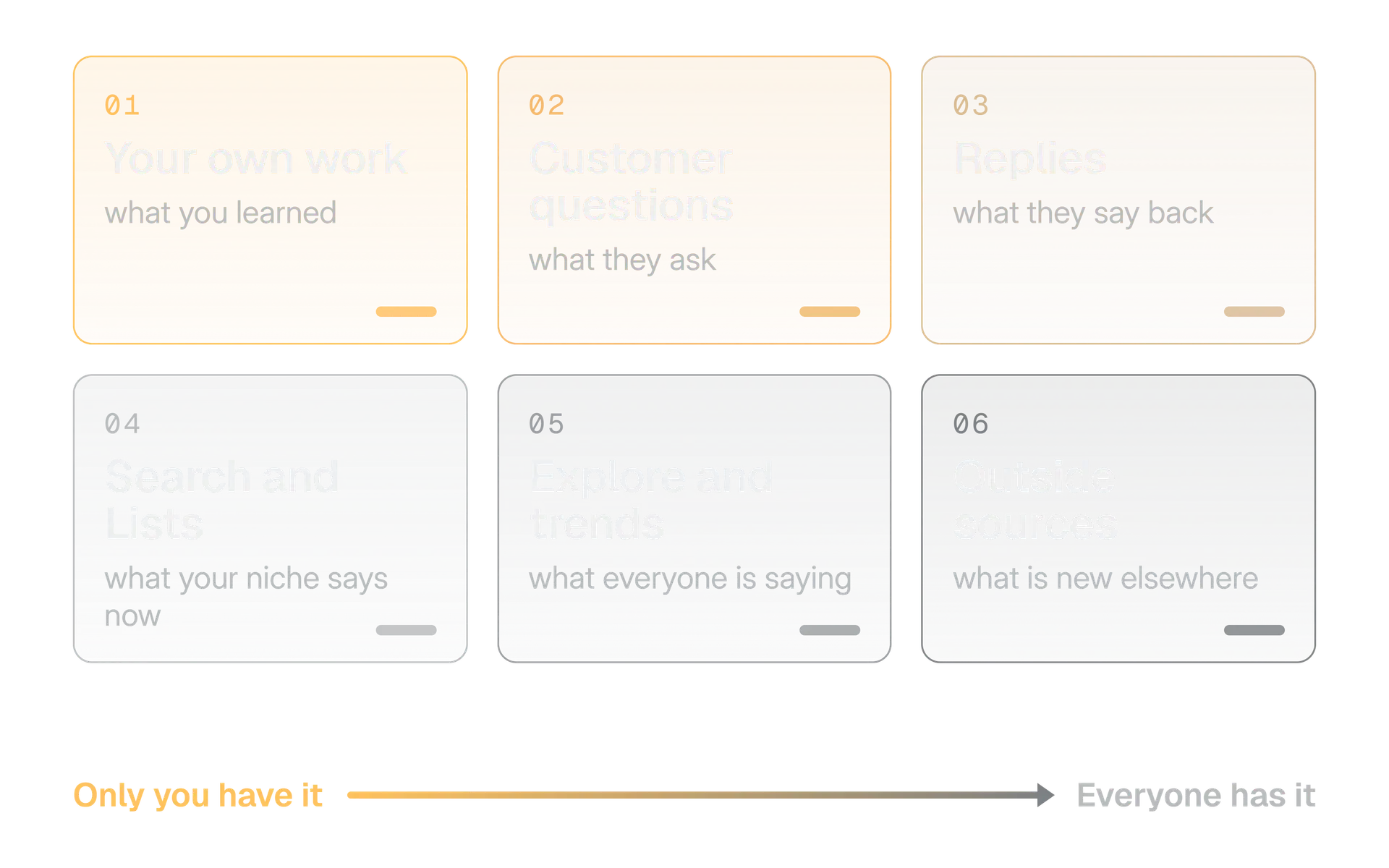
A healthy week draws from both ends. Your own work and your customers give you the posts only you can write. Search, trends and outside sources tell you what people are talking about today and give you something to react to. The next five sections take them in that order. To spot rising topics in your field, use our guide to finding trends for your niche.
How do you find content ideas in your own work?
Start with what you did this week. It is the one source no competitor can copy, and it is already in your head, your calendar and your files. The job is to ask it better questions.
X's Post Activity Dashboard lists impressions, engagements and the engagement rate for each of your posts, and it exports a CSV you can sort.
Five questions to ask of your week
- What did you change your mind about?
- What went wrong, and what did you do about it?
- What did you decide or ship, and for what reason?
- What did you have to explain twice?
- What did you read that you disagree with?
Your past posts are a second mine. Open your analytics and sort your posts by engagement rate, using the method in our guide to calculating engagement rate on X, so a post with few impressions does not mislead you. Do not copy the winners. Ask which question each one answered, then answer a different question in the same territory.
The posts that did poorly deserve a second look too. If you still believe in the idea, the weak part was often the first line. Our guide to X hooks shows how to test a new opening before you give up on the idea.
How do customer questions and replies become content ideas?
A question is the best raw material you can find, because someone already wants the answer. You do not have to guess whether the idea matters. Someone asked.
Questions pile up in more places than people check:
| Where it lives | What to listen for |
|---|---|
| Support inbox and chat | The same question asked three times |
| Sales calls and demos | The objection that comes up before the price |
| Onboarding emails and replies | The step where people get stuck |
| Replies to your own posts | What readers wanted more of, or got wrong |
| Replies on other people's posts in your niche | Questions the author did not answer |
On X, the Notifications timeline has a Mentions view that shows only posts mentioning your username, next to All and Verified (About the Notifications timeline, as of October 2026). The quality filter in your notification settings removes lower quality content such as duplicate or automated posts. X says it does not filter people you follow or accounts you recently interacted with.
If you work in X Pro, the multi column view, you can keep a column for your mentions open beside a column for a search or a List (About X Pro). That puts questions and conversation side by side.
Turn the question into an answer
A customer asks how long a custom order takes. You post the answer in plain words for everyone who wonders the same thing, with no name and no screenshot.
Post the private message
You paste the message, the name or the order details. Even a friendly customer may not want to be on your timeline, and a private message is not yours to publish.
Keep the wording of the question as people really write it. It gives you your hook, and it tells you which words your readers use. Never keep the name that came with it.
How do you use X search, Lists and saved searches for ideas?
Search shows what people are asking right now, and Lists keep the right voices together in one quiet feed. Both are built into X, and together they replace most aimless scrolling.
Search has two modes that answer different questions. After a search, X lets you switch between Top, Latest, People, Media and Lists (How to use X search). Top shows posts by relevance.
X says relevance depends on how popular a post is, the keywords in it and many other factors, and that Latest lists results in chronological order, with safe search removing potentially sensitive content and accounts you muted or blocked from both (Search result FAQs).
Our rule of thumb: use Top to learn what has already worked on a topic, and Latest to see what is being said this hour. Which one you open decides whether you get a pattern or a moment.
| The question you have | Where to look |
|---|---|
| What has a lot of response on my topic? | Top, with your topic word |
| What are people saying about it today? | Latest, with your topic word |
| Who is asking for help? | Latest, with an exact phrase such as does anyone know, plus your topic word |
| Who mentioned my work? | Notifications, Mentions |
| What are my peers and customers posting? | A List made for them |
What advanced search can filter
X's advanced search form lets you find posts by words and phrases (all of the words, an exact phrase, any of the words, none of the words, or a hashtag), by people (posts from an account, replies to an account, or posts mentioning an account), by place and by date (How to use advanced search).
X's developer documentation describes a separate set of query operators for the API. It does not say they work in the app's search box, so we do not teach them here. Use the advanced search form, which X documents for people.
Lists turn a noisy timeline into a quiet one. A List is a curated group of accounts. You can read a timeline of just those accounts, you can follow a List without following the accounts on it, and you can make a List private so only you can open it (How to use X Lists).
1,000
Lists per account
X Help Center, How to use X Lists
5,000
Accounts on one List
X Help Center, How to use X Lists
25
Characters in a List name, at most
X Help Center, How to use X Lists
You will not hit those limits. Three Lists are enough for idea hunting:
- Customers and buyers. The people you write for. Their questions are your ideas.
- Voices. A dozen people who write well about your field. Read them to disagree, not to copy.
- Sources. Publishers, official accounts and researchers who break the news you care about.
Finally, X's help page describes saving a search from the results on the app, so it appears when you tap the search box (How to save searches). Save the two or three searches you would otherwise retype every morning. Search also has a Lists filter, which is a quick way to find a public List someone else already built on your topic.
What are Explore and trends good for?
Explore is good for context, not for ideas. It tells you what is being talked about, which is useful, but the choice of whether it belongs on your account is still yours. Treat a trend as a prompt to think, never as an assignment.
X describes Explore in tabs (Explore Recommendations, as of October 2026):
| Tab | What X says it shows |
|---|---|
| For You | Trends, Events, Topics and Videos that X recommends to you |
| Trending | What is trending in a geographic area, not personalised for every account |
| News, Sports, Entertainment | Other top Trends that X filters into categories; availability varies by location |
For You is shaped by your activity. X says the trends you see there depend on the topics you follow, your recent engagement, shared interests with other groups of users and your location (X Trends FAQ). You can change what it shows by changing the Topics you follow (Topics on X).
That makes Trending the better tab for a neutral read, because it is not personalised for every account. For You is the better tab for a niche check, because it leans on your own interests.
X says trends come from algorithms that look for conversations that are popular now, not topics that were popular over a longer period, and that it filters them for uncredible accounts, inappropriate words and spam (Trends Recommendations). A trend is therefore a good signal that people are talking. It is a poor signal that your readers care.
Before you join one, run three checks:
- Do you have something true to add that the trend does not already say?
- Does it fit the reader you write for, or only the news cycle?
- Would the post still make sense with the trend taken out?
Which newsletters, feeds and industry sources are worth following?
Outside sources give you the story. Your job is to add the point of view, and the best ones are few. Choose a handful you will actually read, and cut the rest.
Weekly
Newsletters
Pick three, not thirty. One for your industry, one for your customers' world and one that argues with you. Delete any you skip for a month.
RSS or Atom
Feeds
A feed is a list of a site's new items that a reader app checks for you, so nothing depends on what a timeline decides to show. Add the sites you trust.
Alerts
In Google Alerts you enter a topic, choose Create Alert and get emails about matching results. Show options lets you set how often, the sites, the language, the region and the number of results (Google Search Help).
The original
Primary sources
Official announcements, regulator pages, company documentation and research papers. They are the originals that the news articles are written about.
Whatever you follow, write down the source, not only the link. "Reported by the regulator on 3 March" is a source. A link to a post about it is a second hand source, and you will want the first hand one in the fact check later.
If you would rather not watch feeds by hand, Brand brain in Kairo Post can help. According to its page, it watches the feeds and single articles you add and gathers fresh stories into a digest you can write from.
How do you capture content ideas so they last the week?
Write every idea down in one place within 30 seconds of having it, or accept that you will lose it. One place matters more than which place. A notes app, a spreadsheet or a board all work, as long as it is the only one.
The tank is the point. If you only draw from it on the day you need an idea, the day you need one will find it empty. Keep at least a week's worth in stock, and when it drops below that, spend one session sourcing instead of writing.
A bare headline is not enough to capture. A week later you will not remember why it mattered. Give every idea a small card:
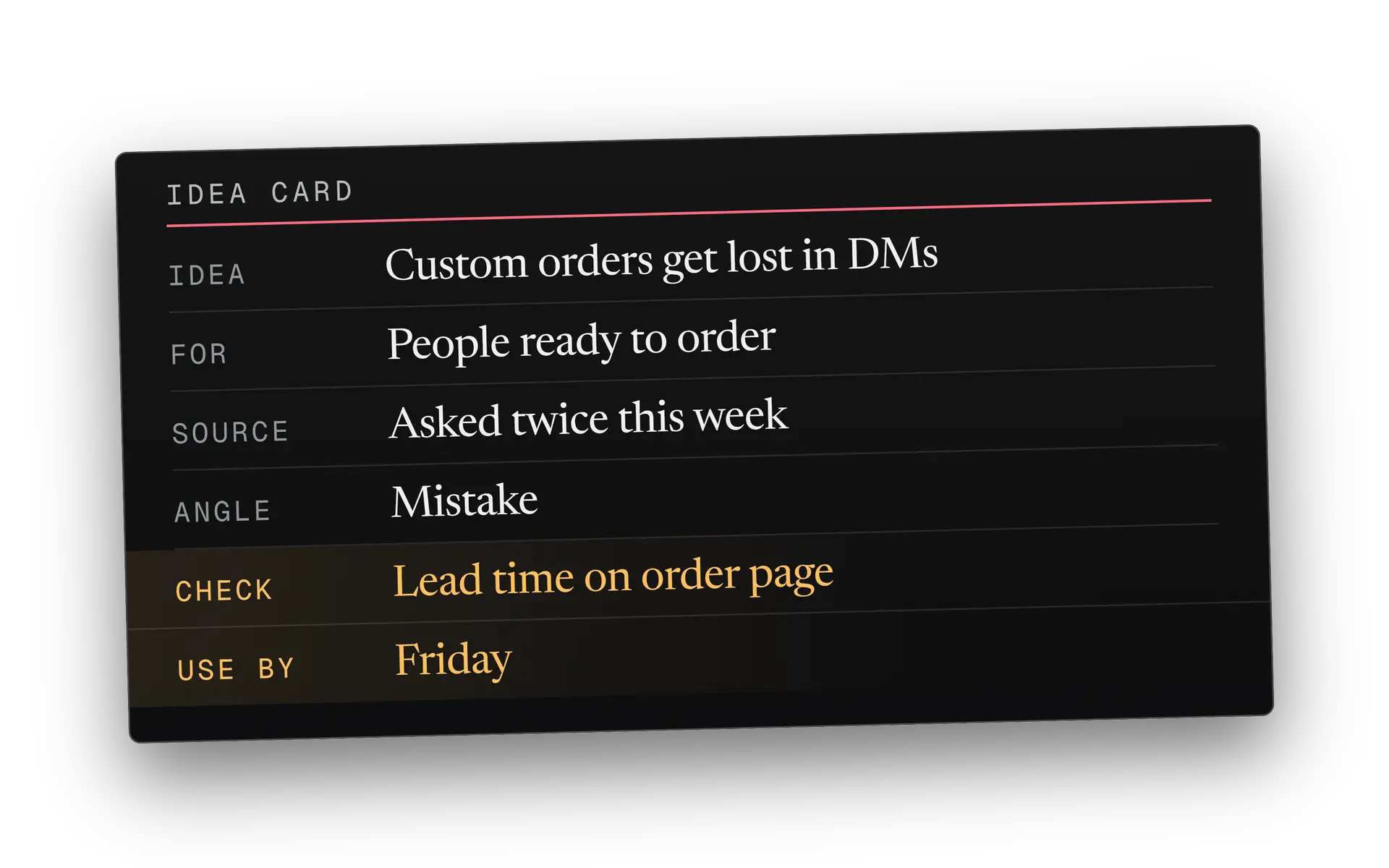
The Use by field matters most for news ideas. A story is worth a post for a day or two, and a card with a date lets you throw it away without guilt.
X has a quick way to save a post as you scroll. Bookmarks save posts into a timeline for easy access, and they are private to you (About Bookmarks). A bookmark is a good first catch, because it takes one tap. But it carries no note, so move it onto an idea card the same day or it becomes a pile you never open.
How do you turn one idea into several angles?
Change who the post is for, what proves it or what shape it takes, and one idea becomes four or five posts that do not repeat each other. The idea stays the same. The angle is the position you take to look at it.
Here are the five angles we reach for most:
Teach
How
The steps, in order. Good for a reader who wants to do the thing today.
Show
Proof
A screenshot, a number with its source or a before and after. The evidence behind the idea.
Warn
Mistake
What goes wrong, and how to spot it early. People remember a warning longer than advice.
Tell
Story
One thing that happened, told in order. Use only events that really happened.
Ask
Question
Put the open part of the idea to your readers. Their answers become the next list of ideas.
Here is one idea turned two ways. The idea is that custom orders were getting lost in direct messages. The business, the account and both posts are made up.
How to order a custom cake from us in three steps: fill in the order form, pick a pickup day, and send the deposit. Orders that arrive any other way take longer, and here is why.
The three details missing from almost every custom cake order: the date, the number of guests and any allergies. Put them in the first line and we can say yes the same day.
The same idea reads differently to a different reader. The first post is for someone ready to order. The second is for someone who already tried and got a slow answer.
Now the part that protects you. Changing the angle is not the same as rewording the post. X's Authenticity policy does not allow repeatedly posting identical or nearly identical posts, so a copy with new adjectives does not help. Our guide to duplicate posts on X explains what X says and does not say.
Change what the post says
Move to a new reader, a new piece of proof or a new format. Another angle means another reason to read the post.
Change only the words
Swapping a few words or the order of the sentences. The reader sees the same claim again, and X may treat it as the same post.
Once you have the angle, the first line does the rest. Our guide to X hooks covers it, and if the angle needs more room, the guide to writing an X thread shows how to structure it.
How do you check the facts before you post?
Trace every claim back to the original source before the post is scheduled, and cut anything you cannot trace. That takes about five minutes a post, and it is the cheapest way to avoid a correction in public.
Popular is not the same as true. The post you regret is rarely one that took too long to check. It is the one you trusted because it was already everywhere. A widely shared claim is popular, not proven.
The best short method we know is SIFT, from the digital literacy researcher Mike Caulfield. Its four moves are Stop, Investigate the source, Find better coverage, and Trace claims, quotes and media to the original context (SIFT: The Four Moves, 2019). Pause before you post, check who is saying it, look for a better source, then follow the claim upstream.
Use the checklist below on every post that states a fact:
Before a claim goes in a post
- You opened the original source, not a post about it.
- The date on the source fits the claim you are making.
- Numbers match the source, with the same unit and year.
- Quotes are word for word and keep their context.
- You have the right to use any image or clip. X's copyright policy says you must have the rights needed for content you post.
- For breaking news, a second independent source agrees.
The copyright line comes from X's copyright policy. A screenshot of a news photo is still someone's photo, so link the article or use your own picture.
It also helps to know how the public check works. On X, a Community Note is context added by volunteer contributors. X's guide says the system tries to find notes that many people find helpful, including people with different points of view (Diversity of perspectives). A note on your post is public, so the fact check is cheaper before you post than after.
How do you plan a week of content ideas?
Plan four slots and leave one open. The four give your week a shape. The open slot is where the news goes, so a story that breaks on Wednesday does not push out a post you promised yourself.
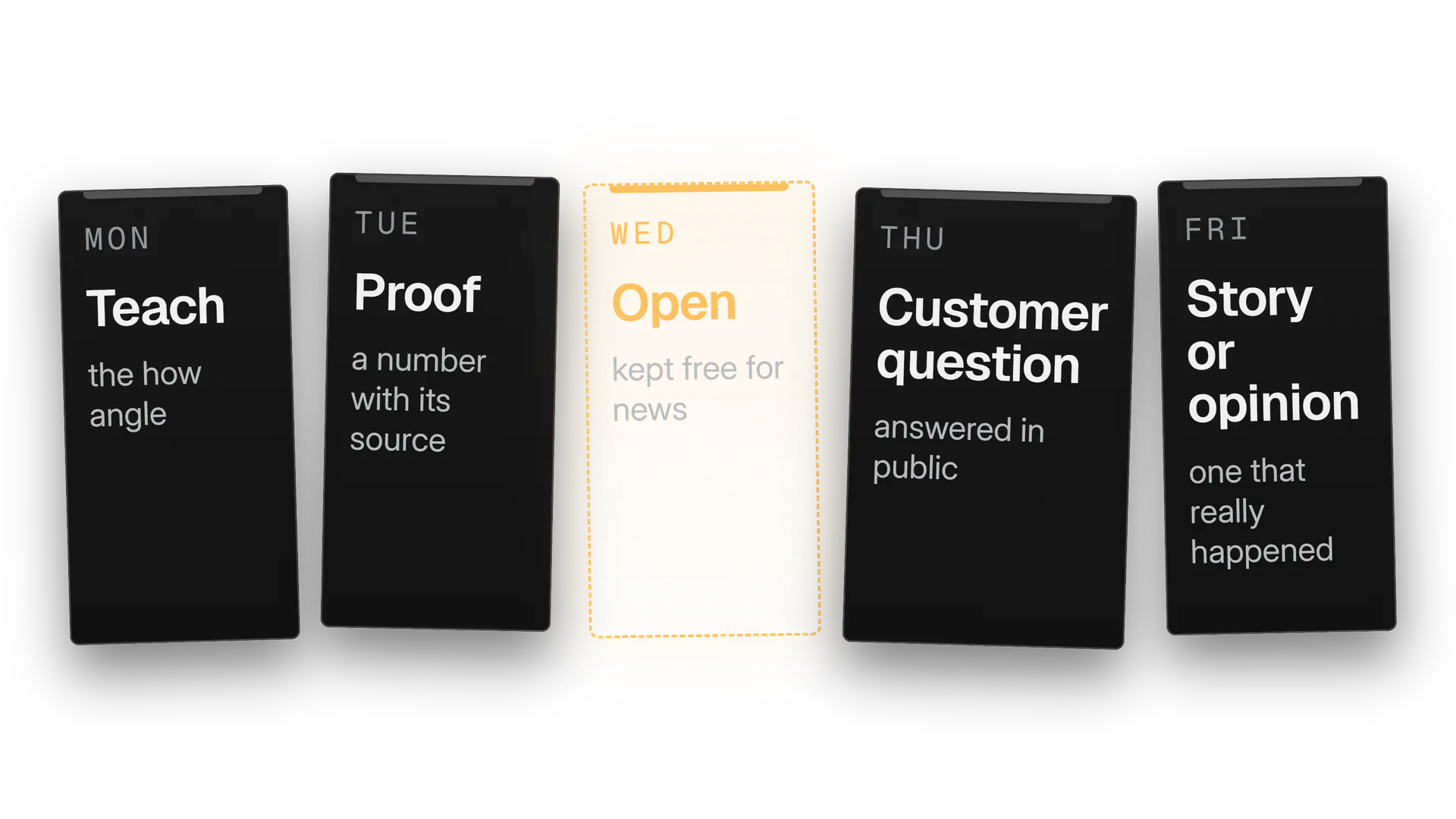
Give each slot a job, not a topic. A job such as proof or customer question tells you which card to pull from the tank, and the topic comes from the card. That is how a small list feeds a full week without you writing anything new from scratch.
Monday
Refill and choose
Look at the tank. If it holds less than a week, spend the session sourcing. Then slot cards into the four jobs.
Every day
Run the 15 minute pass
Pick, angle and check one card. Schedule the post, or hold it for the open slot.
Friday
Review the week
Which cards got a response and which fell flat? Add two new cards from what you learned.
Once a week is working, a longer plan is easy to build. Our free content calendar generator lays out a month of slots from the pillars and rhythm you choose, and downloads as a spreadsheet or calendar file. It plans the slots, and you write the posts.
When you are ready to queue the week, our guide to scheduling posts on X covers where X lets you schedule and what to do about time zones. For the hours your audience is awake, see our guide to the best time to post on X.
What do you post when nothing comes to mind?
Skip the day, or use a fallback made from your own work. A weak post that exists to fill a slot does less for you than a quiet day, and a quiet day gives you time to refill the tank. If you do want to post, these six fallbacks need no news.
Own work
Answer last week's question
Take the question you were asked most and answer it in plain words.
Own work
Show a work in progress
A draft, a half built page or a messy spreadsheet, with one line on what you are trying to fix.
Opinion
Say what changed your mind
A belief you held a year ago and dropped, and the reason.
Teach
Explain one term
The word your customers use wrongly, or the one you stopped noticing was jargon.
New angle
Revisit a strong post
Take a post that did well and ask the next question. Do not repost it as it was.
Question
Ask the open question
The one thing you honestly do not know about your field. The replies feed the next week.
If you rely on the news for ideas, plan for the quiet weeks too. Keep two or three of these fallbacks on cards in the tank, so a slow day never meets an empty list.
Your daily pass, step by step
Do this once a day, at the same time, for two weeks. Then judge it by whether you ever sat down to a blank composer, not by how clever the posts were.
Open the tank
Read the cards waiting on your list. If there are fewer than a week's worth, refill before anything else.
Scan three fresh places
Check your Mentions, one List and one saved search. Add any card that passes the "something true to add" test.
Pick one idea
Choose the card with the best mix of a reader who cares, a source you can show and a clear reason to post today.
Choose an angle
Write the one thing the post says in a single line. If you cannot, the idea is still a topic.
Check the claims
Run the checklist. Cut anything you cannot trace to the original.
Slot it into the week
Place it in the day that suits its job, or hold it for the open slot, then schedule it.
At the end of the first week, count how many cards are still on the list. If the number grew, your sourcing is working. If it shrank, the next session goes to sourcing, not writing, and that is the whole system.
In the product
How Kairo Post does this
Everything above works by hand. Kairo Post does the same work for you, with your approval before anything goes out.
Questions people ask
What do I post on X when I have nothing to say?
How many content ideas should I keep in stock?
Is it fine to post about a trending topic?
Can I use Google Alerts to find ideas for X?
Can I repost an old idea on X?
Should I use AI to come up with content ideas?
Sources
Every rule, limit and figure in this post was checked against these on the date shown.
- Post and Video Activity Dashboards, X Business Help
business.x.com · checked
- Explore Recommendations, X Help Center
help.x.com · checked
- X Trends FAQ, X Help Center
help.x.com · checked
- Trends Recommendations, X Help Center
help.x.com · checked
- Topics on X, X Help Center
help.x.com · checked
- How to use X search, X Help Center
help.x.com · checked
- Search result FAQs, X Help Center
help.x.com · checked
- How to use advanced search, X Help Center
help.x.com · checked
- How to save searches, X Help Center
help.x.com · checked
- How to use X Lists, X Help Center
help.x.com · checked
- About Bookmarks, X Help Center
help.x.com · checked
- About the Notifications timeline, X Help Center
help.x.com · checked
- About X Pro, X Help Center
help.x.com · checked
- Copyright policy, X Help Center
help.x.com · checked
- Developer Guidelines, X developer documentation
docs.x.com · checked
- Diversity of perspectives, Community Notes guide
communitynotes.x.com · checked
- Create an alert, Google Search Help
support.google.com · checked
- SIFT (The Four Moves), Mike Caulfield
hapgood.us · checked
Written by