AI agents for social media: what they can really do

The short answer
An AI agent for social media is software where a language model chooses its own steps and uses tools, such as search, a calendar or your mentions, to finish a job. It can research, draft, plan and sort replies, but a person should keep approval, brand voice and sensitive conversations.
Key takeaways
- A chatbot waits for you, automation follows a fixed rule, and an agent picks its own next step. That freedom is what makes it useful and what makes it risky.
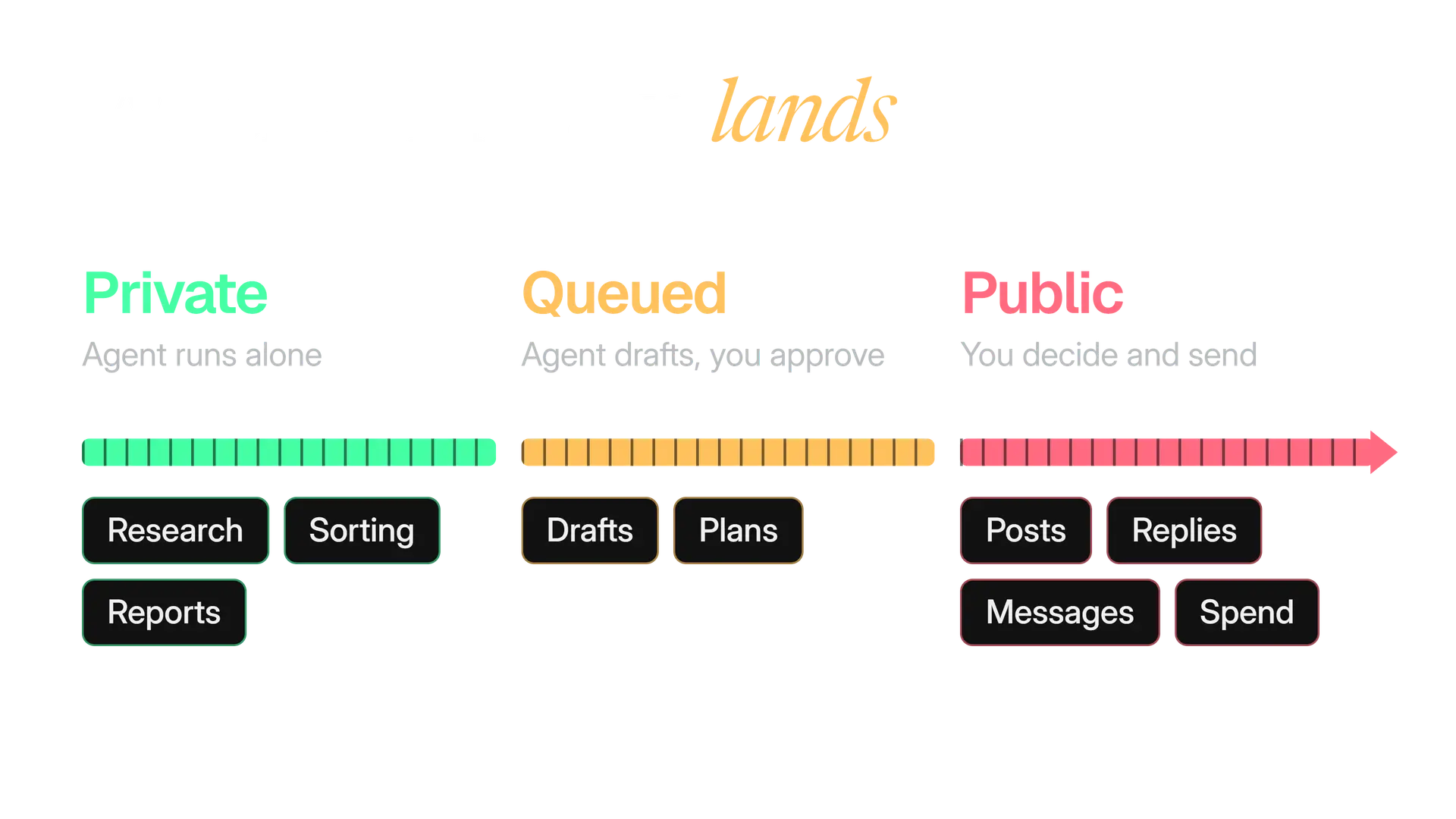
- Give an agent jobs that are easy to undo: research, drafts, plans, sorting and reports. Keep publishing, sensitive replies and spending with a person.
- Three limits matter most: made up facts, a drifting voice, and prompt injection, where text the agent reads carries instructions.
- X's developer rules need prior approval for apps that post AI generated replies, and since 23 February 2026 self serve API replies only go to accounts that mentioned or quoted yours.
- Roll out in stages and measure what people change: approval rate, edit depth and time to approve.
You have probably seen the pitch: an AI agent that runs your social media while you sleep. The honest version is smaller and more useful. An AI agent can research, draft, plan, sort and report for you. It cannot be trusted to speak for your brand on its own.
We ran social media for clients, so we judge every tool by one question: what happens when it is wrong? This guide answers it for AI agents for social media on X. You get the jobs that suit an agent, the jobs to keep, the limits that matter, X's rules, and a way to roll one out and measure it.
What is an AI agent for social media?
An AI agent is software where a language model decides its own next steps and uses tools to reach a goal. On social media, the tools might be web search, your content calendar, your mentions or a scheduler. The goal might be a sentence like "plan next week's posts". Before an agent reads your mentions, read prompt injection risks for social media agents.
The label gets stuck on three different things. Only one of them chooses its own steps.
| Chatbot | Rule based automation | AI agent | |
|---|---|---|---|
| Who picks the next step | You, with every question | A rule someone wrote | The model, within the tools it has |
| Can it act on your accounts | No, you copy its answer | Yes, exactly as set | Yes, through the tools you connect |
| An example on X | You paste a draft and ask for edits | Post the saved item every Monday at 9 | Find this week's stories and queue three drafts |
| How it goes wrong | You copy a mistake | It repeats a mistake exactly | It makes a new mistake nobody planned for |
Many products sold as agents are workflows with a language model inside one step. That is fine. Anthropic advises finding the simplest solution possible and adding complexity only when you need it. It says agents suit open ended problems, where you cannot predict the number of steps or hardcode a path.
A weekly post on a fixed day does not need an agent. "What is worth posting about today?" might. The trade has a price: Anthropic notes that agentic systems often trade latency and cost for better results, and that their autonomy brings a risk of compounding errors, where one wrong step feeds the next.
What can AI agents really do on social media?
On X, five jobs suit an agent: research, drafting, planning, reply triage and reporting. They share three traits. They repeat, they are mostly text, and you can check the result in a minute. The table shows what the agent does and what you still check.
| Job | What the agent does | What you still check |
|---|---|---|
| Research | Reads the sources you chose and summarises them with links | Each claim against its link |
| Drafting | Turns notes, an article or a call into first drafts | Facts, tone and whether it sounds like you |
| Planning | Fills a calendar around your pillars and rhythm | Dates, real events and near duplicate posts |
| Reply triage | Sorts mentions and drafts answers to real questions | Every draft before it is sent |
| Reporting | Pulls your numbers into a weekly summary | The numbers against your analytics screen |
Research
Give the agent a short list of sources and a question, not the whole internet. Compare two requests:
Good: What did these five sources publish this week that our customers would care about? Give me links.
Risky: What should we post about?
The second invites invention. For live conversations on X, advanced search operators are still the quickest way to check what the agent found.
Drafting
An agent drafts best from material that already exists, which makes it a transformation job:
- a customer call or launch note becomes a short post
- a newsletter becomes several posts (newsletter to X posts)
- an article becomes a thread
Inventing opinions from nothing is where drafts turn generic. Give the agent your point of view, and let it do the shaping.
Planning
A plan is cheap to make and cheap to change, which makes it a good agent job. Hand it your content pillars, your rhythm and the dates that matter, and ask for a week at a time. Our guide to scheduling on X covers the posting side.
Reply triage
Reply work has a safe order, from least to most risky:
- Sort. The agent labels mentions: question, praise, complaint, spam. It sends nothing.
- Draft. It writes answers to the real questions for a person to edit.
- Send. This belongs to a person, and X restricts automated replies (more on that below). Our guide to community management on X shows what gets a reply, what escalates and what you leave alone.
Reporting
Reporting carries the least risk, because nothing leaves your workspace. Ask for last week's numbers and the change from the week before, not a story about them.
A summary can invent a trend, so check any number it quotes against the analytics screen. Our guide to engagement rate explains which ratio to ask for.
A worked morning: what one agent run looks like
Here is a plain run for an account that shares one useful tip a day. The agent works through five steps. It stops at the sixth, which is yours.
Notice what is missing: a publish step. The run ends with a draft in a queue and a record of what the agent read. The draft below is invented to show the shape.
Before you schedule a post with a link, open the link on your phone.
It takes ten seconds. It catches the broken page before your readers do.
Which social media jobs should stay with a person?
Keep the jobs where being wrong is public, personal or hard to undo. A simple test: if the agent got this wrong and you found out an hour later, could you fix it quietly? Anything that fails the test needs a person.
Opinion
Your point of view
What your brand believes and will not say. An agent can offer wordings. It has no position to defend.
People
Angry and sensitive replies
Complaints, crises, anything about health, money or safety. See our guide to negative comments on X.
Risk
Promises and claims
Prices, results, legal or medical statements and partnerships. A wrong promise is public and hard to take back.
Consent
Direct Messages
X's developer rules allow automated messages only after the person messages you first, with an easy opt out.
Access
Spend and settings
Ad budgets, account security and connected apps. See how to secure your X account.
Approval
The final yes
Someone who can say no sees the exact post before it goes out. We come back to this below.
What are the limits of AI agents?
Three limits bite social media agents hardest: made up facts, a drifting voice and prompt injection. OWASP, the security community behind the Top 10 for LLM Applications, lists ten risks for 2025. Three of them describe these limits.
LLM01
Prompt Injection
OWASP Top 10 for LLM Applications, 2025
LLM06
Excessive Agency
OWASP Top 10 for LLM Applications, 2025
LLM09
Misinformation
OWASP Top 10 for LLM Applications, 2025
Made up facts
Models can write text that is false but sounds right. This is called hallucination. OWASP names misinformation as a risk and says hallucination is its main cause, because models fill gaps using statistical patterns.
Anthropic's docs say the known techniques reduce hallucination but do not eliminate it, and they advise validating critical information. On X, check these first:
- numbers, percentages and dates
- quotes and who said them
- product names, prices and features
- anything said about another person or company
Voice drift
This one comes from our own practice, so treat it as a lesson, not a measurement. Drafts slide toward a smooth, average voice. Each draft is a little more generic than the last, until a month of posts could belong to anyone.
Three habits slow the drift:
- Give the agent three or four real posts as examples, not only adjectives.
- Review new drafts against your latest real posts, and keep a brand voice guide it can quote.
- Watch for the words that make writing sound like AI. The free AI phrase checker catches them in your browser.
Prompt injection
An agent reads text, and some text contains orders. OWASP describes prompt injection as inputs that alter a model's behaviour in unintended ways. Indirect injection comes from outside sources such as websites or files that the model processes.
For a social media agent, every mention, bio, linked page and image caption is text a stranger wrote. An agent that reads them also reads whatever instructions are hidden in them.
OWASP is candid: given how models work, it is unclear whether fool proof prevention exists. So design for the day it works. OWASP's mitigations include least privilege, separating outside content from instructions, and requiring human approval for high risk operations.
The safest agent is one with no tool that can do real harm. That is what OWASP calls limiting excessive agency.
OWASP's three causes of excessive agency
OWASP traces excessive agency to three causes, and each has a matching fix.
- Excessive functionality. The agent has tools the job does not need. Remove them.
- Excessive permissions. The tools hold more access than the job needs. Narrow them to the minimum.
- Excessive autonomy. High impact actions run with no human check. Put a person in front of them.
OWASP also advises monitoring what the agent does and rate limiting its actions to reduce damage.
What does X allow for automated and AI replies?
X allows automation that follows its rules, and it is stricter about replies than about posts. The rules below come from X's developer pages. Our explainer of the X automation rules goes through all of them.
| What you ask the agent to do | What X's developer rules say |
|---|---|
| Post scheduled content | Allowed from an automated account, for example news, weather or quotes |
| Reply to people | Only if the user engaged first, with at most one reply per interaction |
| Post AI generated replies | Requires prior approval from X before deployment |
| Like posts or follow accounts | Auto liking, bulk liking and bulk or automated following are prohibited |
| Send Direct Messages | Only after the user messages you first, with an easy opt out |
| Work through a browser | Use only the official X API. Browser automation and scraping are not allowed |
Two more points matter for agents. The Developer Policy says a bot account must clearly indicate what it is and who is responsible for it, and it requires explicit consent before automated replies or Direct Messages.
The second is recent. A changelog entry dated 23 February 2026 says replies through the X API are only permitted when the original post's author summoned the replier, by mentioning the account or quoting one of its posts. It affects self serve tiers, and enterprise access is not impacted.
23 Feb 2026
API replies need the author to mention or quote you
X API changelog
1
automated reply per interaction at most
X Developer Guidelines
What about an agent that only drafts, with a person sending from the app? We found no X page that says whether that needs X's approval. Our reading is that a person who reads, edits and sends is not automation. If your agent posts through the API without a person in the moment, treat it as automated and ask X before you launch.
Why should a person approve what an agent posts?
Because the agent cannot be accountable and you can. A person who sees the exact text, account and time before it goes out is the one control that catches made up facts, off brand drafts and injected orders alike.
This is the common position across the sources. The Model Context Protocol specification says there should always be a human in the loop with the ability to deny tool calls. OWASP lists human approval among its mitigations. OpenAI's docs say ChatGPT requires manual confirmation in a conversation before write actions.
Approve the exact text
The reviewer sees the post as it will appear, the account and the time. They can edit it, reject it or send it back.
Approve a summary
The reviewer ticks "weekly plan: 7 posts" and never reads the posts. Approval has become a rubber stamp.
Approval fails in quieter ways too, usually when the queue is long and the reviewer is tired. Our full guide to human approval for AI agents covers approval models, what to check and what an audit trail should record.
Where does MCP fit in?
MCP, the Model Context Protocol, is the plug between an AI assistant and your other tools. Its official docs describe it as an open source standard for connecting AI applications to external systems, and compare it to a USB C port. It is not the brain, and it does not decide what the agent may do.
The specification says the protocol does not mandate any user interaction model, while advising that clients ask for confirmation on sensitive operations and log tool use. So the safety lives in the app you connect through.
| What MCP does | What the connecting app must do |
|---|---|
| Lets the assistant discover and call tools | Decide which tools this assistant gets |
| Is an open standard many assistants share | Ask you before sensitive actions |
| Carries the request and the result | Keep a log of what ran |
Our plain guide, what is MCP, explains clients, servers and permissions for marketers.
Kairo Post's AI assistants page shows one way to set this up. You connect the assistant you already use, pick the accounts and one role, and posting, scheduling, replying and spending wait for your approval in Kairo Post. The assistant cannot approve for you, and disconnecting stops it at once.
How do you choose an AI agent for social media?
Choose by what you can control, not by what it can do. Ask the questions in the table, and walk away from any tool that cannot answer them plainly.
| Ask | A good answer looks like |
|---|---|
| Can I limit its tools? | Reading, drafting and publishing are separate permissions, and publishing starts off |
| Can it publish without approval? | Only if I switch it on, per account, with limits |
| Can I see what it did? | A record of each run: what it read, what it drafted, who approved it |
| Can I stop it quickly? | One switch pauses it, with no support ticket |
| How does it reach X? | Through the official API, not by driving the website in a browser |
| What does it cost per run? | A price or limit I can see before it runs |
These come from the sources above. Least privilege and human approval are OWASP's advice, the MCP specification says clients should log tool use for audit, X's developer rules require the official API, and Anthropic warns that agents cost more.
Kairo Post's Campaigns page describes this pattern. You see the whole plan and its credit forecast first, and you choose whether each post waits for a person. Letting posts go out on their own is a choice only an owner or admin can make, inside a credit cap you set, and a campaign can be paused at any time.
How do you roll out an agent without losing control?
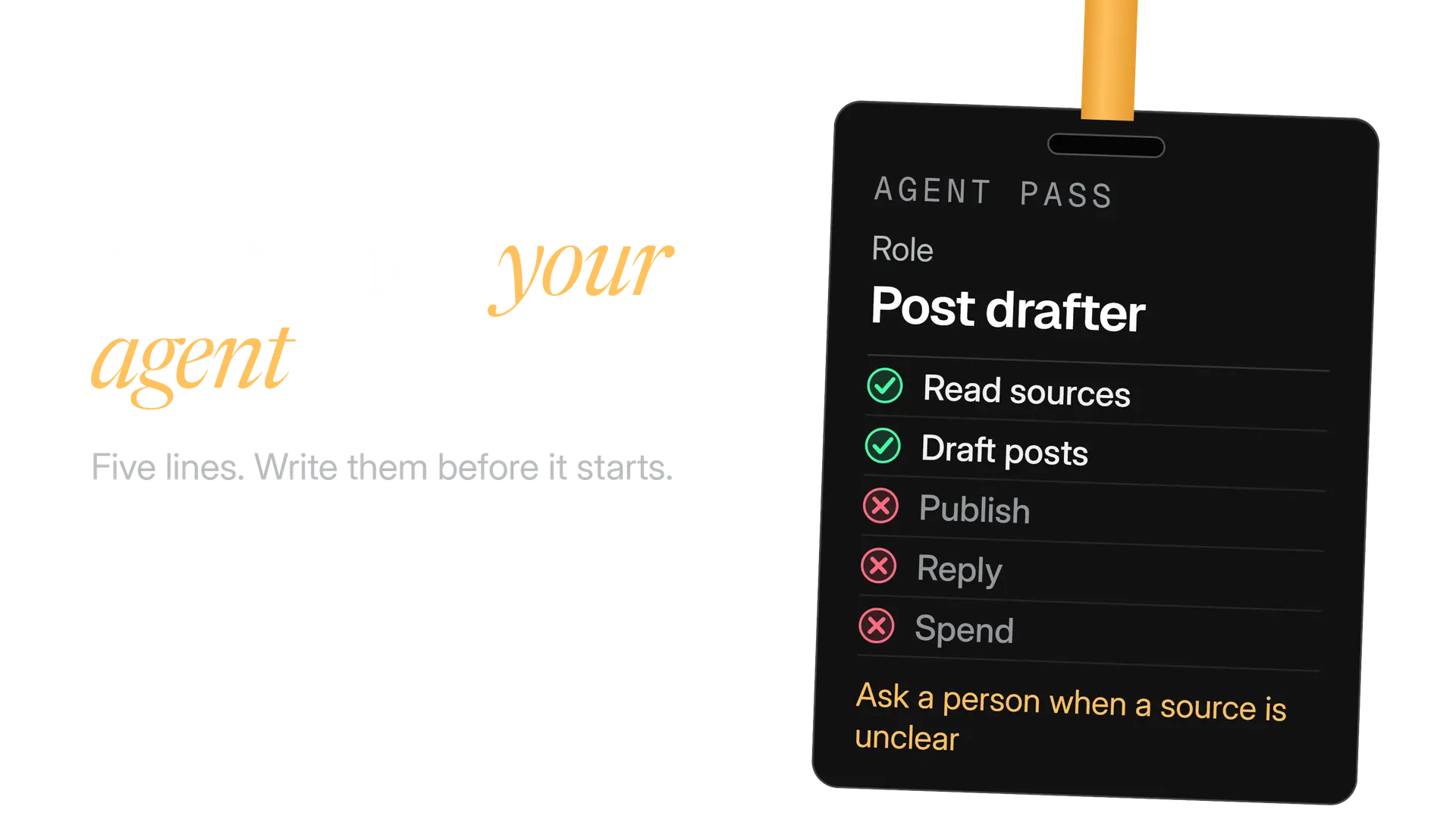
Start with the jobs that cannot hurt you, and widen only after you have read the evidence. Each stage earns the next. Write the agent a job card first, because an agent without one will fill the gaps itself.
Week 1
Read only
The agent researches and reports. You use none of its drafts. You learn how often its facts are wrong.
Week 2
Drafts you edit
Review every draft. Tag each change you make: fact, voice, tone or other.
Week 3
A queue with approval
Approved drafts go into the schedule. Publishing stays with a person, or with a switch you control.
Week 4
Read the tags, add one job
Fix the brief where the edits cluster. Then add one job, not three.
Four mistakes to avoid:
- Starting with publishing. Begin where a wrong answer stays private.
- Broad access because it was easier. Narrow it before the first run.
- Reviewing summaries, not posts. The exact text is what you approve.
- Adding jobs before the first is stable. One change at a time.
If you run accounts for others, keep one agent and one pass per client. Our guide to managing X for clients covers access and approvals.
How do you measure whether an AI agent is working?
Measure two things: the quality of the agent's work and the results on the account. The first tells you if the agent is fit for the job. The second tells you if the job was worth doing.
| Measure | How to work it out | What it tells you |
|---|---|---|
| Approval rate | Drafts approved as written, divided by drafts reviewed | Whether the brief fits |
| Edit depth | How much you change, tagged by reason | Whether voice or facts are failing |
| Fact catches | Wrong claims you caught before approving | How much checking you still need |
| Time to approve | Minutes from queued to decision | Whether review is a bottleneck or a rubber stamp |
| Account results | Engagement rate against your own baseline | Whether the posts perform |
Write down your numbers before the agent starts, so you have a baseline. Change one thing at a time. The free engagement rate calculator works out the rate by impressions or by followers, and our guide to how to use replies to grow on X shows what good conversations look like.
Faster output is not the goal. More drafts per hour mean more to review, and an agent that writes the same idea ten ways fills your feed with near copies. The duplicate post checker compares two drafts, and our guide to duplicate posts on X explains where X draws the line.
A checklist before you give an agent a job
Before the first run
- The job is easy to undo, and written in one sentence.
- The agent has only the tools that job needs, and publishing is off.
- It reads only sources you chose, and you know it may read hostile text.
- Every draft needs a link behind each claim.
- A named person approves the exact text before anything goes out.
- You know what X's developer rules say about replies, likes, follows and Direct Messages.
- There is a spending limit, and a switch that stops it.
- You wrote down your baseline numbers before you started.
Start this week with research and a weekly report, the two jobs that cannot reach your audience. Add drafts when the facts hold up for a full week, and publishing last, if ever. An agent that earns trust slowly is worth more than one you have to watch.
In the product
How Kairo Post does this
Everything above works by hand. Kairo Post does the same work for you, with your approval before anything goes out.
Questions people ask
Can an AI agent run my X account by itself?
Is ChatGPT an AI agent?
Do I have to say a post was written by an AI agent?
Is an agent worth it for a small account?
What does it cost to run an AI agent?
Can an AI agent write in my brand voice?
Sources
Every rule, limit and figure in this post was checked against these on the date shown.
- Developer Guidelines, X developer documentation
docs.x.com · checked
- X Developer Policy, X developer documentation
docs.x.com · checked
- X API changelog and release notes, X developer documentation
docs.x.com · checked
- Building effective agents, Anthropic Engineering
anthropic.com · checked
- OWASP Top 10 for LLM Applications 2025, OWASP GenAI Security Project
genai.owasp.org · checked
- LLM01:2025 Prompt Injection, OWASP GenAI Security Project
genai.owasp.org · checked
- LLM06:2025 Excessive Agency, OWASP GenAI Security Project
genai.owasp.org · checked
- LLM09:2025 Misinformation, OWASP GenAI Security Project
genai.owasp.org · checked
- Reduce hallucinations, Claude developer documentation
platform.claude.com · checked
- Tools, Model Context Protocol specification
modelcontextprotocol.io · checked
- What is the Model Context Protocol (MCP)? Model Context Protocol docs
modelcontextprotocol.io · checked
- MCP and Connectors, OpenAI API docs
developers.openai.com · checked
Written by