Community management on X: the complete guide

The short answer
Community management on X means answering the people who mention, reply to and message your account, keeping the space safe, and building relationships over time. A small daily routine, promises about response times you can keep, a named escalation path and X's own reply, hide, mute and block tools cover most of it.
Key takeaways
- Check 4 places every day: the Mentions tab, replies under your posts, message requests and talk that never tags you.
- Promise a first reply window counted in your open hours, and say your support hours in your profile.
- Move anything personal to a Direct Message. X's rules say not to ask for private information in a public post.
- Hiding is for spam and abuse, not for people who disagree. Answer fair criticism.
- Automated replies are for people who asked for them, one per interaction, never for keyword hits.
A customer @mentions your account with a question. Another leaves a sharp comment under your newest post. A third sends a Direct Message at 11 at night. By Friday you cannot say which of them got an answer, or who was meant to give it. Two practical follow ups: replying to mentions fast and getting more replies on your posts.
Community management on X is the work of answering those people well, keeping the space around your account safe, and slowly turning regulars into a community. This guide gives you a routine small enough to keep, response promises, an escalation path, the moderation tools X documents, its automation rules and a few measures. We checked X's pages on 1 October 2026.
What community management on X covers
It covers everything people say to or about your account, in public and in private, and the longer effort to make those people feel at home. X's business guidance describes it as one to one conversation: conversation thrives on X, so it is a good place for a business to build relationships and community.
Six jobs sit under that one name.
Public
Mentions
Posts that contain your @username. Some ask for help, some praise you, some are noise.
Public
Replies
Answers under your own posts. Everyone who reads the thread sees how you treat them.
Private
Direct Messages
One to one conversations. Anything personal should end up here.
Public, then private
Complaints
Someone has a real problem. The job is to fix it, not to win the thread.
Public
Negative comments
Criticism, sarcasm and pile ons. Some deserve an answer, some a hide, some nothing.
Ongoing
Community building
Knowing your regulars, giving them a reason to talk, and setting rules where you host a group.
X's business page names likes, reposts and replies as the ways to engage. Replying in other people's conversations to be found is a different job: it is covered in our guide to growing with replies on X. This guide is about the people who come to you. To turn followers into regulars, see building a community around your account, and for quieter threads, controlling who can reply.
Where conversations arrive, and how to see all of them
They arrive in 4 places, and only the first is the one most people check. The others are quieter, which is why they go unanswered. Two practical add ons: reply templates for 20 common situations and how to run an AMA on X.
| Place | What lands there | What to know |
|---|---|---|
| Notifications, Mentions tab | Posts that contain your username | The tab shows only mentions. The Quality filter can hide lower quality content, such as duplicate posts or content that looks automated, but it does not filter people you follow or accounts you recently interacted with |
| Replies under your posts | People answering what you published | Hidden replies sit behind an icon on the post, so check it |
| Message requests | Messages from people you do not follow | Kept apart from your inbox until you accept. A quality filter hides lower quality requests, and you are not notified about those |
| Talk that never tags you | People naming your brand without the @ | Only a search finds it. X's business page points to Advanced Search and to Lists for watching accounts without following them |
The Notifications timeline also has a Verified view, which shows only notifications from verified accounts. It is a handy filter on a busy day. It is not a safe way to work, because a customer does not need a badge to deserve an answer.
If you run more than one account, Kairo Post's inbox page describes collecting the mentions of every account in one place, sorted by what they need. A spreadsheet can do the same job for a single account; the point is one list, not a specific tool.
How to sort every message: reply, escalate or leave alone
Sort by two questions: how risky is this, and how soon does it matter? Those two answers decide who handles it and when. The sorting takes seconds once you have done it a few days.
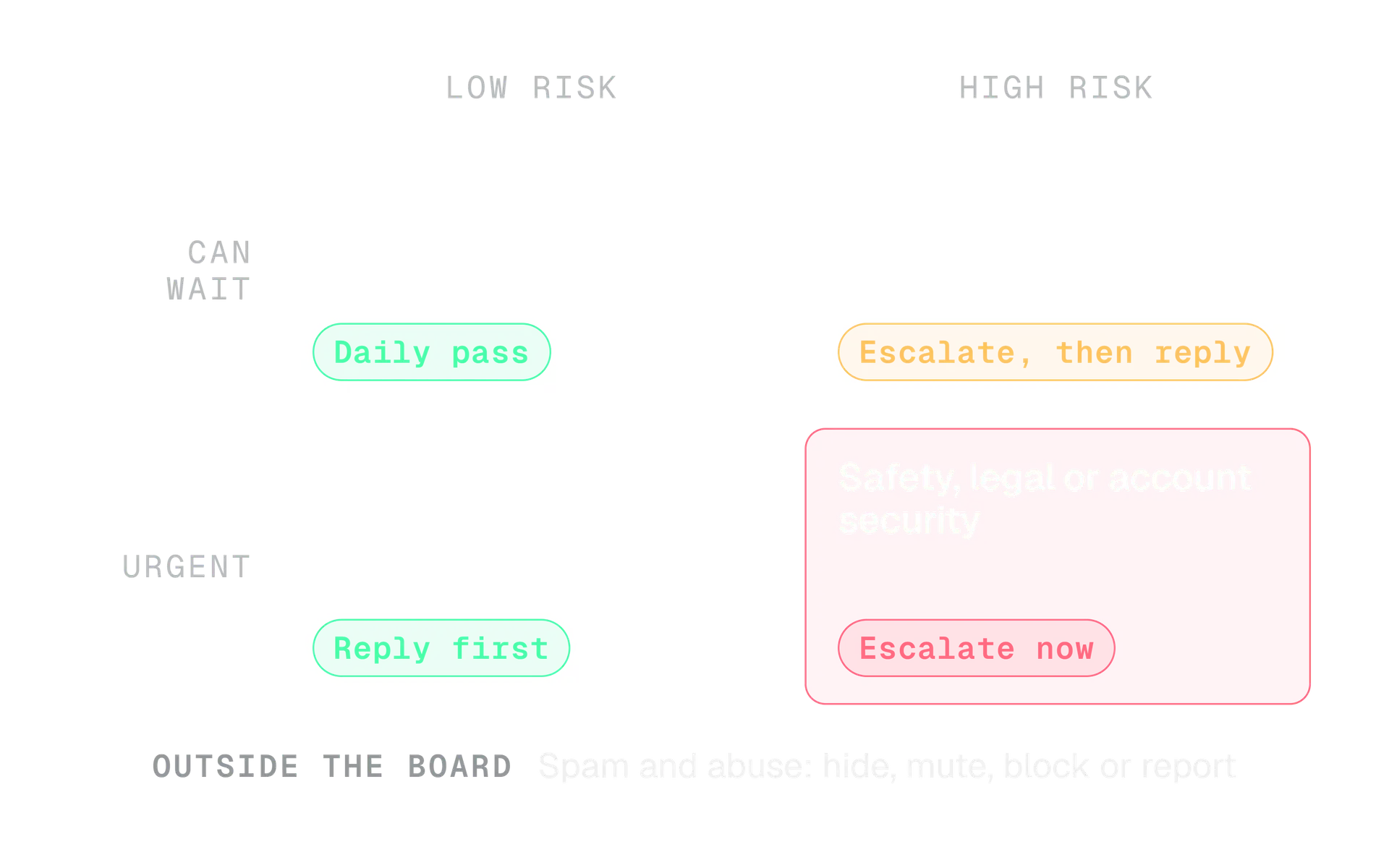
We use 5 tags in the log, and no more, because a long list of tags stops being used:
- Question. Someone needs an answer.
- Praise. Someone is happy. Reply briefly and mean it.
- Complaint. Someone has a problem with you.
- Risk. Legal, press, safety or security. It never gets a quick reply.
- Noise. Spam, bait and bots. Do not reply.
If you manage accounts for other people, the same sorting works with a client in the loop. Our guide to managing X for clients shows how to agree the rules, who answers complaints and how quickly before the first post goes out.
A daily and weekly routine for community management on X
Check in 3 fixed windows a day instead of watching all day. Constant glancing feels diligent, but we think it breaks the day into pieces and does not make answers better. Fixed windows are easier to staff and easier to hand over.
Start of the day
Sweep and answer
Visit all 4 places in the same order. Answer what arrived overnight, tag everything, and send the risky ones to their owner.
Middle of the day
Second pass
Answer new questions, check whether any escalation has a decision, and unhide or hide anything you want to revisit.
End of the day
Clear and hand over
Leave nothing untagged. Write a two line handover for anything still open, with the name of who has it next.
The weekly pass is where the community improves, because it asks what the week was about.
| Day | The job |
|---|---|
| Monday | Read last week's log. Which questions came up twice? Turn those into a post or a pinned answer |
| Wednesday | Check open escalations. Anything older than a few days gets a decision or a plain holding reply |
| Friday | Update your saved replies and your guidelines. Schedule next week's posts so the daily windows are for people, not for drafting |
Scheduling is its own skill, covered in our guide to scheduling posts on X. It helps here because a queue of ready posts leaves your attention free for the conversations.
Response time promises you can keep
Promise a window, not a speed, and count it in your open hours. X's business guidance says two things that matter here: list the hours your support is available in your profile, and reply to let people know you have seen their post even when you cannot solve it yet.
The second point is easy to skip. A one line acknowledgement is cheap, and it stops a person refreshing your profile.
Here is a set of promises, as examples to replace with what your team can really do.
| Message | Example promise | Why this one |
|---|---|---|
| Question | First reply within 2 open hours | Most questions are quick, and a late answer is worth little |
| Complaint | Acknowledged within 2 open hours, resolved or updated within 1 working day | The acknowledgement calms, the update shows progress |
| Praise | Same day | Late thanks still lands |
| Risk | Acknowledged the same day, then as the owner decides | A rushed reply here does the most damage |
Say the window
"We reply Monday to Friday, 9 to 17 UK time. For an urgent account problem, send us a Direct Message."
Promise speed
"We answer everything instantly, any time!" You will break it on your first weekend.
Put the hours in your bio or a pinned post. Our guide to optimising your X profile covers where each line of a profile earns its place.
How to sound like a person in your replies
Use your brand voice, but shorter, warmer and about the person's actual words. A reply is not a press release. Our guide to brand voice for X explains how a voice stays the same while the tone moves with the situation; replies are where the tone moves the most.
| Canned | Written for the person |
|---|---|
| We apologise for any inconvenience this may have caused. | Sorry, that delivery was late. I can see why that was annoying. |
| Please contact support. | Send us a Direct Message with your order number and I will look at it today. |
| Thank you for your valuable feedback. | Thanks. The checkout button was easy to miss. I have passed it to the team. |
Saved replies are fine as skeletons: a first line to acknowledge, a place for one specific detail, a next step. Pasting the same words under many replies is something else. X's rules treat bulk, duplicated and unsolicited replies as spam, and readers notice well before X does. Our guide to duplicate posts on X explains the rule.
Sorry about the late parcel, Sam. That is not the promise we made. Can you send us a Direct Message with your order number? We will check it today and tell you what we find.
Two free checks help if you draft replies with AI. The AI phrase checker flags words that make text sound machine made, and the duplicate post checker compares two texts for similarity, which is useful when your saved replies start to blur together.
How to handle complaints and negative comments
Acknowledge in public, move the personal details to a Direct Message, fix the problem, then close the loop in public. That order keeps the audience on your side without exposing anyone's private details. Four more community guides: mute or block as a brand, thanking and resharing customer content, moving a conversation to DM or email and a community guidelines template.
Read it twice
Most of the time the real complaint is one sentence inside an angry paragraph. Find it before you answer.
Acknowledge it in one line
Name the problem in their words. Do not defend yourself in the first reply.
Take personal details private
X's rules say not to ask people to send personal or private information in a public post. Ask for a Direct Message or another private channel instead.
Fix it, or say when you will
A date you can keep beats a vague promise. If you do not know yet, say when you will update them.
Close the loop in public
When it is solved, say so under the original reply. The next reader sees what happens when someone complains.
Not every negative comment is a complaint. Sort them first.
| What it is | What to do |
|---|---|
| Fair criticism of your product or a decision | Answer it, plainly, once. Take what is true |
| A wrong claim | Correct it once with the facts and a link. Do not repeat it in the thread |
| Sarcasm or a joke at your expense | Often best left alone, or answered with one light line |
| Abuse or harassment | Do not engage. Hide, mute, block or report |
X's abuse and harassment policy says you may not target others with abuse or harassment, or encourage other people to do so. If a post spreads a false claim about you widely, how Community Notes work tells you what you can and cannot do about it.
When to escalate
Escalate anything a reply cannot fix: legal threats, safety concerns, press questions, security problems, refunds above what your team may approve, and anything that speaks for the whole company. The rule is simple: if you would not like your reply read aloud in a meeting, a named person decides first.
Write the ladder down before you need it.
| Trigger | Who decides | While you wait |
|---|---|---|
| Legal threat or defamation | The owner or lawyer | A holding reply, if the owner agrees, and no more |
| Press or journalist question | The press contact | Acknowledge, then pass it on |
| Safety or a threat | The owner, and X's report tools | Do not engage publicly; report it |
| Account security or phishing | Whoever holds the account | Our account security guide shows the steps |
| A refund or exception | The person who owns that budget | Tell the customer when they will hear back |
What we do now is attach a short note to every escalated message, so the decision maker can answer without a call. Five lines are enough: the link, what they said, what we know, what we have said so far, and decide by when.
The moderation tools X gives you
X gives you tools for before, during and after a conversation: reply settings, hiding, muting, leaving, blocking and reporting. Each does something specific, and none of them is a way to silence people who simply disagree with you.
Start with reply settings, which work before you post. You choose who can reply from the compose box, and you can change it afterwards from the More icon, then Change who can reply.
4
settings for who can reply to a post
About conversations on X, X Help Center
4
durations for a muted word: Forever, 24 hours, 7 days, 30 days
How to use advanced muting options, X Help Center
1
automated reply allowed per interaction
Automation rules, X Help Center
The 4 settings are Everyone (for a protected account, only followers), Accounts you follow, Only accounts you mention and Only verified accounts. The second and fourth also let in anyone you mention in the post.
| Tool | What it does | What to know |
|---|---|---|
| Hide a reply | The author of a post hides a reply to it | The reply stays reachable through the hidden reply icon and needs an extra click. The replier is not notified. You can unhide it at any time |
| Mute words, phrases, usernames, emojis or hashtags | Removes matching posts from your Notifications, push, SMS, email, Home timeline and replies | You choose a duration, and for notifications you can choose from anyone or only from people you do not follow |
| Mute a conversation | Stops new notifications about it | You still see its posts in your timeline |
| Leave this conversation | Hides your handle link and stops mentions and notifications | You can still read it. You cannot undo it |
| Block | The account cannot like, reply to, repost, follow or message you | They are not notified, but see it if they visit your profile. Public posts stay viewable to them |
| Block messages only | Stops one account's Direct Messages without a full block | They can still reply to and mention you in public |
| Report | Sends a post, a profile or a message to X for review | Use it for abuse, not for criticism |
Our rule of thumb: hide spam and abuse, mute noise, leave a conversation that has turned into a pile on, block people who keep coming back, and report what breaks X's rules. Do not hide disagreement. Readers notice, and the hidden reply stays one click away anyway. For the wider rules on safety and spam, see X's rules for brands and creators explained simply.
Direct Messages and automated replies
Check your message requests daily, and treat anything personal as private. If you allow requests from people you do not follow, their messages arrive as Requests until you accept them. Deleting a request does not stop that account sending again.
Automation is where brands get into trouble, so here is the short version of X's rules for replies and messages. Our full guide to the X automation rules goes through every case.
| Allowed | Not allowed |
|---|---|
| An app that replies to an @mention asking for help | Replying automatically to anyone who mentions a keyword |
| An automated reply to someone who replied to your post, if they opted in, once per interaction | Welcome messages sent automatically to new followers |
| An automated message after the user started the Direct Message, with an easy way to opt out | Bulk Direct Messages about a launch |
| AI drafts that a person reads, edits and sends | An AI powered app posting replies by itself, unless X approved it first |
Since 23 February 2026 the X API adds a hard stop for self serve access: a programmatic reply is only permitted when the original post's author has mentioned the replying account or quoted one of its posts. That entry concerns replies sent through the API, not replies a person types.
Whatever you automate, honour a request to stop immediately, and keep a human responsible. X's authenticity policy also prohibits sending bulk, aggressive, high volume unsolicited replies, mentions or Direct Messages.
How to build a community, not only answer one
Show up the same way every week, make your regulars visible, and give people a reason to talk to each other. Answering is the base. Community starts when people recognise each other, not only you.
Start here
Replies under your posts
Ask questions you want answered, then answer the answers. Use names. Thank the person who corrected you.
Quiet
A private List of regulars
You can follow a List without following its accounts, and a List can be private. A list of the people who help others shows you whom to thank this week.
More work
An X Community
A space with its own admins, moderators and rules. Open ones show the rules when someone joins; restricted ones need a moderator to approve each request.
An X Community is a commitment, not a feature to try for a week. Admins and moderators enforce the rules, keep conversations on topic, review reports, hide posts and remove disruptive members. Posts in a Community can be seen by anyone on X, but only members can take part.
Before you start a Community
- The rules are written in plain words, and someone has read them aloud.
- At least 2 people are named as moderators, so one holiday does not stop it.
- You have time to review reports every working day.
- You know what you will do about the first spam post.
- There is a reason to join that a normal timeline does not give.
For the wider picture of growth, including content and profile, our guide to growing on X puts community in context.
Running community management as a team or for clients
One person owns each conversation, everyone can see who, and access never depends on a shared password. Without an owner, three people each assume somebody else replied.
- Name the first line and the escalation owner. The first line answers, the escalation owner decides on risk.
- Keep notes next to the conversation. Kairo Post's inbox page describes assigning a conversation and leaving internal notes nobody outside sees. A shared sheet works if everyone reads it.
- Share access safely. Our guide to securing your X account explains how to share access without sharing your password.
- Agree response times in writing. For client accounts, put the windows in the scope, as managing X for clients describes.
A handover note you can copy
Write it at the end of every shift, in 5 lines:
- Open conversations, each with the owner's name.
- What we promised, and by when.
- Anything risky, with the escalation note.
- What changed in the guidelines.
- What the next person should look at first.
How to measure community management on X
Measure the work you control first: how fast you answer, how much you answer and how often it ends well. X's own post metrics tell you what people did with your posts, not how well you served them, so keep your own log with one row per conversation.
| Measure | How to get it | What it tells you |
|---|---|---|
| First reply time | Time of first reply minus time it arrived, counted in open hours. Use the median | Whether your promise holds |
| Answered share | Questions and complaints answered divided by received | Whether things are slipping through |
| Resolved without a second ask | Conversations closed on the first answer divided by all | Whether your replies are specific enough |
| Escalations and time to decision | Count, and hours until someone decided | Whether your ladder works |
| Repeat topics | Tags counted by theme each week | What to fix or explain in a post |
| Mix of tags | Praise, question, complaint, noise | How the mood of the account is moving |
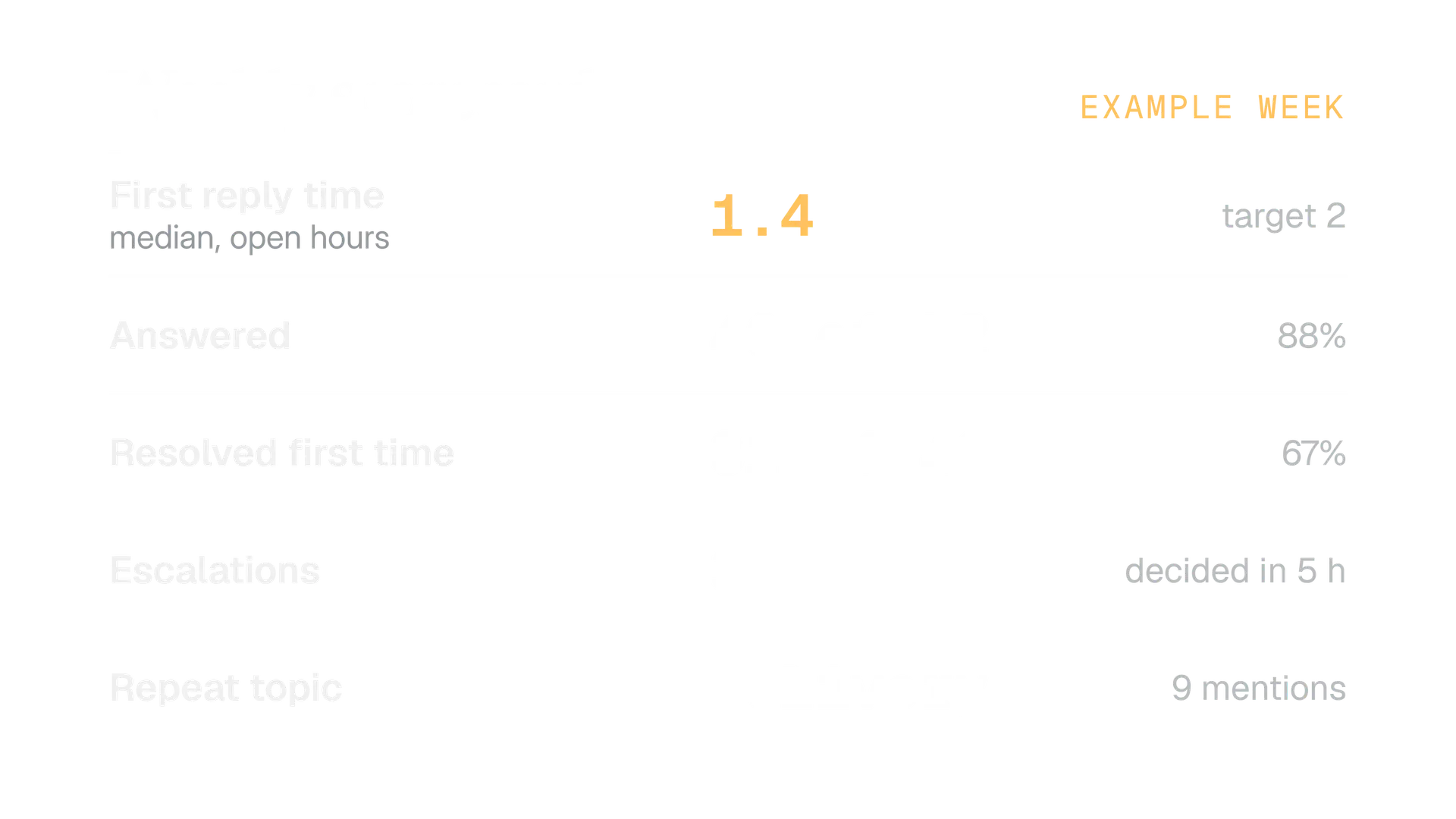
Use the median because one very late reply drags an average a long way. Then connect the log to results gently. If the same question comes up 9 times, answer it in a post and see whether it comes up less.
For the reply side of your own posts, our guide to engagement rate on X explains the formula, and the engagement rate calculator does the arithmetic.
Mistakes we see, and your first week
The common mistakes are all small, and all fixable in a week. Most come from no owner, no written promise or no log.
- Answering everything the same way. Praise, questions and complaints need different tones.
- Promising instant replies. You will break it, publicly.
- Arguing in the thread. Take it private or leave it.
- Hiding disagreement. Hide spam and abuse only.
- Automating replies to keywords. X's rules say no.
- Leaving message requests unread. A customer in Requests is still a customer.
- Having no escalation path. The first real crisis becomes a group chat argument.
- Keeping no log. Without one you cannot say if you are getting better.
Here is a first week that gets the basics in place.
Your first week
- Day 1: Check your reply settings and your message request settings. Put your support hours in your profile.
- Day 2: Adopt the 5 tags and write your response windows.
- Day 3: Name your escalation owners and write the five line note.
- Day 4: Start the log. One row per conversation.
- Day 5: Write your saved reply skeletons in your own voice, then run them through the AI phrase checker.
- Next Monday: Read the log, find the repeat topics and turn one into a post.
In the product
How Kairo Post does this
Everything above works by hand. Kairo Post does the same work for you, with your approval before anything goes out.
Questions people ask
How often should I check mentions on X?
Can I remove a negative reply under my post?
Does X tell someone when I hide their reply?
How do I stop being tagged in a pile on?
Should customer complaints move to Direct Messages?
What is a good response time on X?
Can a bot answer mentions for me?
Sources
Every rule, limit and figure in this post was checked against these on the date shown.
- Community management, X Business
business.x.com · checked
- About conversations on X, X Help Center
help.x.com · checked
- About replies and mentions, X Help Center
help.x.com · checked
- About the Notifications timeline, X Help Center
help.x.com · checked
- How to use advanced muting options, X Help Center
help.x.com · checked
- Blocking on X, X Help Center
help.x.com · checked
- About Direct Messages, X Help Center
help.x.com · checked
- Abuse and harassment, X Help Center
help.x.com · checked
- Automation rules, X Help Center
help.x.com · checked
- Developer Guidelines, X developer documentation
docs.x.com · checked
- X API changelog, X developer documentation
docs.x.com · checked
- Hide replies, X developer documentation
docs.x.com · checked
- Join a Community on X, X Help Center
help.x.com · checked
Written by