X glossary: the terms every brand should know

The short answer
An X glossary explains the words X uses for posting, feeds, metrics, accounts, rules, ads and its API. Each term below has a short plain definition, marked as X's own wording or our description, and a link to the guide that goes deeper.
Key takeaways
- Use X's current words in briefs and reports: post, repost, quote, impression. Older guides and some API field names still use the platform's former name.
- An impression is an appearance on a screen, and X's developer docs say it is not unique, so it is not the same as reach.
- Locked, limited, read only and suspended are different states with different fixes.
- A blue checkmark means an active X Premium subscription plus eligibility, not ID verification.
- X's API counts requests per endpoint, mostly in 15 minute windows, and answers HTTP 429 when you go over.
Someone on your team says a post got a lot of impressions, and someone else hears reach. A client asks why the account is locked, not suspended. A developer says the app hit a 429. This X glossary gives each of those words one plain meaning in one place. Two more account guides: updating your email and phone and using the Highlights tab.
It covers the terms brands meet on X, in seven groups: posting, feeds and reach, engagement and analytics, accounts and verification, safety and rules, ads, and the API. Every entry is short, says whose words it is, and links to the guide where we go deeper. Account housekeeping has its own guides too: saving drafts, deleting old posts in bulk and deactivating or deleting an account.
How to read this X glossary
Every entry has a Source label, so you know whose words you are reading. Where X defines a term, we paraphrase X. Where X does not, the label says Ours and the entry is our plain description, nothing more.
| Label | What it means |
|---|---|
| Help Center | X's own help pages, including its glossary |
| Ads glossary | X's Ads glossary |
| Developer docs | X's API documentation on docs.x.com |
| Ads docs | X's documentation for its advertising API |
| X code | X's published ranking code on GitHub |
| Ours | X does not define it in the pages we read, so this is our description |
One thing to know before you start. Older articles, some tools and some API field names still use the platform's former name for a post. X's own developer pages show field names built on it. Here we use the words X uses today. Four more how to guides: X Articles for long form writing, recovering a forgotten password, managing notifications and embedding a post on your website.
Posting and formats: the words for what you publish
These are the building blocks of everything you put on X. If you only learn one group, learn this one, because the other six refer back to it.
Three counting rules decide whether a post fits. The character counter applies all of them before you publish.
280
characters in a post
X developer docs, counting characters
23
characters for every link
X developer docs, counting characters
2
characters for every emoji
X developer docs, counting characters
The building blocks
| Term | What it means | Source |
|---|---|---|
| Reply | A response to someone else's post. It shows under that post, and the author sees it in Notifications. See replies that grow an account. | Help Center |
| Repost | Passing someone's post on to your followers as it is. X says reposts always keep the original attribution. | Help Center |
| Quote | A repost with your own comment, photos or a GIF added first. Also called a quote post. | Help Center |
| Mention | The @ sign followed by a username, used to call out an account in a post. | Help Center |
| Thread | A series of connected posts from one person, used to add context, an update or an extended point. On the timeline, X shortens threads of 4 or more posts behind a Show this thread prompt. See how to write an X thread. | Help Center |
| Poll | A question with answer options attached to a post. X's docs treat it as its own object, and a post with a poll cannot be edited. | Developer docs |
| Pinned post | The one post you keep at the top of your profile, above the time ordered posts. See profile optimisation. | Help Center |
| Hashtag | A keyword or phrase with # in front, used to index a topic so posts show more easily in X search. See hashtags on X. | Help Center |
| Image description | What X calls alt text: a written description of an image, up to 1,000 characters, read from the ALT badge. See alt text for images. | Help Center |
| Edit post | Changing a post after it is published. The developer docs allow up to 5 edits and exclude replies, reposts, polls, scheduled posts and promoted posts. The time window differs between X's pages (30 minutes in the developer docs), so read X's current Edit post page first. | Developer docs |
Three of these get mixed up constantly. A repost passes a post on untouched, a quote adds your words, and a reply answers it where it sits.
Each one is counted separately in X's data. The repost count does not include quote posts, which matters when you read a report.
Here is how those terms look inside one made up post.
New guide: how a small bakery plans a week of posts. Thanks to @examplehelper for testing it. #baking https://example.com/guide
The mention names an account. The hashtag indexes a topic. The link counts as 23 characters, whatever its real length.
Controls and containers
| Term | What it means | Source |
|---|---|---|
| Reply settings | The choice of who can reply to a post: everyone, accounts you follow, only accounts you mention, or only verified accounts. You can change it after you post. | Help Center |
| Hidden reply | A reply the post's author hides. It stays reachable through a hidden reply icon, and the person who wrote it is not notified. | Help Center |
| List | A curated group of accounts, public or private. You can follow a List to see its posts without following each account. | Help Center |
| Bookmark | A private way to save a post for later. X's API reports how many times a post was bookmarked as a public count. | Help Center |
| Community | A public or private group where members share posts, discuss topics and connect around shared interests. | Developer docs |
| Space | A live audio session. X's docs track three states for a Space: live, scheduled and ended. | Developer docs |
| Media Studio | A media library where you can pick a date and time for uploaded content to post. See video on X. | Help Center |
| Direct Message | A private message to one or more accounts, rather than a public post. | Ours |
| Scheduled post | A post written now and set to publish at a later date and time. See how to schedule posts on X. | Ours |
Feeds and reach: the words for who sees a post
A feed is a list of posts that X puts in front of one person. The terms here explain why your post reaches some people and not others. They are also the most misused words in reports.
| Term | What it means | Source |
|---|---|---|
| Timeline | A real time stream of posts. Your Home timeline is where you see posts shared by the accounts you follow. | Help Center |
| Following | The feed of recent posts from accounts you follow. (The word also names the count of accounts you follow.) | X code |
| In network, out of network | In network posts come from accounts the viewer follows. Out of network posts are found for the viewer from elsewhere on X. | X code |
| Algorithm | The rules and models that choose which posts a person sees and in what order. X publishes its ranking code on GitHub. | X code |
| Ranking and score | Found posts are scored, and higher scores are shown first. In X's published code the score adds up the predicted chance of each action, weighted. | X code |
| Filter | A check that drops posts before or after scoring: duplicates, old posts, your own, blocked accounts and posts already seen. | X code |
| Trend | A topic or hashtag that X's algorithm finds to be among the most popular at that moment. By default trends are tailored to who you follow, your interests and your location. | Help Center |
| Topics | Subjects you can follow. X says changing the accounts and Topics you follow changes what it finds for you. | Help Center |
| Search: Top and Latest | Top results are picked by an algorithm using popularity, keywords and other factors. Latest shows matching posts newest first. | Help Center |
| Notifications | Where mentions and replies are collected. The views are All, Mentions and Verified, and a quality filter hides lower quality content such as duplicate posts. | Help Center |
| Reply ranking | Replies under a post are not always in time order. X looks at whether the author replied, whether you follow the replier and whether they subscribe to X Premium. You can sort by Latest or Likes. | Help Center |
| Reach | The number of different people who saw something. X's own metric, impressions, counts appearances instead. | Ours |
How the score is built, in one line
X's published code describes the score as a sum: for each action it predicts (like, reply, repost, quote, share, click, follow, or a negative action), it multiplies the predicted probability by a weight, then adds them up. It then adjusts for author diversity, discounts out of network posts and boosts new authors. The weights are the part that changes, which is why we do not quote them. Our guide covers what the code does and does not tell you.
Engagement and analytics: the words for measuring a post
Measurement words cause the most arguments in client calls. Two people say engagement and mean different numbers. The definitions below come from X, so you can point to them.
| Term | What it means | Source |
|---|---|---|
| Engagement | Each time someone interacts with a post. X counts clicks anywhere on the post, reposts, replies, follows and likes. | Help Center |
| Engagement rate | Engagements divided by impressions, in X's definition. See how to calculate engagement rate and the engagement rate calculator. | Ads glossary |
| Public counts | Likes, replies, reposts, quotes and bookmarks, which X's API lists as public metrics next to impressions. | Developer docs |
| Repost count and quote count | Two separate numbers. The repost count does not include quote posts, and quotes are always organic. | Developer docs |
| Link clicks | Clicks on a link in your post. X's API lists URL clicks as a non public metric. See how to track clicks from X. | Developer docs |
| Profile clicks | Clicks through to your profile. X's API lists them as a non public metric too. | Developer docs |
| Video views | X adds views across every post that contains the same video, so one video shared in many posts has one total. | Developer docs |
| Playback quartiles | How many unique users played through each percentage of a video, which shows where viewers drop off. | Developer docs |
| Organic and promoted | Organic is earned unpaid. Promoted is shown through ads. X's API reports both versions of a metric for posts you own, within 30 days of creation. | Developer docs |
| t.co link | X wraps every link in its t.co shortener, and each wrapped link counts as 23 characters. | Developer docs |
| UTM tag | A label added to a link's address so your web analytics can tell where a visit came from. Build one with the UTM builder. | Ours |
| Baseline | Your own typical result over recent posts. The number to compare a new post with. | Ours |
Public and non public matters here. X's metrics page lists impressions, likes, reposts, replies, quotes and bookmarks as public, and URL clicks, profile clicks and engagements as non public. That is why two screenshots of the same post can show different numbers.
If a report mixes the two kinds, the rate in it is hard to defend. We cover the fix in our guide to engagement rate on X.
Accounts, profiles and verification: the words for who you are
These terms describe the account itself. They matter for any brand because a profile is the page every new visitor lands on, and verification words are the easiest to misread.
| Term | What it means | Source |
|---|---|---|
| Display name | The name shown on your profile, up to 50 characters. It does not have to match the handle. | Help Center |
| Bio | A short description of the account, up to 160 characters. | Help Center |
| Header and profile photo | X recommends 1500 by 500 pixels for the header and 400 by 400 pixels for the profile photo. See X image sizes. | Help Center |
| Protected posts | A setting where people send a follow request you approve. Only approved followers see your posts, and they do not appear in search engines. | Help Center |
| Delegate | A way to let others act for an account without sharing the password. The owner invites admins or contributors, and only the owner manages the password, phone number and login verification. See managing X for clients. | Help Center |
| X Premium | X's paid subscription. A blue checkmark needs an active subscription. Plans and prices change, so see X's About X Premium page. | Help Center |
| Automated label | A label on accounts that run programmed actions through the API. It sits under the name and links to the human run account that manages it. X's developer rules require it for bots. See X automation rules. | Help Center |
| Parody, commentary or fan label | These accounts are allowed if they say so. Among other requirements: a label, a profile photo that is not identical to the entity's, and a term such as parody or fan at the start of the name. | Help Center |
| ID verification | An optional check for X Premium subscribers using a government issued ID. It earns an ID verified label and is separate from the blue checkmark. Availability varies by country. | Help Center |
The three checkmark colours are the part most people get wrong. Each is a different seal for a different kind of account.
Premium
Blue checkmark
An active X Premium subscription plus X's eligibility requirements. X says it does not mean the account has been ID verified.
Business
Gold checkmark
An official organisation account through Premium Business, shown with a square avatar.
Government
Grey checkmark
A government or multilateral organisation, or an official of one.
Linked accounts
Affiliate badge
Shows the parent organisation's profile photo next to an affiliated account's checkmark.
Our full guide, X verification explained, covers how each is earned and what it does not mean. For a profile that earns the follow, start with how to optimise your X profile and check your fields with the bio checker.
Safety and rules: the words for what X allows
This group is where a wrong word becomes a wrong decision. Locked and suspended need different actions. Automation and spam sit close together but are not the same thing. Our overview is X rules for brands and creators, explained simply.
Rules and enforcement
| Term | What it means | Source |
|---|---|---|
| X Rules | The rules X groups under safety, privacy and authenticity. | Help Center |
| Automation | In X's words, accounts or apps that take repeated actions without a person actively performing them. See is X automation allowed. | Help Center |
| Duplicate content | X's Authenticity policy does not allow repeatedly posting identical or nearly identical posts, or posting the same content from several accounts you operate. See how X handles duplicate posts and the duplicate post checker. | Help Center |
| Community Notes | A system where contributors add context to potentially misleading posts. A note shows publicly when enough contributors from different points of view rate it helpful. See how Community Notes work. | Help Center |
| Report | The way to tell X about a post or account that breaks its rules: open the post's menu and choose Report. Reasons include spam, abuse, impersonation and copyright. | Help Center |
| Mute and block | Mute lets you stop seeing an account's posts. Block cuts the account off from interacting with you. | Ours |
| Enforcement | X can act on a single post or message, on an account, or on both. | Help Center |
| Limited visibility | Restricting how far a rule breaking post can travel, so it is less discoverable. X calls its approach Freedom of Speech, Not Reach. | Help Center |
| Paid partnership label | A disclosure that a post is part of a paid deal: gifts, money or in kind payment, affiliate commissions or a commercial agreement such as an ambassador role. It is set in Content Disclosure settings. | Help Center |
| Sensitive media | Media marked as possibly sensitive. Viewers may be asked to confirm first. Adult content is allowed on X only when the post or account is marked sensitive. | Help Center |
| Synthetic and manipulated media | Media that may deceive or confuse people and lead to harm. X may label such posts. | Help Center |
Account states
The next four describe what has happened to an account. They are different states with different fixes, and our guide to what to do if your X account is locked or suspended walks through each.
| Term | What it means | Source |
|---|---|---|
| Limited account | A state where the account may be filtered out of places such as search and notifications. The message may say only followers can see your activity. | Help Center |
| Locked account | X asks the owner to verify ownership before it unlocks, with a phone code, an email code or a captcha. | Help Center |
| Read only mode | Temporarily limits an account's ability to post, repost or like. The person can still read timelines and send Direct Messages to followers. | Help Center |
| Suspension | X can suspend accounts that break its policies. X says most suspended accounts are spammy or fake. | Help Center |
| Ban evasion | Trying to get around a suspension, for example with new accounts or by having someone else run an account for you. | Help Center |
| Appeal | Asking X to review a lock or suspension, using the form Appeal a locked or suspended account. | Help Center |
Account security
| Term | What it means | Source |
|---|---|---|
| Two factor authentication | An extra step at login. X lists three methods: authentication app, security key and, for X Premium subscribers only, text message. | Help Center |
| Passkey | A sign in method set up in the X app. X encourages it but does not require it. | Help Center |
| Password reset protection | When on, X asks for the email address or phone number on the account before it sends a reset link or code. | Help Center |
| Connected apps | Apps you have given access to your account. Each has permissions you can see and revoke in settings. | Help Center |
| Session | A login on one device. The Apps and sessions settings list them and let you log out of all other sessions. | Help Center |
Set these up once, and keep them current. Our guide on how to secure your X account lists the settings in the order that matters. Two housekeeping guides: muting words and accounts and downloading your X data archive.
Ads and business: the words in X Ads
X's ad vocabulary is the best defined in this glossary, because X documents it for developers. The words are also the ones your agency or ad buyer will use, so it is worth knowing what they mean.
How an ad is organised
| Term | What it means | Source |
|---|---|---|
| Ads account | The top of the hierarchy. One ads account can be managed by several X users. | Ads docs |
| Funding instrument | A source of money for ads, from insertion orders signed with X to a credit card attached to the account. | Ads docs |
| Campaign | Holds the name, schedule and budget. It is created under a funding instrument. | Ads docs |
| Creative | The promoted content, such as images, GIFs and video. A line item needs at least one to run. | Ads docs |
| Card | A format that extends a post with an image, video or interface elements. | Ads docs |
| Promoted post | A post an advertiser pays to show more widely. In the Ads API, creatives attach directly to the post. | Ads docs |
| Promoted only post | A post made for ads. It can run in campaigns but does not go to your followers or appear on the public timeline. | Ads docs |
Who sees an ad and what it costs
| Term | What it means | Source |
|---|---|---|
| Targeting criteria | Rules on a line item that choose who sees the ad, from location, keywords and gender to behaviours and interests. | Ads docs |
| Custom audience | A segment built from your own first party data, such as a customer list or website visitors. Tailored audiences are X's ways of building one. An audience needs at least 100 matched users to be targetable. | Ads docs |
| Lookalike audience | A segment derived from an existing custom audience. X's docs say you cannot exclude lookalike audiences from targeting. | Ads docs |
| Bid | Auto lets X optimise to your targets. Max sets the most you will pay per result. Target sets a cost to aim for, and X keeps the average within 20% of it. | Ads docs |
| Placement | Where an ad can run, such as the timeline, search, profiles, trends or X's publisher network. | Ads docs |
| Budget | A daily budget is the most spent in one 24 hour period in the account's time zone. A total budget is the limit for the whole campaign. | Ads docs |
Each objective in X's Ads API is priced on a different result. Ads Manager can word these differently, so check the names in your own account.
| Objective | You are charged per |
|---|---|
| Reach | Thousand impressions (CPM) |
| Engagements | Engagement (CPE) |
| Followers | Follower (CPF) |
| Website clicks | Link click (CPLC) |
| Video views | Video view (CPV), or per 3 second or completed view |
| App installs | Install or app click (CPI or CPAC) |
The cost words in reports follow X's Ads glossary. CPM is the price for a thousand impressions. CPC is total spend divided by total clicks. CPE is total spend divided by engagements, and CPA is total spend divided by new customer acquisitions.
Measuring results
| Term | What it means | Source |
|---|---|---|
| X Pixel | An event source you add in Events Manager to track website conversion events. | Ads docs |
| Conversion event | A tracked action on your website, created in Ads Manager or Events Manager. | Ads docs |
| Conversion API | A server side way to send conversion events to X without pixel code on the page. | Ads docs |
| Click ID (twclid) | An identifier X generates and adds to a link's address as the twclid parameter. X recommends including it in conversion requests. | Ads docs |
API and developers: the words behind every integration
You do not have to write code to need these words. If a tool connects to your X account, your developer or vendor will use them, and knowing them helps you ask the right question. This section stays at the level of meaning.
15 min
the usual rate limit window
X developer docs, rate limits
429
the HTTP status when you exceed a limit
X developer docs, rate limits
3
headers that report your limit, what remains and when it resets
X developer docs, rate limits
Access and keys
| Term | What it means | Source |
|---|---|---|
| X API | X's programming interface to posts, users, trends and more. Access is pay per use (credits, no long term commitment) or Enterprise (high volume, with custom limits). | Developer docs |
| Developer Console | Where developers buy credits, view pricing, monitor usage, set auto recharge and manage spending limits. Check the API cost calculator for planning posting volume. | Developer docs |
| Credits | A prepaid balance bought in the Developer Console and used up as requests are made. | Developer docs |
| Developer app | The registered application whose keys and tokens send requests to the API. | Ours |
| Endpoint | One address you send a request to, for one job, such as looking up a post. Rate limits apply per endpoint. | Ours |
| Bearer token (app only) | An app only access token that lets an app read information that is publicly available on X. | Developer docs |
| OAuth 1.0a user context | Lets an authorised app read private account information or act for an account. | Developer docs |
| OAuth 2.0 with PKCE | User context sign in with finer control over scope, including flows across devices. | Developer docs |
| Rate limit headers | Three response headers: x-rate-limit-limit (the most allowed), x-rate-limit-remaining (what is left) and x-rate-limit-reset (when the window resets). | Developer docs |
Reading and listening
| Term | What it means | Source |
|---|---|---|
| Expansions | A request option that adds related users, media, polls, places or referenced posts to one response, in an includes section. | Developer docs |
| Fields | A request option that picks which extra properties come back for each object. | Developer docs |
| Pagination | Getting results a page at a time. A response gives a next_token, which you pass back as pagination_token. | Developer docs |
| Conversation ID | Every reply in a conversation shares one conversation_id, equal to the original post's ID. | Developer docs |
| Search operators | The pieces of search syntax that narrow a query, such as a keyword, a hashtag or an account. | Developer docs |
| Filtered stream | A connection that delivers near real time posts matching filter rules you build from operators. You can add or remove rules without disconnecting. | Developer docs |
| Webhook | A message X pushes to your web address when something happens, such as a post or a Direct Message. | Developer docs |
| CRC check | A challenge response check. X sends a GET request to your webhook address and you answer with an HMAC SHA256 hash to prove you control it. | Developer docs |
| SDK | A code library that wraps the API. X offers official Python and TypeScript SDKs. | Developer docs |
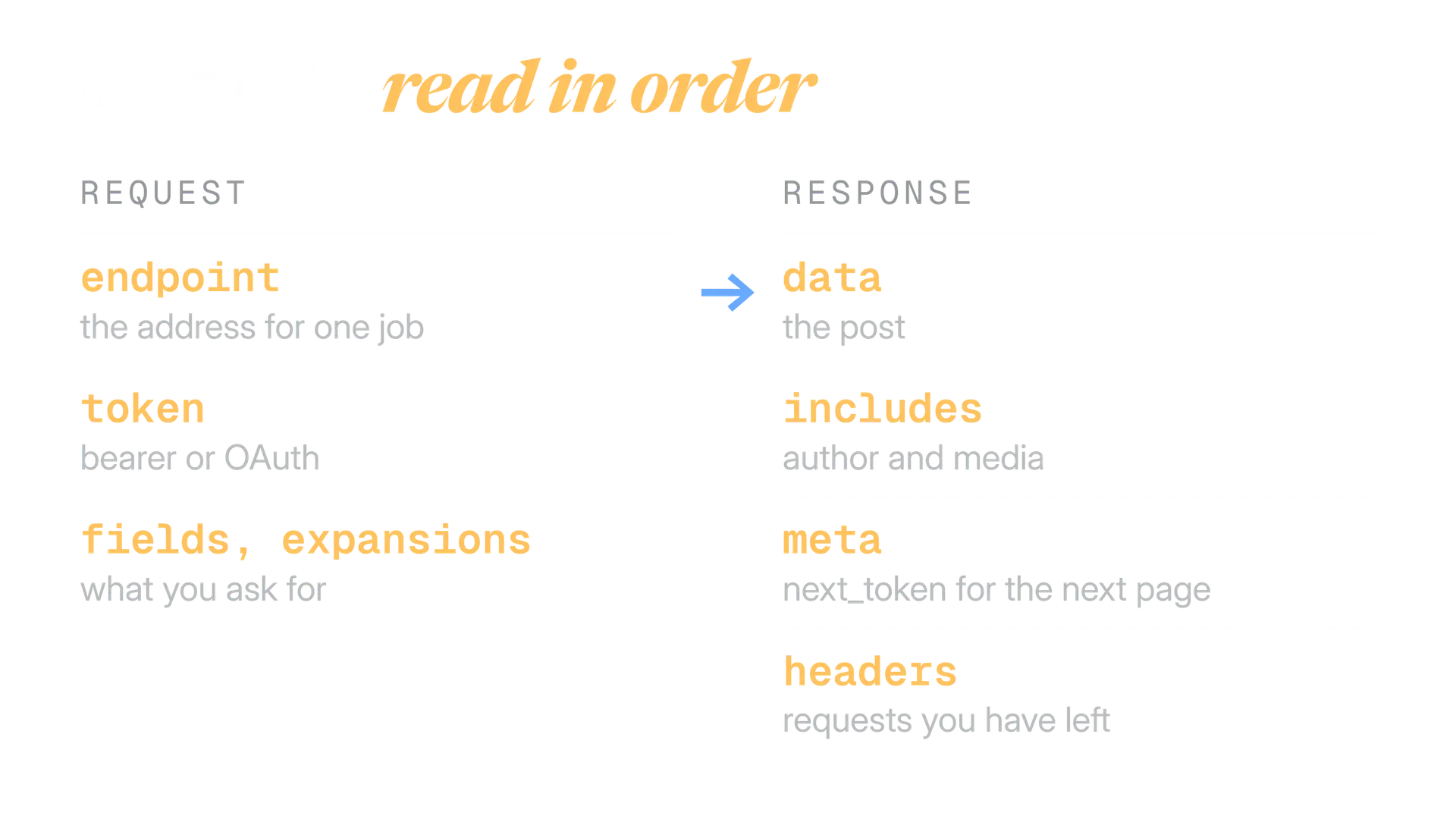
Checking a webhook's signature is a separate step from the CRC check. Our webhook signature verifier runs the HMAC SHA256 check in your browser.
Terms people mix up on X
Some pairs of words look like synonyms and are not. These six cause the most wrong decisions, so here they are side by side.
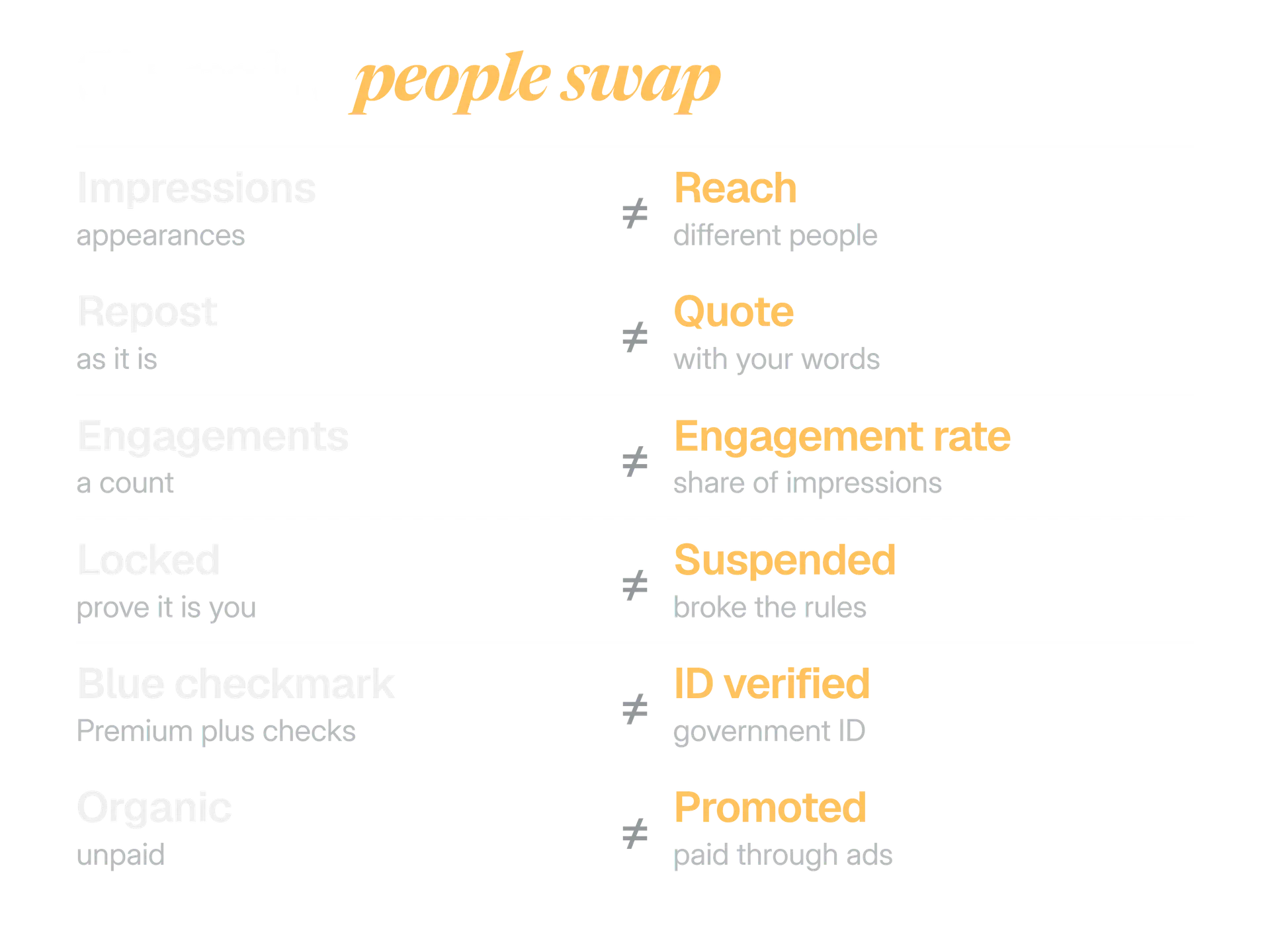
| Impressions | Reach |
|---|---|
| Counts each time a post appeared on a screen | Counts the different people who saw it |
| X reports it and says it is not unique | A marketing word. X's metrics page does not list it |
| Grows when one person sees a post twice | Does not grow for the same person |
The practical rule is to name the metric by X's word and write the formula next to a rate. A line such as "engagement rate = engagements divided by impressions" ends most arguments before they start.
In our agency work, the same word often meant two different numbers to two people in the same meeting. A shared glossary was the cheapest fix we found.
Write the metric the way X does
"Reposts and quotes, reported as two separate numbers." X counts them separately, so a report that does too can be checked.
Merge words that X keeps apart
"The post got 15 shares." A reader cannot tell whether that includes quotes, and X does not use the word that way.
How to use this glossary with your team
A glossary only helps if people use it. Treat it as the dictionary behind your briefs, reports and approvals, and keep it short enough that people read it.
Set up your team's X dictionary
- Copy the twenty terms your team uses most into your brand voice guide, with the Source label.
- Write the formula next to every rate in a report, using X's wording.
- Use post, repost, quote and impression in briefs, and never the platform's former words.
- Name the account state exactly: limited, locked, read only or suspended.
- Open X's page for any rule or limit before you quote it, and note the date you checked.
Link each entry to its guide in your own docs, so a new teammate can follow a term from short definition to full explanation. Our guide to defining a brand voice for X shows where a one page dictionary fits. Before a draft goes out, the post preview shows it on phone and desktop. Kairo Post's free tools run in your browser.
Not everyone needs every group. Start where your work is.
| If you are | Start with |
|---|---|
| A social lead or writer | Posting and formats, then feeds and reach |
| Reporting results | Engagement and analytics |
| Running a brand or client account | Accounts and verification, then safety and rules |
| Buying ads | Ads and business |
| Building or buying an integration | API and developers |
In the product
How Kairo Post does this
Everything above works by hand. Kairo Post does the same work for you, with your approval before anything goes out.
Questions people ask
Why do some guides and tools still use the platform's former name for posts?
Where does X publish its own glossary?
What does impression mean on X?
Is a Community the same as a List?
What is the difference between a campaign and a line item in X ads?
What is a bearer token in the X API?
Sources
Every rule, limit and figure in this post was checked against these on the date shown.
- Glossary, X Help Center
help.x.com · checked
- X Ads glossary, X Business help
help.x.com · checked
- Counting characters, X developer documentation
docs.x.com · checked
- Post metrics, X developer documentation
docs.x.com · checked
- Ads API hierarchy and terminology, X developer documentation
docs.x.com · checked
- Campaign management, X Ads API documentation
docs.x.com · checked
- Audiences, X Ads API documentation
docs.x.com · checked
- Web conversions, X Ads API documentation
docs.x.com · checked
- Rate limits, X developer documentation
docs.x.com · checked
- Authentication overview, X developer documentation
docs.x.com · checked
- Webhooks, X developer documentation
docs.x.com · checked
- X recommendation algorithm source code, xai-org on GitHub
github.com · checked
Written by