X marketing for SaaS: a playbook for company and founder accounts
The short answer
Run two accounts with different jobs: the company account posts product updates, how tos and support replies, and the founder account tells why you built it and what you learned. Tag every link, answer customers in public first and in private second, and review signups from X every week.
Key takeaways
- Give the company account the facts and the founder account the story, and never post the same words from both.
- Post four kinds of thing: what shipped, how to do something, an answer to a real customer question, and a look at the people.
- Put a UTM tag on every link and store it when someone signs up, or you will not know which post brought them.
- Reply to customers in public first, move private details to a Direct Message, then close the loop in public.
- Do not send automated welcome messages to new followers. X's developer guidelines do not allow them.
You run a SaaS product and someone has told you to be on X. Maybe your customers already post about tools like yours there. This playbook covers X marketing for SaaS in practice: who posts, what they post, how a launch and support fit in, and how you know a signup came from X. It is one of the playbooks in X for business.
It is built for a small team: one marketer, one founder who can spare 20 minutes a day, and a support person who sometimes helps. We keep the claims modest. X owes you no reach, and we found no honest SaaS benchmark, so you will not find invented numbers here. You will find a rhythm you can keep for a quarter. Earlier stage? Start with X for startups.
What is X good for in a SaaS company?
X is good at four jobs for a software company. It lets you say what changed, answer questions where others can see them, show the people behind the product, and hear what users say without being asked.
Updates
Say what shipped
Product updates reach customers who never open your changelog page.
Support
Answer in public
One answer helps the person who asked and everyone who had the same question.
Trust
Show the people
Buyers of software are buying a team they will have to rely on. Let them meet it.
Research
Listen
Users describe problems in their own words. Those words belong in your copy.
X is a poor fit for one thing: expecting a signup from every post. A post is a small, public reason to trust you. Trust adds up over weeks, and the sections below turn each job into something you can schedule.
Should a SaaS use a founder account or a company account on X?
Use both, with different jobs. The company account holds the facts: what shipped, how to use it, where to get help. The founder account holds the thinking: why you built it, what you got wrong, what you believe about your field. The two should never post the same words.
| Company account | Founder account |
|---|---|
| Speaks as we, facts first | Speaks as I, opinions and stories |
| Product updates, how tos, support | Why you built it, lessons, honest misses |
| Pinned post says what the product does | Bio names the company, pinned post is your best idea |
| Risk: sounds like a press office | Risk: one person is the whole channel |
If you can only run one at the start, our rule is simple. With no brand yet and no support queue, start with the founder, because people follow people. Once customers write to you for help, open the company account so the answers have a home.
The same news can fit both accounts, as long as each one tells it in its own words.
Forms now save as you type. If a tab closes halfway through, your answers are still there when you reopen it. Rolling out to everyone today. Notes: example.com/notes
For two years we said no to autosave. We worried about half finished forms cluttering your dashboard. Then we watched three people lose a long form to a closed tab, and we changed our minds.
What X's rules say about two accounts
X's automation rules say you may not post duplicative or substantially similar posts across accounts you operate, and they allow related accounts that do not duplicate each other. The developer guidelines list identical content across multiple accounts as spam or platform manipulation. A repost shares the original instead of copying it, and a quote with your own comment adds something new.
Our guide to duplicate posts on X explains where the line sits. You can also paste two drafts into the free duplicate post checker before they go out.
Two more details. If your founder or team should show a link to the company, X has an affiliate badge for organisations on Premium Business. We explain it in our guide to X verification badges. And set up each profile as a landing page, which our profile guide walks through.
What should a SaaS company post on X?
Post four kinds of thing: what shipped, how to do something, an answer to a real customer question, and a look at the people. Each answers a different question a buyer has. If a draft fits none, it is probably an announcement nobody asked for.
| Kind | The question it answers | Example from a made up form tool |
|---|---|---|
| Ship | What is new? | Forms now save as you type |
| Teach | How do I do this? | Three steps to send a form to a client for signature |
| Answer | Does it work for my case? | A customer asked if forms can be sent in French. They can. Here is how |
| Show | Who are these people? | What our support week looked like, in five lines |
We use the mix as a guide, not a quota. Post a ship note only when something shipped, and fill the rest of the week with teach, answer and show posts. Teach and answer posts keep paying off, because they are the ones people find when they search for the problem.
For ideas you have not had yet, use the system in our guide to content ideas for X. To make the first line earn a read, see X hooks. A how to that needs eight steps is a thread, and a feature that is easier to show than describe is a short video.
How do you post product updates and a changelog on X?
Post the one change a customer will feel, say who gets it and what they can do now, show it, and link to the full notes. Your release might list 14 changes. A post has room for one.
Pick the change someone will notice
Ask which item a customer would mention to a colleague. That is the post. The rest stay in your notes.
Say who it helps and what they can do now
Start with the benefit in plain words, not the version number or the ticket title.
Show it
A screenshot, or a clip under 20 seconds with captions. Write alt text for the image so everyone can follow it.
Link the full notes with a tagged link
Use a UTM tag so you can tell which update brought visits. The tagging section below shows the pattern.
A changelog pasted into a post
v2.4.1 is out. Bug fixes and performance improvements.
Nobody can picture anything, and nobody knows whether it affects them.
One change, one reader (an example)
Forms now save as you type. If a tab closes halfway through, your answers are still there. Rolling out today.
A reader knows what happened to them and whether to care.
When a release has three or four changes that belong together, write one thread, one change per post, and keep the first post readable alone. For help on that format, see how to write an X thread. For alt text, see our guide to alt text on X.
How do customer questions become posts?
Every question a customer asks twice is a post waiting to be written. Collect the questions from your support inbox, sales calls, onboarding emails and replies on X. Then answer the question in the first line, in the customer's words, and link to the docs for the rest.
- Support inbox. Tag each ticket that came up more than once. Those are your teach posts.
- Sales calls. The objections buyers raise are answer posts: Does it work with our tools? Who owns the data?
- Replies and mentions. Search your product name and your category. Add the people who ask good questions to a private List, which X lets you keep visible only to you.
- Your own onboarding. The step where most new users get stuck is a how to.
Keep the person out of it unless they say yes. X prohibits publishing other people's private information without their authorisation, and sharing private media of individuals without consent. A private message from a customer is theirs. Ask first, and if you quote a public post, link or reply to it instead of copying it.
Before you post a customer's words
- They said yes, in writing, to being named or quoted.
- Nothing private is in the screenshot: emails, account numbers, other customers.
- If they got a free plan or a discount for posting, the post says so.
- Anything you claim they achieved is something they told you, not something you assume.
The third line comes from the US Federal Trade Commission. Its endorsement guidance says people who got a free product or another incentive should disclose it.
For finding good people to reply to and how to do it well, use our guide to replies on X.
How does a SaaS launch on X work?
A launch is a short run of posts across two accounts, in three stages: before, launch day and after. The company account gives the facts and the founder gives the story, each in their own words. We keep this section short because a launch is a project of its own.
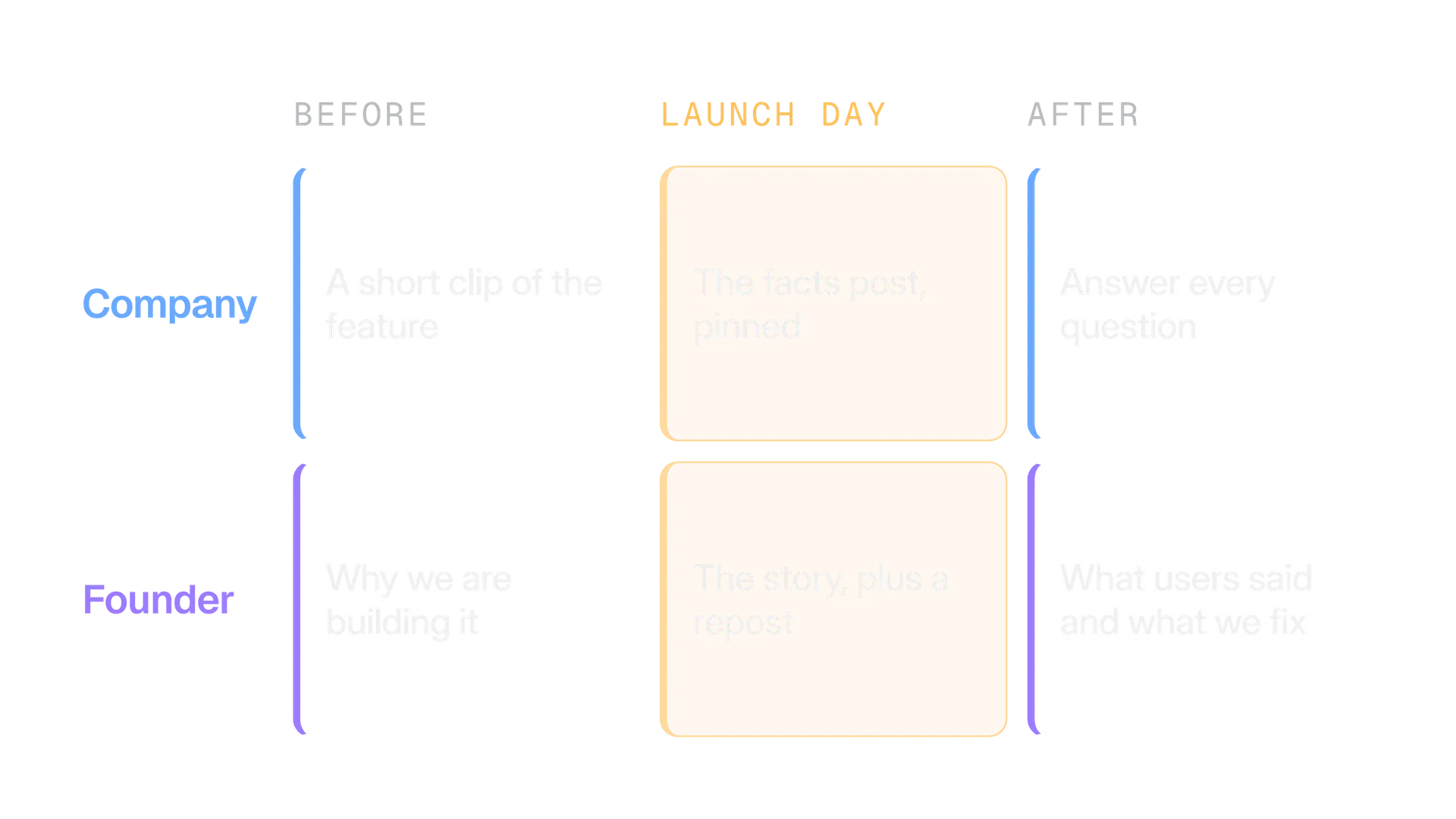
Before
Make people want to be told
Post a short clip or one screenshot of the feature. Send people to a waitlist or a page, with a tagged link.
Launch day
Facts from the company, story from the founder
The company posts what it is, who it is for and where to start, then pins it. The founder tells why, and may repost the company post.
After
Stay in the replies for a week
Answer every question, turn the best ones into posts, and report back on what changes next.
If you plan a launch across several accounts, Kairo Post's campaigns feature lets you plan it from one brief, gives each account its own angle, checks that posts are not near copies of each other, and holds the release until every gate has passed. It is the honest next step when a spreadsheet stops being enough. You can do the same by hand, with two drafts and a calendar.
How do you handle customer support on X?
Reply in public with a human acknowledgement, move private details to a Direct Message or email, then come back in public and close the loop. The public reply shows everyone you answer. The private one keeps account details out of the feed.
| Situation | Public reply | Then |
|---|---|---|
| Bug report | Thanks, we can reproduce it, and say when you will update | Ask for details by Direct Message or email |
| How to question | Answer in one or two lines and link the guide | Turn it into a how to post if it repeats |
| Billing or account problem | Say you will help and where | Move it private straight away |
| Angry post | Acknowledge once, calmly, without arguing | Fix it privately, then reply once more in public |
| Praise | Thank them in a sentence | Ask if you may share it |
Three habits make this work:
- Name an owner. One person owns the queue each day. A mention nobody owns is a mention nobody answers.
- Say your hours. Put your support hours in the bio or pinned post. Promise only what you can keep.
- Escalate bugs. A bug report should reach engineering the same day, with the link to the post.
X's rules shape what you can automate. Per the developer guidelines, an automated reply is allowed only when the person engaged first, with one reply per interaction. An AI powered reply bot needs X's approval first. Automated Direct Messages are allowed only to people who opted in or messaged you first, with an easy way to opt out, and a welcome message to new followers is not allowed.
Our guide to X's automation rules goes through the details. For the tone of a reply, see brand voice for X, and keep logins safe with our guide to securing an X account.
How do you track signups from X?
Put a UTM tag on every link you post, and store the tag when someone signs up. The tag tells your analytics where a visit came from. Storing it in your signup record tells you which post brought a user, not only a visitor.
Google says to always use utm_source, utm_medium and utm_campaign, and that values are case sensitive, so use lowercase. Here is a pattern for a SaaS account. The names are examples. Pick yours once and keep them.
| Parameter | What to put | Example |
|---|---|---|
utm_source | Always the same | x |
utm_medium | Always the same for organic posts | social |
utm_campaign | The launch or series | autosave_launch_2026_10 |
utm_content | The post | company_post_01 or founder_story_01 |
X counts a link as 23 characters whatever its length, so the tags cost you no room in the post. The free UTM builder builds the links and can output a batch for the week. Our guide to tracking clicks from X explains what X's click count and your analytics each measure, and why they never match.
The step that most SaaS teams miss is the one in the animation. A visitor lands with the tag in the address, browses, and signs up on another page. Unless your form or product saves the source when they arrive, the tag is gone. Ask your developer to store it in a cookie or a hidden form field, and write it to the user record.
Add one more cheap signal: a short optional field on the signup form that asks where they heard about you. People who found you on X will often say so, even when the tags are lost.
What does a weekly rhythm look like for a SaaS on X?
A weekly rhythm has two small content lanes, one daily reply block and one review on Friday. It is our starting plan for a small team, not a benchmark. Change it after four weeks, once you know what you can keep up.
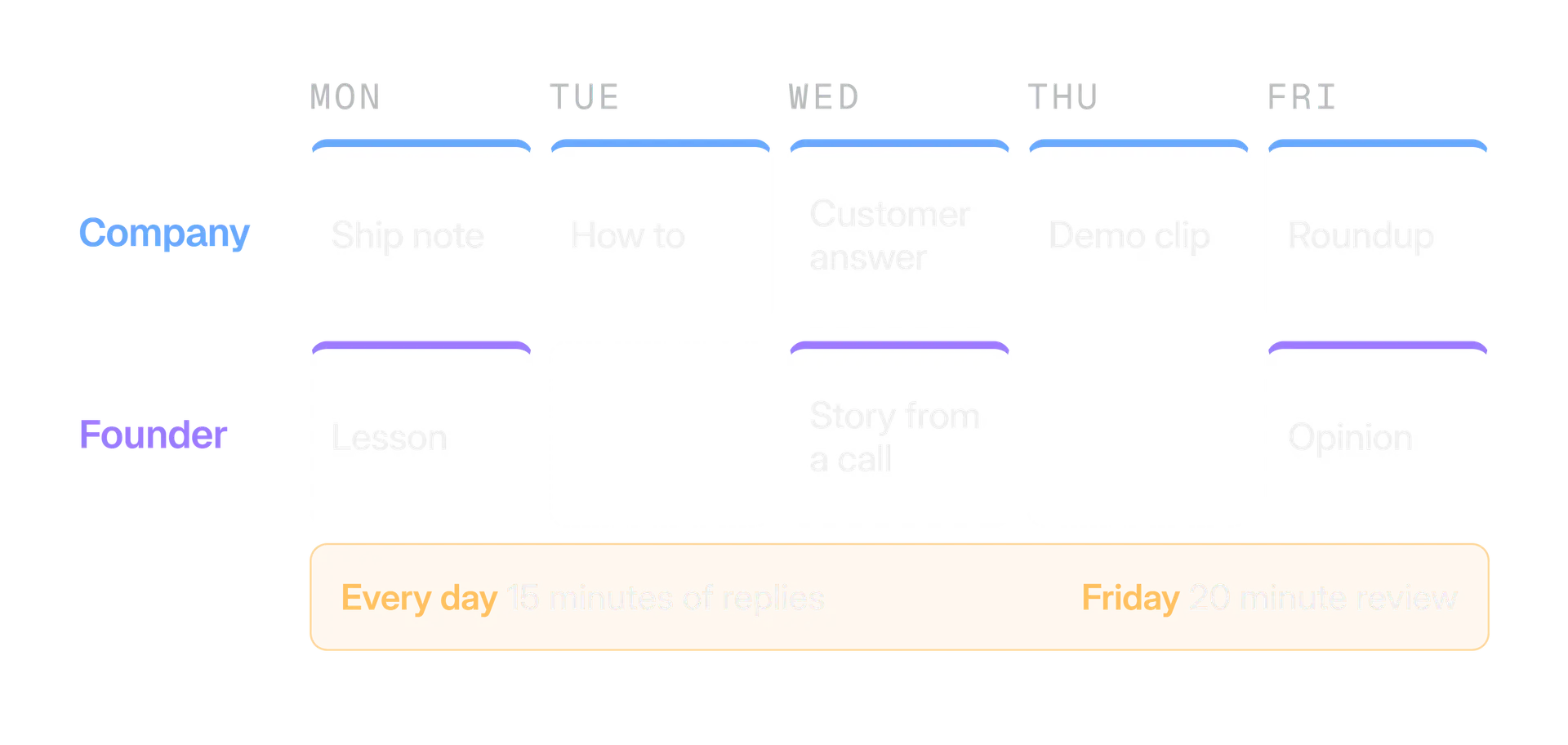
- Write in batches. Write the week on Monday morning and schedule it. See how to schedule posts on X.
- Reply daily. Fifteen minutes of replies, to customers first and then to people in your field, does more than a fifth post.
- Review on Friday. Look at tagged visits, signups with the X tag, questions you answered and the posts people replied to.
Pick posting times from your own audience, not from a list. Our guide to the best time to post on X shows how. The free content calendar generator lays a month out from your pillars and rhythm, and measuring is covered in engagement rate on X.
What mistakes do SaaS accounts make on X?
Most mistakes come from treating X as a noticeboard. These are the ones we would fix first:
- Only announcing. An account that posts only releases gives people no reason to follow between them.
- Pasting the changelog. One change per post, in the reader's words.
- Posting the same words from both accounts. It reads like spam to people and falls under X's duplicate content rules.
- Automated welcome messages. X's developer guidelines do not allow them, and they feel cold anyway.
- Untagged links. In a month you will have traffic and no idea which posts earned it.
- Going quiet after a launch. The week after is where the questions arrive.
- Slow or missing replies. A question left for days tells everyone how you treat customers.
- Category jargon. Describe the problem in the words your customers use.
- Hidden connections. Staff and rewarded customers should say so.
Your first 30 days on X as a SaaS company
Start small and keep it going. Four weeks of steady work gives you more information than a big launch.
Week 1
Set up the two profiles
Write the bios, pin the company post, tag your links, and decide who owns replies each day.
Week 2
Post the four kinds
One ship, one teach, one answer and one show post from the company account. Two founder posts. Reply daily.
Week 3
Fix the tracking
Check that the tag survives your signup form. Add the where did you hear about us field.
Week 4
Review and cut
Keep the kinds that brought conversations and tagged signups, and drop the ones that did not.
For the wider picture of growing an account, read how to grow on X. When you are ready to build your plan, start with the content calendar generator and the UTM builder.
In the product
How Kairo Post does this
Everything above works by hand. Kairo Post does the same work for you, with your approval before anything goes out.
Questions people ask
Is X worth it for a B2B SaaS company?
How often should a SaaS company post on X?
Can my team post about the product from their own accounts?
Should the signup link go in the post or in a reply?
Can I send an automatic welcome message to new followers?
Do I need a different account for support?
Sources
Every rule, limit and figure in this post was checked against these on the date shown.
- Counting characters, X developer documentation
docs.x.com · checked
- Developer Guidelines, X developer documentation
docs.x.com · checked
- Automation rules, X Help Center
help.x.com · checked
- Authenticity, X Help Center
help.x.com · checked
- Private information policy, X Help Center
help.x.com · checked
- How to customize your profile, X Help Center
help.x.com · checked
- Premium Business, X Help Center
help.x.com · checked
- UTM parameters, Google Analytics Help
support.google.com · checked
Written by